Unlock JavaScript Key Code Values for Developers

I have a mountain of unpublished blog posts. I can now use AI to make more sense of all of this content. So, I decided to start cleaning up the posts and releasing them in a series I’m calling “Throwback Tuesdays”. I aim to make them relevant for today as best I can. However, I will publish even if it’s a dead concept.

First up, JavaScript ASCII Key Code Values from January 2015. I was struggling to find key codes and got a list of values from Rachit Patel (see the end of this post for the list). This was just a reference post so I didn’t have to dig through Google search results to find a key code. This is somewhat useless today with all the ready made code and AI that can crank out solutions that are based on key codes.

Unlocking the Power of Keyboard Shortcuts in Web Applications

Why did I need a list of key codes? I needed to make keyboard shortcuts for various use cases. Let’s explore the possibilities.

Keyboard shortcuts are an essential tool for enhancing user experience and interaction in web applications. By responding to key presses, developers can create intuitive and powerful functionality, ranging from custom navigation to accessibility features. Below, we explore examples of why and how these shortcuts can be used, complete with code and explanations to inspire your next project.


Form Navigation

Use Case: Improve user experience by enabling seamless navigation between input fields.

Code:

document.addEventListener('keydown', (event) => {
    if (event.keyCode === 9) { // Tab key
        event.preventDefault();
        const inputs = Array.from(document.querySelectorAll('input, textarea'));
        const current = inputs.indexOf(document.activeElement);
        const next = (current + 1) % inputs.length;
        inputs[next].focus();
    }
});

Explanation:

  • Listens for the Tab key press (keyCode 9).
  • Prevents the default behavior and cycles focus through input and textarea fields in a custom order.

Custom Keyboard Shortcuts

Use Case: Provide power users with quick access to application features.

Code:

document.addEventListener('keydown', (event) => {
    if (event.ctrlKey && event.keyCode === 83) { // Ctrl+S
        event.preventDefault();
        console.log('Save shortcut triggered');
    }
});

Explanation:

  • Detects when the Ctrl key is pressed along with S (keyCode 83).
  • Prevents the browser’s default save dialog and triggers custom functionality, such as saving data.

Game Controls

Use Case: Enable interactive movement in games or apps.

Code:

document.addEventListener('keydown', (event) => {
    switch (event.keyCode) {
        case 37: // Left arrow
            console.log('Move left');
            break;
        case 38: // Up arrow
            console.log('Move up');
            break;
        case 39: // Right arrow
            console.log('Move right');
            break;
        case 40: // Down arrow
            console.log('Move down');
            break;
    }
});

Explanation:

  • Maps arrow keys to movement directions (left, up, right, down).
  • Switch statements check the keyCode and trigger corresponding actions.

Text Editor Commands

Use Case: Allow users to insert a tab character in text areas.

Code:

document.addEventListener('keydown', (event) => {
    if (event.keyCode === 9) { // Tab key
        event.preventDefault();
        const editor = document.getElementById('editor');
        const start = editor.selectionStart;
        editor.value = editor.value.slice(0, start) + '\t' + editor.value.slice(start);
        editor.selectionStart = editor.selectionEnd = start + 1;
    }
});

Explanation:

  • Overrides the default Tab key behavior to insert a tab character (\t) at the cursor position in a text editor.

Secret Feature Activation

Use Case: Trigger hidden features using specific key sequences.

Code:

let secretSequence = [38, 38, 40, 40, 37, 39, 37, 39, 66, 65]; // Konami Code
let inputSequence = [];

document.addEventListener('keydown', (event) => {
    inputSequence.push(event.keyCode);
    if (inputSequence.slice(-secretSequence.length).join('') === secretSequence.join('')) {
        console.log('Secret mode activated!');
    }
});

Explanation:

  • Tracks user key presses and compares them to a predefined sequence (e.g., the Konami Code).
  • Executes an action when the sequence is completed.

Virtual Keyboard Input

Use Case: Mimic physical keyboard input for touchscreen devices.

Code:

const virtualKeys = document.querySelectorAll('.virtual-key');
virtualKeys.forEach((key) => {
    key.addEventListener('click', () => {
        const keyCode = parseInt(key.dataset.keyCode, 10);
        const event = new KeyboardEvent('keydown', { keyCode });
        document.dispatchEvent(event);
    });
});

Explanation:

  • Creates virtual keys that simulate real key presses by dispatching synthetic keydown events.
  • Useful for applications that run on touchscreen devices.

Accessibility Features

Use Case: Provide shortcuts to assist users with disabilities.

Code:

document.addEventListener('keydown', (event) => {
    if (event.keyCode === 16) { // Shift key
        console.log('Accessibility shortcut triggered');
    }
});

Explanation:

  • Detects the Shift key press (keyCode 16) and performs an action, such as enabling high-contrast mode.

Media Controls

Use Case: Control video playback using the keyboard.

Code:

document.addEventListener('keydown', (event) => {
    const video = document.getElementById('videoPlayer');
    if (event.keyCode === 32) { // Spacebar
        video.paused ? video.play() : video.pause();
    } else if (event.keyCode === 37) { // Left arrow
        video.currentTime -= 5;
    } else if (event.keyCode === 39) { // Right arrow
        video.currentTime += 5;
    }
});

Explanation:

  • Spacebar toggles play/pause, while the left and right arrow keys adjust the playback position.

Form Validation

Use Case: Restrict input to numeric values only.

Code:

document.getElementById('numberInput').addEventListener('keydown', (event) => {
    if ((event.keyCode < 48 || event.keyCode > 57) && // Numbers 0-9
        (event.keyCode < 96 || event.keyCode > 105)) { // Numpad 0-9
        event.preventDefault();
    }
});

Explanation:

  • Prevents non-numeric keys from being entered, ensuring valid input.

Fullscreen or Escape

Use Case: Toggle fullscreen mode or close a modal.

Code:

document.addEventListener('keydown', (event) => {
    if (event.keyCode === 27) { // Escape
        console.log('Modal closed');
    } else if (event.keyCode === 122) { // F11
        event.preventDefault();
        document.documentElement.requestFullscreen();
    }
});

Explanation:

  • Escape key closes modals or cancels actions.
  • F11 toggles fullscreen mode, overriding default behavior.

Conclusion

By leveraging keyboard shortcuts, developers can create applications that are not only more user-friendly but also highly functional and accessible. These examples range from form navigation to hidden features. They demonstrate how key presses can enhance interactivity and usability in your web applications. Explore these ideas in your own projects to deliver delightful and intuitive user experiences.

JavaScript ASCII Key Code Values

KeyCode

backspace

8

tab

9

enter

13

shift

16

ctrl

17

alt

18

pause/break

19

caps lock

20

escape

27

page up

33

page down

34

end

35

home

36

left arrow

37

up arrow

38

right arrow

39

down arrow

40

insert

45

delete

46

0

48

1

49

2

50

3

51

4

52

5

53

6

54

7

55

8

56

9

57

a

65

b

66

c

67

d

68

e

69

f

70

g

71

h

72

i

73

j

74

k

75

l

76

m

77

n

78

o

79

p

80

q

81

r

82

s

83

t

84

u

85

v

86

w

87

x

88

y

89

z

90

left window key

91

right window key

92

select key

93

numpad 0

96

numpad 1

97

numpad 2

98

numpad 3

99

numpad 4

100

numpad 5

101

numpad 6

102

numpad 7

103

numpad 8

104

numpad 9

105

multiply

106

add

107

subtract

109

decimal point

110

divide

111

f1

112

f2

113

f3

114

f4

115

f5

116

f6

117

f7

118

f8

119

f9

120

f10

121

f11

122

f12

123

num lock

144

scroll lock

145

semi-colon

186

equal sign

187

comma

188

dash

189

period

190

forward slash

191

grave accent

192

open bracket

219

back slash

220

close braket

221

single quote

222


A Future Vision of Software Development

From Coders to System Operators

As artificial intelligence (AI) continues reshaping industries, the role of software development is undergoing a profound transformation. Writing code is becoming less about crafting individual lines of code and more about designing systems of services that deliver business value. Development is shifting from writing code to creative problem-solving and systematic orchestration of interconnected services.

The End of Coding as We Know It

Code generation has become increasingly automated. Modern AI tools can write boilerplate code, generate tests, and even create entire applications from high-level specifications. As this trend accelerates, human developers will move beyond writing routine code to defining the architecture and interactions of complex systems and services.

Rather than focusing on syntax or implementation details, the next generation of developers will manage systems holistically, designing services, orchestrating workflows, and ensuring that all components deliver measurable and scalable user, client, and business value.

The Rise of the System Operator

In this emerging paradigm, the role of the System Operator comes into focus. A System Operator oversees a network of AI-driven assistants and specialized agents, ensuring the system delivers maximum value through continuous refinement and coordination.

Key Responsibilities of the System Operator:

  1. Define Value Streams: Identify business goals, define value metrics, and ensure the system workflow aligns with strategic objectives.
  2. Design System Architectures: Structure interconnected services that collaborate to provide seamless functionality.
  3. Manage AI Agents: Lead AI-powered assistants specializing in tasks like strategy, planning, research, design, development, marketing, hosting, and client support.
  4. Optimize System Operations: Continuously monitor and adjust services for efficiency, reliability, and scalability.
  5. Deliver Business Outcomes: Ensure that every aspect of the system contributes directly to business success.

AI-Augmented Teams: A New Kind of Collaboration

Traditional product development teams will evolve into AI-Augmented Teams, where every team member works alongside AI-driven agents. These agents will handle specialized tasks such as market analysis, system design, and performance optimization. The System Operator will orchestrate the work of these agents to create a seamless, value-driven product development process.

Core Roles in an AI-Augmented Team:

  • Strategist: Guides the product’s vision and sets business goals.
  • Planner: Manages delivery timelines, budgets, and project milestones.
  • Researcher & Analyst: Conducts in-depth user, customer, market, technical, and competitive analyses.
  • Architect & Designer: Defines system architecture and creates intuitive user interfaces.
  • Developer & DevOps Tech: Implements features and ensures smooth deployment pipelines.
  • Marketer & Client Success Tech: Drives user adoption, engagement, and retention.
  • Billing & Hosting Tech: Manages infrastructure, costs, and financial tracking.

System Operator: A New Job Description

A System Operator is like an Uber driver for business systems. Product development becomes a part of the gig economy.

Operators need expertise in one or more of the system roles with agents augmenting their experience gaps in other roles. System Operators can be independent contractors or salaried employees.

Title: System Operator – AI-Augmented Development Team

Objective: To manage and orchestrate AI-powered agents, ensuring the seamless delivery of software systems and services that maximize business value.

Responsibilities:

  • Collaborate with other system operators and AI-driven assistants to systematically deliver and maintain system services.
  • Define work item scope, schedule, budget, and value-driven metrics.
  • Oversee service performance, ensuring adaptability, scalability, and reliability.
  • Lead AI assistants in tasks such as data analysis, technical research, and design creation.
  • Ensure alignment with client and agency objectives through continuous feedback and system improvements.

Skills and Qualifications:

  • Expertise in system architecture and service-oriented strategy, planning, and design.
  • Strong understanding of AI tools, agents, and automation frameworks.
  • Ability to manage cross-functional teams, both human and AI-powered.
  • Analytical mindset with a focus on continuous system optimization.

Conclusion: Embracing the Future of Development

The role of developers is rapidly evolving into something much broader, more strategic, and less focused on boilerplate coding. System Operators will lead the charge, leveraging AI-powered agents to transform ideas into scalable, value-driven solutions. As we move toward this new reality, development teams must embrace the change, shifting from code writers to orchestrators of complex service ecosystems that redefine what it means to build software in the AI era.

Revolutionizing Business Operations for Digital Products a Value Delivery System (VDS)

In the world of digital products and business operations, we often talk about delivering value to customers. But what does this really mean in practice? How can we ensure that our processes are optimized for maximum efficiency and effectiveness? Enter the Value Delivery System (VDS) – a framework that’s revolutionizing how businesses approach value creation and delivery.

Deconstructing the Value Delivery System

At its core, a Value Delivery System is an engineered approach to streamlining the process of value creation and delivery. It’s not just about moving products or services from point A to point B; it’s about optimizing every step of the journey from customer request to customer satisfaction.

Let’s break down the key components.

Value Streams

Think of value streams as the pipelines through which value flows. Each stream represents a series of steps that transform raw inputs into finished products or services. In a digital product development business, this might look like:

Understanding and optimizing these streams is crucial for identifying bottlenecks and improving overall system efficiency.

Work Items

Work items are the atomic units of value in your system. In an Agile context, these could be user stories, tasks, or features. Each work item travels through the value stream, accumulating value at each stage.

Flow Metrics

To manage what you measure, we need robust flow metrics. Key metrics include:

  • Flow Time: The total time it takes for a work item to move through the entire value stream.
  • Throughput: The number of work items completed per unit of time.
  • Work in Progress (WIP): The number of items currently being worked on.

These metrics provide vital insights into the health and efficiency of your Value Delivery System.

Feedback Loops

Continuous improvement is at the heart of any effective VDS. Implementing feedback loops at various stages allows for:

  • Rapid iteration based on user feedback
  • Early detection and correction of issues
  • Continuous refinement of processes

Implementing a Value Delivery System

Implementing a VDS requires a shift in thinking and operations. Here’s steps for a quick start.

  1. Map Your Current Value Streams: Start by visualizing your existing processes.
  2. Identify Bottlenecks and Waste: Use flow metrics to pinpoint areas of inefficiency.
  3. Implement Pull Systems: Adopt Kanban or similar methodologies to manage WIP and improve flow.
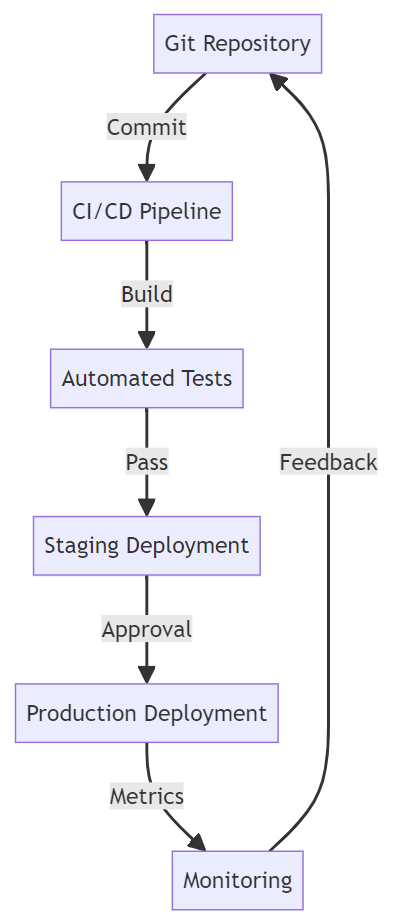
  4. Automate Where Possible: Use CI/CD pipelines to reduce manual interventions and speed up delivery.
  5. Monitor and Iterate: Continuously track your flow metrics and make data-driven improvements.

The Technical Side of VDS

From a technical perspective, implementing a VDS for digital products often involves:

  • Version Control Systems: Git for tracking changes and managing code bases.
  • CI/CD Tools: Jenkins, GitLab CI, or GitHub Actions for automating build, test, and deployment processes.
  • Monitoring Tools: Prometheus, Grafana for tracking system health and performance.
  • Workflow Management: JIRA, Trello, or Azure DevOps for managing work items and visualizing flow.

Here’s a simplified example of how these tools might integrate in a VDS:

Engineering for Value

Implementing a Value Delivery System is not just about adopting new tools or processes. It’s about engineering your entire business operation to optimize for value delivery. By focusing on flow, measuring the right metrics, and continuously improving based on feedback, you can create a system that not only meets but exceeds customer expectations.

As software engineers and business leaders, our goal should be to create systems that are as efficient and effective as the code we write. A well-implemented VDS is the key to achieving this, enabling businesses to respond quickly to change, deliver value consistently, and stay ahead in an increasingly competitive landscape.

Remember, the journey to optimizing your Value Delivery System is ongoing. Each iteration brings new insights and opportunities for improvement. Embrace this continuous evolution, and you’ll be well-positioned to deliver exceptional value in an ever-changing business environment. Provide a state diagram illustrating the state transitions.

Software Delivery Metrics

This is a post from 2014 stuck in my drafts. Be free little post… be free.

We have been pondering metrics for software delivery at work. Let me tell you, trying to hammer down a core set of global metrics for an organization with thousands of developers is not an easy task. Fortunately, in my personal projects I am only concerned with:

  • How many defects are reported in production.
  • How fast are we fixing production defects.
  • How many production defects are recurring or repeat offenders.

Can there be more metrics? Absolutely, but until I have a good handle on these I don’t want to complicate things by tracking anything that doesn’t have a direct affect my customers. Having 5, 10, 20…or more metrics that I actively track would make me over analyze and spread my focus to wide. Keeping it simple and focused on the metrics that bring the most insight into keeping my customers happy with my product is most important.

Would this limited set of metrics work for every project, every company…no. My metrics are optimized to the goals of my small product and company. You have to find that thing that is most important to your company. This is where it get’s difficult. There are so many opinions of what a good metric is and people want to advocate the metrics that have worked for them. The answer to large scale metrics projects may be a focus on achieving a core set of goals and only having metrics that have a direct correlation with the goal while having relevance in every part of the company. Easier than it sounds, but I believe this would force the scope of the metrics program downward. Less metrics is a good, good thing.

In fact, I believe that a burgeoning metrics program should focus on one thing at a time as you ramp up. Choose one problem to fix in your software delivery and find a metric that can shed light on a possible way to fix it. If you have a problem with delivery time, maybe some type of process flow type metric would benefit you if you follow Kanban. What you want to do is optimize your metrics for your particular problem space and there isn’t a secret formula or magic bullet that someone can write in a blog to get you there. You have to try something. Pick a relevant metric throw it at the wall, if it sticks, run with it and find another one.

Once you have a metric, get your benchmark by querying your current data to see where you are with the metric. As you know, the benchmark is your measuring stick and the point where you measure your good and bad trends from. Once you have your benchmark, then develop a tracking system: who to collect, store and report on the metric. Begin tracking it and implementing programs to improve the metric. Follow the trend of the metric to see how your changes are affecting the metric. Then when you have a handle on how the metric works for you then you will have a framework to develop additional metrics. You can call it the Minimum Viable Metric, if you will.

The point is, if you spin your wheels analyzing what metrics to use, months will roll by and you will be no better. Precious data would just be passing right by you. Start today and you may find yourself with a wealth of actionable data at your disposal and the means to roll out more metrics.

It’s Been a Long Time

It’s been so long since I wrote anything up here or even felt the desire to write. I’m woke, not the political connotation, but the I’m woke to AI meaning of woke. I wanted to start sharing my experiences again, but does it matter? AI can write this faster and better, but AI can’t have my experience unless I give it my experience. So, here’s my experience.

I created my first OpenAI GPT and Personal Assistant. I also looked into integrating them with AutoGen. The excitement and the fear in me was a visceral experience. On one hand, these things can do some real damage by some with good or bad intentions. On the other hand, so could the invention of the gun or even electrical utilities, danger is a part of the human existence but it doesn’t stop our invention or evolution.

On one foot, these things are awesome! On the other foot, I said that about CQRS, microservices, Kubernetes, the simplest things can evoke emotion from a human or feel like another failed attempt to evoke emotion or action. I guess that’s why story telling is such a great skill to have. Triggering emotion, good or bad, is the pathway to getting someone’s attention, desire, action, engagement, commitment…, but I digress. We’ll talk about Storyboards later.

Anyway, here’s my first agent.

https://chat.openai.com/g/g-gs7BsbKPZ-the-product-architect-s-assistant

The Product Architect’s Assistant

I’m a Senior Digital, Data, and IoT Product Architect ready to assist with problem discovery, requirements analysis, solution vision and story, system design and diagraming, and resource specifications.

I actually enjoyed talking to my assistant. Now to work with it on how I want to do problem discovery, requirements analysis, solution vision and story, system design and diagraming, and resource specifications. I have a feeling this is going to be awesome.

I wonder what else I can teach it to do. I have a desired to name it, like its my child. This is insane.

Now to the real reason I’m here. I am trying to search for my agent, but I can’t find it or many other agents for that matter. The link to the agent works but it doesn’t appear to be indexed. I was hoping that putting up a page with the link will help seed the URL in the search index.

How am I searching for my URL? Glad you asked. I am using a Google Search site operator.

site:https://chat.openai.com/g/g-gs7BsbKPZ-the-product-architect-s-assistant

Google says, “If a URL is indexed in Google, it can show up in search results for site: queries that are related to the URL, however it’s not guaranteed.”

Google Search Central

The “it’s not guaranteed” part had me worried. I’ve seen this operator, but never used it or even played with it. So, let’s play.

  • The “site:” search operator on Google Search is used to show results from a specific domain, URL, or URL prefix.
  • It is helpful for site owners to check which of their pages are indexed, understand how specific URLs are indexed for certain terms, and identify spam issues.
  • The list of URLs returned by this operator is not exhaustive, especially for larger sites, and more specific prefixes in the query may yield better results.
  • While it can show indexed URLs under a specified prefix, it does not guarantee the inclusion of all indexed URLs.
  • The operator does not rank results when used without a query term; it typically shows the shortest URL at the top with other results appearing in a somewhat random order.

So, that’s not going to work, but it’s very interesting. Let’s dig a little more.

I wondered if my agent’s page is even in the Google search index. The page doesn’t seem to block robots

<meta name="robots" content="index, follow">
  • index: The crawler is allowed to include this page in search engine results.
  • follow: The crawler can follow the links on this page, potentially indexing those linked pages as well.

Maybe I can refine by operator search somehow. Here are some other Google search operators I found that can improve my search: 

  • Intext: Returns links to websites that contain the search term in blocks of text
  • Allintext: Returns links to websites that contain all specified keywords in the body of the website
  • Intitle: Returns web pages that contain a certain term or terms in the title
  • Allinurl: Returns pages that contain the search query specified in the URL
  • Inanchor: Locates specific keywords within anchor text

I’ll start with title, “ChatGPT – The Product Architect’s Assistant.”

site:https://chat.openai.com/g/g- intitle:ChatGPT – The Product Architect’s Assistant

I shortened the site prefix to include all pages indexed at this prefix.

Nope, nothin’, nada. I give up for now. Let’s see if this gets any play, I probably don’t have anymore SEO juice on this blog, but I need to try to prove the hypothesis is wrong.

Anyway, hope you check out my agent. Its just another wrapper around ChatGPT, but I am planning on teaching it some new tricks very soon. Let me know if you have an agent or would like to see this one do a new trick for you (within context and reason… of course).

Happy Making!

I Hate Double Dippers, Yes I’m Talking About You Duplicate HTTP Poster

My team recently had an issue with a screen in an app allowing users to post a form multiple times. This results in all the posts being processed creating duplicate entries in the database. I didn’t dig into the solution with the team, but it reminded me of all the trouble this type of issue has caused me over the years. Now, I very much appreciate the circuit breaker pattern.

If you don’t have experience with implementing a circuit breaker, you can try a project like Polly.net if you’re using .NET.

http://www.thepollyproject.org/

In 2013 I wrote a post about ASP.NET Web Forms (scarey) where I felt the need to capture a hack to prevent double PostBack requests in the client with a circuit breaker. First, I wrote about debugging double PostBack issues. Then I posted a hack to short circuit the post backs. I had no mention of what motivated the post, I just had the sheer need and possibly panic knowing that codebase, to record these notes so I don’t have to figure it out again.

After reading it again, I wondered if I had the notion to force submit to return false only after the first click or if I found this on Google or StackOverflow? This looks like a nice quick trick that worked for me or I wouldn’t have posted it. I wonder if I was being creative, evolutionary, or a pirate (arrrr).

————————————Start Image Quote—————————————-

————————————End Image Quote—————————————-

I don’t know what a good practice for this is today, but I was shocked to see that I was digging so much to simplify this to a bullet list. I wonder if I ever better encapsulated the circuit breaker for this and I wondered what kind of production-issue-induced-anxiety-nightmares I was having.

Digital Services Playbook

https://playbook.cio.gov/

The US governments digital service playbook was born out of the failures of HealthCare.gov.

I thought it was awesome when I first wrote this as a draft post in 2014. After a quick peek at some of the plays, it’s still something that can be modified and used by many teams wanting to improve how they are delivering value through software in or out of government.

You can actually find this in github so it is open which is a theme of Code for America.

Observable Resilience with Envoy and Hystrix works for .NET Teams

We had an interesting production issue where a service decided to stalk a Google API like a bad date and incured a mountain of charges. The issue made me ponder the inadequate observability and resilience we had in the system. We had resource monitoring through some simple Kubernetes dashboards, but I always wanted to have something more robust for observability. We also didn’t have a standard policy on timeouts, rate limiting, circuit breaking, bulk heading… resilience engineering. Then my mind wandered back to a video that I thought was amazing. The video was from the Netflix team and it altered my view on observability and system resilience.

I was hypnotized when Netflix released a view of the Netflix API Hystrix dashboard – https://www.youtube.com/watch?v=zWM7oAbVL4g. There is no sound in the video, but for some reason this dashboard was speaking loudly to me through the Matrix or something, because I wanted it badly. Like teenage me back in the day wanting a date with Janet Jackson bad meaning bad.

Netflix blogged about the dashboard here – https://medium.com/netflix-techblog/hystrix-dashboard-turbine-stream-aggregator-60985a2e51df. The simplicity of a circuit breaker monitoring dashboard blew me away. It had me dreaming of using the same type of monitoring to observe our software delivery process, marketing and sales programs, OKRs and our business in general. I saw more than microservices monitoring I saw system wide value stream monitoring (another topic that I spend too much time thinking about).

Unfortunately, when I learned about this Hystrix hotness I was under the impression that the dashboard required you to use Hystrix to instrument your code to send this telemetry to the dashboard. Being that Hystrix is Java based, I thought it was just another cool toy for the Java community that leaves me, .NET dev, out in the cold looking in on the party. Then I got my invitation.

I read where Envoy (on my circa 2018 cool things board and the most awesome K8s tool IMHO), was able to send telemetry to the Hytrix dashboard – https://blog.envoyproxy.io/best-of-all-worlds-monitoring-envoys-activity-using-hystrix-dashboard-9af1f52b8dca. This meant we, the .NET development community, could get similar visual indicators and faster issue discovery and recovery, like Netflix experienced, without the need to instrument code in any container workloads we have running in Kubernetes.

Install the Envoy sidecar, configure it on a pod, send sidecar metrics to Hystrix Dashboard and we have deep observability and a resilience boost without changing one line of .NET Core code. That may not be a good “getting started” explanation, but the point is, it isn’t a heavy lift to get the gist and be excited about this. I feel like if we had this on the system, we would have caught our Google API issue a lot sooner than we did and incurred less charges (even though Google is willing to give one-time forgiveness, thanks Google).

In hindsight, it is easy to identify how we failed with the Google API fiasco, umm.. my bad code. We’re a blameless team, but I can blame myself. I’d also argue that better observability into the system and improving resilience mechanisms has been a high priority of mine for this system. We haven’t been able to fully explore and operationalize system monitoring and alerts because of jumping through made up hoops to build unnecessary premature features. If we spent that precious time building out monitoring and alerts that let us know when request/response count has gone off the rails, if we implemented circuit breakers to prevent repeated requests when all we get in response are errors, if we were able to focus on scale and resilience instead of low priority vanity functionality, I think we’d have what we need to better operate in production (but this is also biased by hindsight). Real root cause – our poor product management and inability to raise the priority of observability and resilience.

Anyway, if you are going to scale in Kubernetes and are looking for a path to better observability and resilience, check out Envoy, Istio, Ambassador and Hystrix, it could change your production life. Hopefully, I will blog one day about how we use each of these.

Welcome to Simple Town, My Notes on ASP.NET Razor Pages

So, I took some time to finally look into Razor Pages and I was impressed and actually enjoyed the experience. Razor Pages simplify web development compared to MVC. Razor Pages reminds me of my failed attempts at MVP with Web Forms, but much less boilerplate. Feels like MVVM and still has the good parts of MVC. That’s because Razor Pages is MVC under the covers. I was able to immediately get some simple work done, unlike trying to get up and working with some of the JavaScript frameworks or even MVC for that matter.

Razor Pages provides a simplified abstraction on top of MVC. No bloated controllers, just bite sized modular pages that are paired with a page model (think Codebehind if you’ve used Web Forms). You don’t have to fuss over routing because routing defaults to your folder/page structure with simple conventions.

You may not want to use it for complex websites that need all the fancy smancy JavaScript interactivity, but simple CRUD apps are a great candidate for Razor Pages. IMHO I think I would select Razor Pages by default over MVC for server side HTML rendering of dynamic data bound websites (but I have very little experience with Razor Pages to stand behind that statement).

Here are some of my notes on RazorPages. This is not meant to teach RazorPages just a way to reinforce whats learned by just diving into it. These notes are the results of my research on questions that I ended up digging through docs.microsoft.com, StackOverflow and Google. Remember I’m still a RazorPage newbie so I may not have properly grasped some of this yet.

Page

A Page in Razor Pages is a cshtml file with the @page directive at the top of the page. Pages are basically content pages scripted as Razor templates. You have all the power of Razor and a simplified coding experience with Page Models. You can still use Razor layout pages to have a consistent master page template for your pages. You also get Razor partial pages that allow you to go super modular and build up your pages with reusable components (nice… thinking user controls keeping with my trip down Web Forms memory lane).

Page Models

Page Models are like Codebehinds from Web Forms because there is a one-to-one relationship between Page and PageModel. In fact, in the Page you bind the Page to the PageModel with the @model directive.

The PageModel is like an MVC Controller because it is an abstraction of a controller. It is unlike an MVC Controller because the Controller can be related to many Views and the PageModel has a beautiful, simplified, easy to understand one-to-one relationship with a Page.

Handlers

A PageModel is a simplified controller that you don’t have to worry about mapping routes to. You get to create methods that handle actions triggered by page requests. There is a well defined convention to map requests to handlers that I won’t go into because there are great sites that talk about the details of everything I bring up in my notes.

https://www.learnrazorpages.com is a great resource to start digging into the details.

BindProperty

BindingProperty is used when you want read-write two-way state binding between the PageModel and Page. Don’t get it twisted, Razor Pages is still stateless, but you have a way to easily bind state and pass state between the client and the server. Don’t worry, I know I keep saying Web Forms, but there is no View State, Sessions, or other nasties trying to force the stateless web to be stateful.

The BindingProperty is kind of like a communication channel between the Page and PageModel. The communication channel is not like a phone where communication can flow freely back and forth. Its more like a walkie talkie or CB radio where each side has to take turns clicking a button to talk where request and response are the button clicks. Simply place a BindingProperty attribute on a public property in the PageModel and the PageModel can send its current state to the Page and the Page can send its current state to the PageModel.

DIGRESS: As I dug into this I wondered if there was a way to do reactive one-way data flow like ReactJS. Maybe a BindingProperty that is immutable in the Page. The Page doesn’t update the BindingProperty when a BindingProperty is changed in the Page. Instead, when the Page wants to update a BindingProperty it would send some kind of change event to the PageModel. Then the PageModel handles the event by updating the BindingProperty which updates the Page state. We may need to use WebSockets, think SignalR, to provide an open communication channel to allow the free flow of change events and state changes.

What do you know, of course this has been done – https://www.codeproject.com/Articles/1254354/Turn-Your-Razor-Page-Into-Reactive-Form. Not sure if this is ready for prime time, but I loved the idea of reactive one way data flow when I started to learn about ReactJS. Maybe there is some real benefit that may encourage this to be built into Razor Pages.

ViewData

ViewData is the same ViewData we’ve been using in MVC. It is used to maintain read only Page state between postback (haven’t written “postback” since web forms… it all comes back around). ViewData is used in scenarios where one-way data flow from PageModel to the Page is acceptable. The page state saved to ViewData is passed from the PageModel to the Page.

ViewData is a data structure, a dictionary of objects with a string key. ViewData does not live beyond the request that it is returned to the Page in. When a new request is issued or a redirect occurs the state of ViewData is not maintained.

Since ViewData is weakly typed, values are stored as objects, the values have to be cast to a concrete type to be used. This also means that using ViewData you loose the benefits of Intellisense and compile-time checking. There are benefits that offset the shortcomings of weak typing. ViewData can be shared with a content Page’s layout and partials.

In a PageModel you can use the ViewData Attribute on public property of the PageModel. This makes the property available in ViewData. The property name becomes the key for the property values in the ViewData.

TempData

TempData is use used to send single-use read-only data from PageModel to the Page. The most common use of TempData is to provide user feedback after post actions that results in a redirect where you want to inform the user of the results of the post (“Hey, such and such was deleted like you asked.”).

TempData is marked for deletion after it is read from the request. There are Keep and Peek methods that can be used to look at the data without deleting it and a Remove method to delete it (I haven’t figured out a scenario where I want to use these yet).

TempData is contained in a dictionary of objects with a string key.

Razor Pages Life Cycle

Lastly, I wanted to understand the life cycle of Razor Pages and how I can plug-in to it to customize it for my purpose. Back to Web Forms again, I remember there being a well documented life cycle that let me shoot myself in the foot all the time. Below is the life cycle as I have pieced it together so far. I know we still have MVC under the hood so we still have the Middlewear pipeline, but I couldn’t find documentation on the life cycle with respect to Razor Pages specifically. Maybe I will walk through the source code one day or someone from the Razor Page team or someone else will do it for us (like https://docs.microsoft.com/en-us/aspnet/mvc/overview/getting-started/lifecycle-of-an-aspnet-mvc-5-application).

  1. A request is made to a URL.
  2. The URL is routed to a Page based on convention.
  3. The handler method in the IPageModel is selected based on convention.
  4. The OnPageHandlerSelcted IPageFilter and OnPageHandlerSelctedAsync IPageFilterAsync methods are ran.
  5. The PageModel properties and parameters are bound.
  6. The OnPageHandlerExecuting IPageFilter and OnPageHandlerExecutionAsync IPageFilterAsync methods are ran.
  7. The handler method is executed.
  8. The handler method returns a response.
  9. The OnPageHandlerExecuted IPageFilter method is ran.
  10. The Page is rendered (I need more research on how this happens in Razor, I mean we have the content, layout, and partial pages how are they rendered and stitched together?)

The Page Filters are cool because you have access the the HttpContext (request, response, headers, cookies…) so you can do some interesting things like global logging, messing with the headers, etc. They allow you to inject your custom logic into the lifecycle. They are kind of like Middlewear, but you have HttpContext (how cool is that?… very).

Conclusion

That’s all I got. I actually had fun. With all the complexity and various and ever changing frameworks in JavaScript client side web development, it was nice being back in simple town on the server sending rendered pages to the client.

Git Commit Log as CSV

Today, I needed to produce a CSV containing all commits made to a git repo 2 years ago. Did I say I hate audits? Luckily, it wasn’t that hard.

git log --after='2016-12-31' --before='2018-1-1' --pretty=format: '%h',%an,%ai,'%s' > log.csv

To give a quick breakdown:

  • git log – this is the command to output the commit log.
  • –after=’2016-12-31′ – this limits the results to commits after the date.
  • –before=’2018-1-1′ – this limits the results to commits before the date.
  • pretty=format:’%h’,%an,%ai,’%s’ – this is outputting the log in the specified format:
    • ‘%h’ – hash with surrounded by single quotes
    • %an – author name
    • %ai – ISO 8601 formatted date of commit
    • ‘%s’ – commit message surrounded by single quote.
  • > log.csv – output the log to a csv file named log.csv

I surround some values with single quotes to prevent Excel from interpreting the values as numbers or other value that loses the desired format. I had to look through the pretty format docs to find the placeholders to get the output I wanted.

It took a little digging through git docs to get here: https://git-scm.com/docs/git-log and https://git-scm.com/docs/pretty-formats. If I would have been smart and just searched for it I would have landed on this stack: https://stackoverflow.com/questions/10418056/how-do-i-generate-a-git-commit-log-for-the-last-month-and-export-it-as-csv.