Category: Dev

Building Resilient .NET Applications using Polly
In distributed systems, outages and transient errors are inevitable. Ensuring that your application stays responsive when a dependent service goes down is critical. This article explores service resilience using Polly, a .NET library that helps handle faults gracefully. It covers basic resilience strategies and explains how to keep your service running when a dependency is unavailable.
What Is Service Resilience
Service resilience is the ability of an application to continue operating despite failures such as network issues, temporary service unavailability, or unexpected exceptions. A resilient service degrades gracefully rather than crashing outright, ensuring users receive the best possible experience even during failures.
Key aspects of resilience include:
- Retrying Failed Operations automatically attempts an operation again when a transient error occurs.
- Breaking the Circuit prevents a system from continuously attempting operations that are likely to fail.
- Falling Back provides an alternative response or functionality when a dependent service is unavailable.
Introducing Polly: The .NET Resilience Library
Polly is an open-source library for .NET that simplifies resilience strategies. Polly allows defining policies to handle transient faults, combining strategies into policy wraps, and integrating them into applications via dependency injection.
Polly provides several resilience strategies:
- Retry automatically reattempts operations when failures occur.
- Circuit Breaker stops attempts temporarily if failures exceed a threshold.
- Fallback provides a default value or action when all retries fail.
- Timeout cancels operations that take too long.
These strategies can be combined to build a robust resilience pipeline.
Key Polly Strategies for Service Resilience
Retry Policy
The retry policy is useful when failures are transient. Polly can automatically re-execute failed operations after a configurable delay. Example:
var retryPolicy = Policy
    .Handle<HttpRequestException>()
    .OrResult<HttpResponseMessage>(r => !r.IsSuccessStatusCode)
    .WaitAndRetryAsync(3, retryAttempt => TimeSpan.FromSeconds(Math.Pow(2, retryAttempt)),
        onRetry: (outcome, timespan, retryCount, context) =>
        {
            Console.WriteLine($"Retry {retryCount}: waiting {timespan} before next attempt.");
        });
Circuit Breaker
A circuit breaker prevents an application from continuously retrying an operation that is likely to fail, protecting it from cascading failures. Example:
var circuitBreakerPolicy = Policy
    .Handle<HttpRequestException>()
    .OrResult<HttpResponseMessage>(r => !r.IsSuccessStatusCode)
    .CircuitBreakerAsync(
        handledEventsAllowedBeforeBreaking: 3,
        durationOfBreak: TimeSpan.FromSeconds(30),
        onBreak: (outcome, breakDelay) =>
        {
            Console.WriteLine("Circuit breaker opened.");
        },
        onReset: () =>
        {
            Console.WriteLine("Circuit breaker reset.");
        });
Fallback Strategy: Keeping Your Service Running
When a dependent service is down, a fallback policy provides a default or cached response instead of propagating an error. Example:
var fallbackPolicy = Policy<HttpResponseMessage>
    .Handle<HttpRequestException>()
    .OrResult(r => !r.IsSuccessStatusCode)
    .FallbackAsync(
         fallbackAction: cancellationToken => Task.FromResult(
             new HttpResponseMessage(HttpStatusCode.OK)
             {
                 Content = new StringContent("Service temporarily unavailable. Please try again later.")
             }),
         onFallbackAsync: (outcome, context) =>
         {
             Console.WriteLine("Fallback executed: dependent service is down.");
             return Task.CompletedTask;
         });
Timeout Policy
A timeout policy ensures that long-running requests do not block system resources indefinitely. Example:
var timeoutPolicy = Policy.TimeoutAsync<HttpResponseMessage>(TimeSpan.FromSeconds(10));
Implementing Basic Service Resilience with Polly
Example Use Case: Online Payment Processing System
Imagine an e-commerce platform, ShopEase, which processes customer payments through an external payment gateway. To ensure a seamless shopping experience, ShopEase implements the following resilience strategies:
- Retry Policy: If the payment gateway experiences transient network issues, ShopEase retries the request automatically before failing.
- Circuit Breaker: If the payment gateway goes down for an extended period, the circuit breaker prevents continuous failed attempts.
- Fallback Policy: If the gateway is unavailable, ShopEase allows customers to save their cart and receive a notification when payment is available.
- Timeout Policy: If the payment gateway takes too long to respond, ShopEase cancels the request and notifies the customer.
By integrating these resilience patterns, ShopEase ensures a robust payment processing system that enhances customer trust and maintains operational efficiency, even when external services face issues.
Conclusion
Building resilient services means designing systems that remain robust under pressure. Polly enables implementing retries, circuit breakers, timeouts, and fallback strategies to keep services running even when dependencies fail. This improves the user experience and enhances overall application reliability.
I advocate for 12-Factor Apps (https://12factor.net/) and while resilience is not directly a part of the 12-Factor methodology, many of its principles support resilience indirectly. For truly resilient applications, a combination of strategies like Polly for .NET, Kubernetes auto-recovery, and chaos engineering should be incorporated. Encouraging 12-Factor principles, auto-recovery, auto-scaling, and other methods ensures services remain resilient and performant.
By applying these techniques, developers can create resilient architectures that gracefully handle failure scenarios while maintaining consistent functionality for users. Implement Polly and supporting resilience strategies to ensure applications stay operational despite unexpected failures.
Streamlining Dependency Management: Lessons from 2015 to Today
In this throwback Tuesday post, we revamp at a dusty draft post from 2015.
In 2015, I faced a challenging problem. I had to manage dependencies across a suite of interconnected applications. It was crucial to ensure efficient, safe builds and deployments. Our system included 8 web applications, 24 web services, and 8 Windows services. This made a total of 40 pipelines for building, deploying, and testing. At the time, this felt manageable in terms of automation, but shared dependencies introduced complexity. It was critical that all applications used the same versions of internal dependencies. This was especially important because they interacted with a shared database and dependencies can change the interaction.
Back then, we used zip files for our package format and were migrating to NuGet to streamline dependency management. NuGet was built for exactly this kind of challenge. However, we needed a system to build shared dependencies once. It was necessary to ensure version consistency across all applications. The system also needed to handle local, and server builds seamlessly.
Here’s how I approached the problem in 2015 and how I’d tackle it today, leveraging more modern tools and practices.
The 2015 Solution: NuGet as a Dependency Manager
Problem Statement
We had to ensure:
- Shared dependencies were built once and consistently used by all applications.
- Dependency versions were automatically synchronized across all projects (both local and server builds).
- External dependencies are handled individually per application.
The core challenge was enforcing consistent dependency versions across 40 applications without excessive manual updates or creating a maintenance nightmare.
2015 Approach
- Migrating to NuGet for Internal Packages
We began by treating internal dependencies as NuGet packages. Each shared dependency (e.g., ProjB, ProjC, ProjD) was packaged with a version number and stored in a NuGet repository. When a dependency changed, we built it and updated the corresponding NuGet package version. - Version Synchronization
To ensure that dependent applications used the same versions of internal packages:- We used nuspec files to define package dependencies.
- NuGet commands like
nuget updatewere incorporated into our build process. For example, if ProjD was updated,nuget update ProjDwas run in projects that depended on it.
- Automating Local and Server Builds
We integrated NuGet restore functionality into both local and server builds. On the server, we used Cruise Control as our CI server. We added a build target that handled dependency restoration before the build process began. Locally, Visual Studio handled this process, ensuring consistency across environments. - Challenges Encountered
- Updating dependencies manually with
nuget updatewas error-prone and repetitive, especially for 40 applications. - Adding new dependencies required careful tracking to ensure all projects referenced the latest versions.
- Changes to internal dependencies triggered cascading updates across multiple pipelines, which increased build times.
- We won’t talk about circular dependencies.
- Updating dependencies manually with
Despite these challenges, the system worked, providing a reliable way to manage dependency versions across applications.
The Modern Solution: Solving This in 2025
Fast forward to today, and the landscape of dependency management has evolved. Tools like NuGet remain invaluable. However, modern CI/CD pipelines have transformed how we approach these challenges. Advanced dependency management techniques and containerization have also contributed to this transformation.
1. Use Modern CI/CD Tools for Dependency Management
- Pipeline Orchestration: Platforms like GitHub Actions, Azure DevOps, or GitLab CI/CD let us build dependencies once. We can reuse artifacts across multiple pipelines. Shared dependencies can be stored in artifact repositories (e.g., Azure Artifacts, GitHub Packages) and injected dynamically into downstream pipelines.
- Dependency Locking: Tools like NuGet’s lock file (
packages.lock.json) ensure version consistency by locking dependencies to specific versions.
2. Automate Version Synchronization
- Semantic Versioning: Internal dependencies should follow semantic versioning (e.g.,
1.2.3) to track compatibility. - Automatic Dependency Updates: Use tools like Dependabot or Renovate to update internal dependencies across all projects. These tools can automate pull requests whenever a new version of an internal package is published.
3. Embrace Containerization
- By containerizing applications and services, shared dependencies can be bundled into base container images. These images act as a consistent environment for all applications, reducing the need to manage dependency versions separately.
4. Leverage Centralized Package Management
- Modern package managers like NuGet now include improved version constraints and dependency management. For example:
- Use a shared
Directory.Packages.propsfile to define and enforce consistent dependency versions across all projects in a repository. - Define
privateNuGet feeds for internal dependencies and configure all applications to pull from the same feed.
- Use a shared
5. Monitor and Enforce Consistency
- Dependency Auditing: Tools like WhiteSource or SonarQube can analyze dependency usage to ensure all projects adhere to the same versions.
- Build Once, Deploy Everywhere: By decoupling build and deployment, you can reuse prebuilt NuGet packages in local and server builds. This ensures consistency without rebuilding dependencies unnecessarily.
Case Study: Revisiting ProjA, ProjB, ProjC, and ProjD
Let’s revisit the original example that help me figure this out in 2015 but using today’s tools.
- When ProjD changes:
- A CI/CD pipeline builds the new version of ProjD and publishes it as a NuGet package to the internal feed.
- Dependency lock files in ProjB and ProjC ensure they use the updated version.
- Applications automatically update:
- Dependabot identifies the new version of ProjD and creates pull requests to update ProjB and ProjC.
- After merging, ProjA inherits the changes through ProjB.
- Consistency is enforced:
- Centralized package configuration (
Directory.Packages.props) ensures that local and server builds use the same dependency versions.
- Centralized package configuration (
The Results
By modernizing our approach:
- Efficiency: Dependencies are built once and reused, reducing redundant builds.
- Consistency: Dependency versions are enforced across all projects, minimizing integration issues.
- Scalability: The system can scale to hundreds of applications without introducing maintenance overhead.
Conclusion
In 2015, we solved the problem using NuGet and MSBuild magic to enforce dependency consistency. Today, with modern tools and practices, the process is faster, more reliable, and scalable. Dependency management is no longer a bottleneck; it’s an enabler of agility and operational excellence.
Are you ready to future-proof your dependency management? Let’s talk about optimizing your build and deployment pipelines today.
I Hate Double Dippers, Yes I’m Talking About You Duplicate HTTP Poster
My team recently had an issue with a screen in an app allowing users to post a form multiple times. This results in all the posts being processed creating duplicate entries in the database. I didn’t dig into the solution with the team, but it reminded me of all the trouble this type of issue has caused me over the years. Now, I very much appreciate the circuit breaker pattern.
If you don’t have experience with implementing a circuit breaker, you can try a project like Polly.net if you’re using .NET.
http://www.thepollyproject.org/
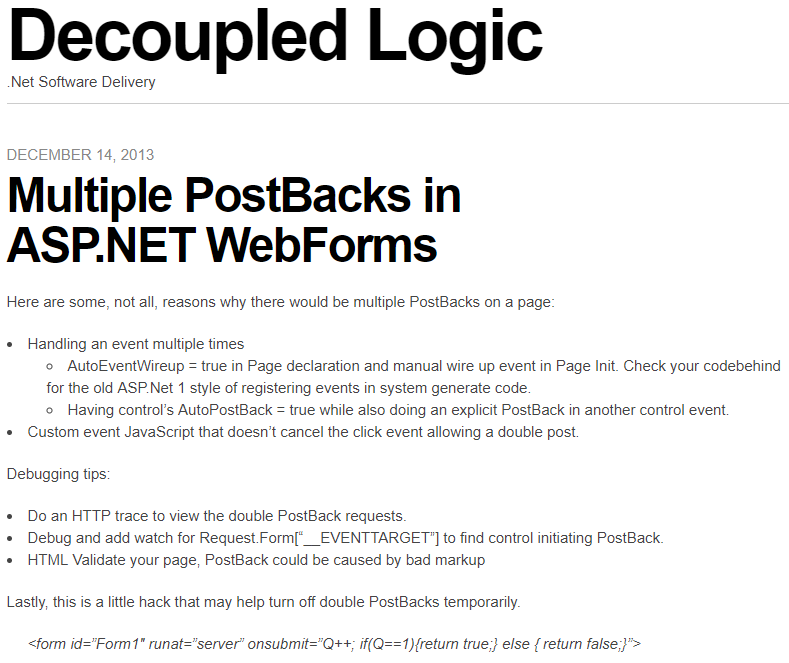
In 2013 I wrote a post about ASP.NET Web Forms (scarey) where I felt the need to capture a hack to prevent double PostBack requests in the client with a circuit breaker. First, I wrote about debugging double PostBack issues. Then I posted a hack to short circuit the post backs. I had no mention of what motivated the post, I just had the sheer need and possibly panic knowing that codebase, to record these notes so I don’t have to figure it out again.
After reading it again, I wondered if I had the notion to force submit to return false only after the first click or if I found this on Google or StackOverflow? This looks like a nice quick trick that worked for me or I wouldn’t have posted it. I wonder if I was being creative, evolutionary, or a pirate (arrrr).
————————————Start Image Quote—————————————-
————————————End Image Quote—————————————-
I don’t know what a good practice for this is today, but I was shocked to see that I was digging so much to simplify this to a bullet list. I wonder if I ever better encapsulated the circuit breaker for this and I wondered what kind of production-issue-induced-anxiety-nightmares I was having.
Observable Resilience with Envoy and Hystrix works for .NET Teams
We had an interesting production issue where a service decided to stalk a Google API like a bad date and incured a mountain of charges. The issue made me ponder the inadequate observability and resilience we had in the system. We had resource monitoring through some simple Kubernetes dashboards, but I always wanted to have something more robust for observability. We also didn’t have a standard policy on timeouts, rate limiting, circuit breaking, bulk heading… resilience engineering. Then my mind wandered back to a video that I thought was amazing. The video was from the Netflix team and it altered my view on observability and system resilience.
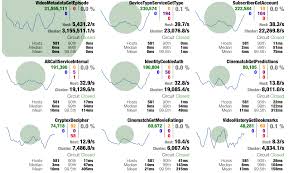
I was hypnotized when Netflix released a view of the Netflix API Hystrix dashboard – https://www.youtube.com/watch?v=zWM7oAbVL4g. There is no sound in the video, but for some reason this dashboard was speaking loudly to me through the Matrix or something, because I wanted it badly. Like teenage me back in the day wanting a date with Janet Jackson bad meaning bad.

Netflix blogged about the dashboard here – https://medium.com/netflix-techblog/hystrix-dashboard-turbine-stream-aggregator-60985a2e51df. The simplicity of a circuit breaker monitoring dashboard blew me away. It had me dreaming of using the same type of monitoring to observe our software delivery process, marketing and sales programs, OKRs and our business in general. I saw more than microservices monitoring I saw system wide value stream monitoring (another topic that I spend too much time thinking about).
Unfortunately, when I learned about this Hystrix hotness I was under the impression that the dashboard required you to use Hystrix to instrument your code to send this telemetry to the dashboard. Being that Hystrix is Java based, I thought it was just another cool toy for the Java community that leaves me, .NET dev, out in the cold looking in on the party. Then I got my invitation.
I read where Envoy (on my circa 2018 cool things board and the most awesome K8s tool IMHO), was able to send telemetry to the Hytrix dashboard – https://blog.envoyproxy.io/best-of-all-worlds-monitoring-envoys-activity-using-hystrix-dashboard-9af1f52b8dca. This meant we, the .NET development community, could get similar visual indicators and faster issue discovery and recovery, like Netflix experienced, without the need to instrument code in any container workloads we have running in Kubernetes.
Install the Envoy sidecar, configure it on a pod, send sidecar metrics to Hystrix Dashboard and we have deep observability and a resilience boost without changing one line of .NET Core code. That may not be a good “getting started” explanation, but the point is, it isn’t a heavy lift to get the gist and be excited about this. I feel like if we had this on the system, we would have caught our Google API issue a lot sooner than we did and incurred less charges (even though Google is willing to give one-time forgiveness, thanks Google).
In hindsight, it is easy to identify how we failed with the Google API fiasco, umm.. my bad code. We’re a blameless team, but I can blame myself. I’d also argue that better observability into the system and improving resilience mechanisms has been a high priority of mine for this system. We haven’t been able to fully explore and operationalize system monitoring and alerts because of jumping through made up hoops to build unnecessary premature features. If we spent that precious time building out monitoring and alerts that let us know when request/response count has gone off the rails, if we implemented circuit breakers to prevent repeated requests when all we get in response are errors, if we were able to focus on scale and resilience instead of low priority vanity functionality, I think we’d have what we need to better operate in production (but this is also biased by hindsight). Real root cause – our poor product management and inability to raise the priority of observability and resilience.
Anyway, if you are going to scale in Kubernetes and are looking for a path to better observability and resilience, check out Envoy, Istio, Ambassador and Hystrix, it could change your production life. Hopefully, I will blog one day about how we use each of these.
Welcome to Simple Town, My Notes on ASP.NET Razor Pages
So, I took some time to finally look into Razor Pages and I was impressed and actually enjoyed the experience. Razor Pages simplify web development compared to MVC. Razor Pages reminds me of my failed attempts at MVP with Web Forms, but much less boilerplate. Feels like MVVM and still has the good parts of MVC. That’s because Razor Pages is MVC under the covers. I was able to immediately get some simple work done, unlike trying to get up and working with some of the JavaScript frameworks or even MVC for that matter.
Razor Pages provides a simplified abstraction on top of MVC. No bloated controllers, just bite sized modular pages that are paired with a page model (think Codebehind if you’ve used Web Forms). You don’t have to fuss over routing because routing defaults to your folder/page structure with simple conventions.
You may not want to use it for complex websites that need all the fancy smancy JavaScript interactivity, but simple CRUD apps are a great candidate for Razor Pages. IMHO I think I would select Razor Pages by default over MVC for server side HTML rendering of dynamic data bound websites (but I have very little experience with Razor Pages to stand behind that statement).
Here are some of my notes on RazorPages. This is not meant to teach RazorPages just a way to reinforce whats learned by just diving into it. These notes are the results of my research on questions that I ended up digging through docs.microsoft.com, StackOverflow and Google. Remember I’m still a RazorPage newbie so I may not have properly grasped some of this yet.
Page
A Page in Razor Pages is a cshtml file with the @page directive at the top of the page. Pages are basically content pages scripted as Razor templates. You have all the power of Razor and a simplified coding experience with Page Models. You can still use Razor layout pages to have a consistent master page template for your pages. You also get Razor partial pages that allow you to go super modular and build up your pages with reusable components (nice… thinking user controls keeping with my trip down Web Forms memory lane).
Page Models
Page Models are like Codebehinds from Web Forms because there is a one-to-one relationship between Page and PageModel. In fact, in the Page you bind the Page to the PageModel with the @model directive.
The PageModel is like an MVC Controller because it is an abstraction of a controller. It is unlike an MVC Controller because the Controller can be related to many Views and the PageModel has a beautiful, simplified, easy to understand one-to-one relationship with a Page.
Handlers
A PageModel is a simplified controller that you don’t have to worry about mapping routes to. You get to create methods that handle actions triggered by page requests. There is a well defined convention to map requests to handlers that I won’t go into because there are great sites that talk about the details of everything I bring up in my notes.
https://www.learnrazorpages.com is a great resource to start digging into the details.
BindProperty
BindingProperty is used when you want read-write two-way state binding between the PageModel and Page. Don’t get it twisted, Razor Pages is still stateless, but you have a way to easily bind state and pass state between the client and the server. Don’t worry, I know I keep saying Web Forms, but there is no View State, Sessions, or other nasties trying to force the stateless web to be stateful.
The BindingProperty is kind of like a communication channel between the Page and PageModel. The communication channel is not like a phone where communication can flow freely back and forth. Its more like a walkie talkie or CB radio where each side has to take turns clicking a button to talk where request and response are the button clicks. Simply place a BindingProperty attribute on a public property in the PageModel and the PageModel can send its current state to the Page and the Page can send its current state to the PageModel.
DIGRESS: As I dug into this I wondered if there was a way to do reactive one-way data flow like ReactJS. Maybe a BindingProperty that is immutable in the Page. The Page doesn’t update the BindingProperty when a BindingProperty is changed in the Page. Instead, when the Page wants to update a BindingProperty it would send some kind of change event to the PageModel. Then the PageModel handles the event by updating the BindingProperty which updates the Page state. We may need to use WebSockets, think SignalR, to provide an open communication channel to allow the free flow of change events and state changes.
What do you know, of course this has been done – https://www.codeproject.com/Articles/1254354/Turn-Your-Razor-Page-Into-Reactive-Form. Not sure if this is ready for prime time, but I loved the idea of reactive one way data flow when I started to learn about ReactJS. Maybe there is some real benefit that may encourage this to be built into Razor Pages.
ViewData
ViewData is the same ViewData we’ve been using in MVC. It is used to maintain read only Page state between postback (haven’t written “postback” since web forms… it all comes back around). ViewData is used in scenarios where one-way data flow from PageModel to the Page is acceptable. The page state saved to ViewData is passed from the PageModel to the Page.
ViewData is a data structure, a dictionary of objects with a string key. ViewData does not live beyond the request that it is returned to the Page in. When a new request is issued or a redirect occurs the state of ViewData is not maintained.
Since ViewData is weakly typed, values are stored as objects, the values have to be cast to a concrete type to be used. This also means that using ViewData you loose the benefits of Intellisense and compile-time checking. There are benefits that offset the shortcomings of weak typing. ViewData can be shared with a content Page’s layout and partials.
In a PageModel you can use the ViewData Attribute on public property of the PageModel. This makes the property available in ViewData. The property name becomes the key for the property values in the ViewData.
TempData
TempData is use used to send single-use read-only data from PageModel to the Page. The most common use of TempData is to provide user feedback after post actions that results in a redirect where you want to inform the user of the results of the post (“Hey, such and such was deleted like you asked.”).
TempData is marked for deletion after it is read from the request. There are Keep and Peek methods that can be used to look at the data without deleting it and a Remove method to delete it (I haven’t figured out a scenario where I want to use these yet).
TempData is contained in a dictionary of objects with a string key.
Razor Pages Life Cycle
Lastly, I wanted to understand the life cycle of Razor Pages and how I can plug-in to it to customize it for my purpose. Back to Web Forms again, I remember there being a well documented life cycle that let me shoot myself in the foot all the time. Below is the life cycle as I have pieced it together so far. I know we still have MVC under the hood so we still have the Middlewear pipeline, but I couldn’t find documentation on the life cycle with respect to Razor Pages specifically. Maybe I will walk through the source code one day or someone from the Razor Page team or someone else will do it for us (like https://docs.microsoft.com/en-us/aspnet/mvc/overview/getting-started/lifecycle-of-an-aspnet-mvc-5-application).
- A request is made to a URL.
- The URL is routed to a Page based on convention.
- The handler method in the IPageModel is selected based on convention.
- The OnPageHandlerSelcted IPageFilter and OnPageHandlerSelctedAsync IPageFilterAsync methods are ran.
- The PageModel properties and parameters are bound.
- The OnPageHandlerExecuting IPageFilter and OnPageHandlerExecutionAsync IPageFilterAsync methods are ran.
- The handler method is executed.
- The handler method returns a response.
- The OnPageHandlerExecuted IPageFilter method is ran.
- The Page is rendered (I need more research on how this happens in Razor, I mean we have the content, layout, and partial pages how are they rendered and stitched together?)
The Page Filters are cool because you have access the the HttpContext (request, response, headers, cookies…) so you can do some interesting things like global logging, messing with the headers, etc. They allow you to inject your custom logic into the lifecycle. They are kind of like Middlewear, but you have HttpContext (how cool is that?… very).
Conclusion
That’s all I got. I actually had fun. With all the complexity and various and ever changing frameworks in JavaScript client side web development, it was nice being back in simple town on the server sending rendered pages to the client.
Git Commit Log as CSV
Today, I needed to produce a CSV containing all commits made to a git repo 2 years ago. Did I say I hate audits? Luckily, it wasn’t that hard.
git log --after='2016-12-31' --before='2018-1-1' --pretty=format: '%h',%an,%ai,'%s' > log.csv
To give a quick breakdown:
- git log – this is the command to output the commit log.
- –after=’2016-12-31′ – this limits the results to commits after the date.
- –before=’2018-1-1′ – this limits the results to commits before the date.
- pretty=format:’%h’,%an,%ai,’%s’ – this is outputting the log in the specified format:
- ‘%h’ – hash with surrounded by single quotes
- %an – author name
- %ai – ISO 8601 formatted date of commit
- ‘%s’ – commit message surrounded by single quote.
- > log.csv – output the log to a csv file named log.csv
I surround some values with single quotes to prevent Excel from interpreting the values as numbers or other value that loses the desired format. I had to look through the pretty format docs to find the placeholders to get the output I wanted.
It took a little digging through git docs to get here: https://git-scm.com/docs/git-log and https://git-scm.com/docs/pretty-formats. If I would have been smart and just searched for it I would have landed on this stack: https://stackoverflow.com/questions/10418056/how-do-i-generate-a-git-commit-log-for-the-last-month-and-export-it-as-csv.
Visual Studio, DotNet Core, Windows and Docker, a Match Made in Heaven
Why
If you haven’t heard about Docker, catch up. Out the gate, the best reasons for me to use Docker is being able to run a production like environment locally and being able to instantly create new test environments without having to go through the tiring dance of manual configuration. So, each test deployment gets a brand new fresh environment and the environment can be thrown away after testing is done. So, Docker delivers on “infrastructure as code” and allows you to save your Docker container configuration in source control and iterate it along with the source code. There are other reasons, but they had me at “create new test environments without having to go through the tiring dance…”
With Windows Server 2016 having Docker support, it’s time to get on board. It has been possible to run ASP.NET/.NET Core on Linux, but I have been waiting to be able to do this on Windows. So, here we go.
Install
- .NET Core 1.1.0 – https://www.microsoft.com/net/download/core
- Docker for Windows 17.03.1-ce – https://docs.docker.com/docker-for-windows/install/#download-docker-for-windows
- Right click the Docker icon in the System Tray, click Settings and select Shared Drives.
- Check the drive to share with Docker.
- Click Apply
- If you installed Docker after installing Visual Studio, restart Visual Studio
- Visual Studio 2017 – https://www.visualstudio.com/
- Enable .NET Core workload
Create New .NET Core Solution
- Create ASP.NET Core Web Project (.NET Core)
- Use the ASP.NET Core 1.1 Template for WebAPI
- Opt to Enable Docker Support
Use Existing .NET Core Solution
- Open an existing .NET Core solution
- Right click on the Web Project in the Solution Explorer and click “Add Docker Support”
Docker Support
When you Enable Docker Support a Docker Compose project is created. The Docker Compose project is Visual Studio’s tooling to manage the creation of Docker containers. It has two YAML files:
- docker-compose.ci.build.yml – configures how the image is built and ran.
- docker-compose.yml – configures the image to be built and ran. It also has nested files that allow you to override the configuration for debug and release (similar to web.config transforms).
Debug
Debugging is as simple as debugging traditional web projects. To give a little background on what’s happening behind the scenes, when you F5/debug your Docker containerizes the application (is that a word)
- Visual Studio runs docker compose
- The image defined in the docker-compose.ci.build.yml is downloaded if not in cache
- ASPNETCORE_ENVIRONMENT is set to Development inside the container
- Port 80 is explosed and mapped to a dynamically assigned port for localhost. The Docker host controls the dynamic port. You can see the container port with the Docker CLI command to list containers:
docker ps
- The application is copied from the build output folder into the continer
- The default browser is launched with the debugger attached to the container.
The application is now running and you can run docker ps to see some of the properties of the running container. The dev image that was built does not contain the application, rather it is mounted from drive we shared with the containers during install. This is to allow you to iterate and make changes while developing without having to to go through the expense of writing the application in the image.
If you make changes to a static file, they are automatically updated without having to recompile. You do have to refresh the browser, so it’s not as lovely as client side development, but better than stopping and starting the container.
If you make changes to a compiled file, hit Ctrl-F5 and the application is compiled and the Kestrel web server is restarted in the container. The container doesn’t have to be rebuilt or stopped, because we don’t have to rebuild the application in the image (hence the reason for the empty dev image).
Release
When you are ready to release the application to Docker Hub or your private hub, you create a production image of the application. When you build in release mode the application is actually copied into the image and unlike dev images, future changes have to be re-imaged.
Finally
This was a very pleasing development experience. I had no issues at all (knock on wood) and I was debugging a running .NET Core application in a Docker container locally on Windows 10 in less than 15 minutes (not including install time). I’m still very new at this new tooling and Windows support, so I hope I will get to write more about it as I hit road blocks. There are always road blocks and I’m sure that I will hit them when I answer some of my current questions:
- How to automate and integrate in continuous delivery pipeline
- Container build and publish
- Deploying container and running application to Windows Server 2016 on premise and in Azure
- How to run multiple load balanced containers
- How to monitor containers
- How to deploy more containers to handle increase load or failover
- How to use as base of Microservices architecture
- And the questions keep coming…
References
- https://docs.microsoft.com/en-us/dotnet/articles/core/docker/visual-studio-tools-for-docker
- https://marketplace.visualstudio.com/items?itemName=ms-vscs-rm.docker
- https://blogs.msdn.microsoft.com/jcorioland/2016/08/19/build-push-and-run-docker-images-with-visual-studio-team-services/
- https://docs.microsoft.com/en-us/virtualization/windowscontainers/manage-containers/swarm-mode
- https://www.ntweekly.com/?p=12298
TransactionScope Async Thread Fail
I updated some data access code to wrap some operations in a TransactionScope. The operations are async methods running some Dapper execute statements to write data to a SQL Server database. Something like:
public async Task InserData(SourceData sourceData)
{
  using (var transactionScope = new TransactionScope(TransactionScopeAsyncFlowOption.Enabled))
  {
    using (IDbConnection connection = new SqlConnection(this.ConnectionString))
    {
      connection.Open();

      await InsertSomeData(sourceData.Registers, connection);
      await InsertMoreData(sourceData.Deposits, connection);

      transactionScope.Complete();
     }
   }
 }
Anyway, I wire up a unit test to this method and it fails with this message:
Result Message:
Test method ExtractSourceDataTest.CanStart threw exception:
System.InvalidOperationException: A TransactionScope must be disposed on the same thread that it was created.
As usual, Google to the rescue. I found a nice blog post that explains the issue, https://particular.net/blog/transactionscope-and-async-await-be-one-with-the-flow. Basically, TransactionScope was not made to operate asynchronously across threads, but there is a work around for that. Microsoft released a fix, TransactionScopeAsyncFlowOption.Enabled. I went from a zero
using (var transactionScope = new TransactionScope())
to a hero
using (var transactionScope = new TransactionScope(TransactionScopeAsyncFlowOption.Enabled))
Now, if this would have been turned on by default I wouldn’t of had this little problem… talking to you Microsoft. I’m sure there is some backward compatibility issue or other quirk that makes default enable difficult, but I’m ranting anyway.
Conclusion
This is awesome, but I basically just enabled a distributed transaction and that scares me. You do not know the trouble I have seen with distributed transactions. Hopefully, its not that bad since we are distributing across processes on the same machine and not over the network, but scary none the least.
Build a .Net Core WebAPI using Visual Studio Code
So, we have an intern and she is helping us build an internal tool. She is good on the client side, but very light in experience on the back-end. So, I wanted to give her a challenge, Build a .Net Core WebAPI using Visual Studio Code. I wrote up these instructions and she had the API up and a basic understanding of how to iterate it forward in less than an hour. I thought I’d share it in hopes it helps someone else.
- Install .Net Core SDK – https://www.microsoft.com/net/core#windowscmd
- Open the Windows command prompt console
Check out Cmder, http://cmder.net/, as an alternative to Windows command prompt.
- Make a directory for the application. I am creating my application in an “api” folder inside my _projects folder. Run
mkdir c:\_projects\api
- Change to your new directory. Run
cd c:\_projects\api
- Create a .Net Core application. Run
dotnet new
- Restore dependencies that are listed in your project.json. Run
dotnet restore
- Open Visual Studio Code and open your application folder. Run
code
- You may see a warning, “Required assets to build and debug are missing from ‘api’. Add them?”, click yes.
- Open the Quick Open (Ctrl+P)
- Run this command “ext install charp”. https://marketplace.visualstudio.com/items?itemName=ms-vscode.csharp
- Back in the console you should be able to run the application and see “Hello World!” printed to the console. Run
dotnet run
The project.json currently looks like:
{
  "version": "1.0.0-*",
  "buildOptions": {
    "debugType": "portable",
    "emitEntryPoint": true
  },
  "dependencies": {
  },
  "frameworks": {
    "netcoreapp1.1": {
      "dependencies": {
        "Microsoft.NETCore.App": {
          "type": "platform",
          "version": "1.1.0"
        }
      },
      "imports": "dnxcore50"
    }
  }
}
We need to update this to run ASP.Net MVC:
{
  "version": "1.0.0-*",
  "buildOptions": {
    "debugType": "portable",
    "emitEntryPoint": true
  },
  "dependencies": {
  },
  "frameworks": {
    "netcoreapp1.1": {
      "dependencies": {
        "Microsoft.NETCore.App": {
          "type": "platform",
          "version": "1.1.0"
        },
        "Microsoft.AspNetCore.Server.Kestrel": "1.1.0",
        "Microsoft.AspNetCore.Mvc": "1.1.1",
        "Microsoft.AspNetCore.Mvc.Core": "1.1.1"
      },
      "imports": "dnxcore50"
    }
  }
}
Under frameworks, you will notice that we are running .Net Core 1.1, the current version when this was written. Also, we added some additional dependencies:
- Kestrel – a web server that will serve up your API endpoints to clients
- Mvc – The base ASP.Net Core 1.1.1 dependency
- Mvc.Core – The core ASP.Net Core 1.1.1 depencency
These dependencies will allow us to write and serve our API using ASP.Net Core MVC.
Once you save the project.json Visual Studio Code will let you know “There are unresolved dependencies from ‘project.json’. Please execute the restore command to continue.” You can click “Restore” and you can open the console and run
dotnet restore
This will install the new dependencies that were added to project.json.
Now we need to configure our application to serve our API. We need to update Program.cs from:
using System;

namespace ConsoleApplication
{
    public class Program
    {
        public static void Main(string[] args)
        {
            Console.WriteLine("Hello World!");
        }
    }
}
to:
using System;
using Microsoft.AspNetCore.Builder;
using Microsoft.AspNetCore.Hosting;
using Microsoft.Extensions.DependencyInjection;

namespace BInteractive.StoryTeller.Api
{
    public class Program
    {
        public static void Main(string[] args)
        {
            var host = new WebHostBuilder()
                .UseKestrel()
                .UseStartup<Program>()
                .Build();
            host.Run();
        }

        // This method gets called by the runtime. Use this method to add services to the container.
        public void ConfigureServices(IServiceCollection services)
        {
            services.AddMvc();
        }

        // This method gets called by the runtime. Use this method to configure the HTTP request pipeline.
        public void Configure(IApplicationBuilder app)
        {
            app.UseMvcWithDefaultRoute();
        }
    }
}
Here we added new using statements at the top of the class to reference the dependencies we want to use. I changed the namespace to match my application, you can customize the name space to match you application. Normally, I like to have my namespace with MyCompanyName.MyApplicationName.{If the class is in a folder Under my root folder, MyFolderName}.
Now we update the Main method, the entry into the application, to run our API instead of printing “Hello World”. We wire up a host using the Kestrel web server, using this Program class as the start up class, then we build and call run on the host. This starts the server listening and will route based on the configured routes and handle them through the MVC service.
The ConfigureServices method allows you to configure the services you want to use with your API. Right now we only have MVC configured.
The Configure method allows you to inject middle wear into the HTTP pipeline to enhance HTTP request and response handling. You can add things like logging and error pages handling that would work across every request/response.
Now that we are wired up for ASP.Net MVC lets build an API. We are going to build an API that collects and serves questions. So, let define what a question is. Create a new folder under your root folder named “models”. Then create a file name questionmodel.cs.
using System;

namespace BInteractive.StoryTeller.Api.Models
{
    public class Question
    {
        public string Id { get; set; }
        public string Title { get; set; }
    }
}
This is a plain old CSharp object that has properties to get and set the question Id and Title.
With this we can create a controller that allows clients to work with this model through our API. Create a new folder under your root folder named “controllers”. Then create a file named questioncontroller.cs.
using System.Collections.Generic;
using Microsoft.AspNetCore.Mvc;
using StoryTeller.Api.Models;

namespace BInteractive.StoryTeller.Api.Controllers
{
    [Route("api/[controller]")]
    public class QuestionController : Controller
    {
        private static List<Question> _questions;

        static QuestionController()
        {
            _questions = new List<Question>();

            Question question = new Question();
            question.Id = "1";
            question.Title = "Hello World?";

            _questions.Add(question);
        }

        [HttpGet]
        public IEnumerable<Question> GetAll()
        {
            return _questions.AsReadOnly();
        }

        [HttpGet("{id}", Name = "GetQuestion")]
        public IActionResult GetById(string id)
        {
            var item = _questions.Find(x => x.Id == id);

            if (item == null)
            {
                return NotFound();
            }

            return new ObjectResult(item);
        }

        [HttpPost]
        public IActionResult Create([FromBody] Question item)
        {
            if (item == null)
            {
                return BadRequest();
            }

            item.Id = (_questions.Count + 1).ToString();

            _questions.Add(item);

            return CreatedAtRoute("GetQuestion", new { controller = "Question", id = item.Id }, item);
        }

        [HttpDelete("{id}")]
        public void Delete(string id)
        {
            _questions.RemoveAll(n => n.Id == id);
        }
    }
}
There is a lot here, but the gist is we are setting up an endpoint route for our question API and we are adding methods to get, post, and delete questions. You can dive more into what this is doing by reading up on ASP.Net Core, https://www.asp.net/core.
You should be able to Ctrl-Shift-B to build the application and if everything is good you won’t see any errors. If you are all good you should be able to run the application. In the console go to the application root directory and run
dotnet run
Then you should be able to browse the API at http://localhost:5000/api/question and see a JSON response with the default question of “Hello World?”.
Modular MicroSPAs
Warning – this is just an unstructured thesis and a challenge for myself to find a solution for building applications with microSPAs. There is no real substance here, just me brainstorming and recording thoughts.
I recently had to bring many microSPAs under the control of one application. A microSPA in this context is just a SPA (single page application) that is meant to coexist with other SPAs in a single application. Each SPA is focused on a discrete domain of the application, maybe a decomposition something like microservices.
I only say micro because I have been through exercises to break up server side monolithic APIs into microservices. Now the break up was client side. Take a client side massive SPA or monolith and break out functionality to smaller SPAs then combine them with new SPAs to form a new modular application. This is nothing new, but it is new to me.
MEAN.js has a wonderful structure for discrete modular AngularJS microSPAs.
https://github.com/meanjs/mean/tree/master/modules
The idea is to have a folder containing all of your microSPAs. Each microSPA get’s its own folder. Each microSPA gets its own repository and development life cycle. An example is below, borrowing heavily from MEAN.js. I can’t go into the particulars because this is just a thought from a problem we had with microSPAs, but something I will be involved in solving.
- app
- myapp.core <— this is a microSPA
- client
- config
- controllers
- css
- directives
- images
- models
- services
- interceptors
- socket
- views
- server
- config
- controllers
- data
- models
- policies
- routes
- templates
- views
- tests
- client
- small
- medium
- large
- server
- small
- medium
- large
- client
- myapp.core.client.js
- client
- myapp.stories
- …
- myapp.users
- …
- myapp.admin
- …
- myapp.other_micro_spa
- …
- myapp.core <— this is a microSPA
Now the question is, how do you stitch the microSPAs together under one domain name, client context, user session… and manage the entire application across composed micro-SPAs? We need to think about problems areas like:
- Authentication
- Root Application and microSPA Level
- Authorization
- Routes
- Menu
- Layout Templates
- Static Assets
- Styles
- Images
- Sharing Across MicroSPAs
- State
- Components/Modules
- Dependencies
- Debugging
- Testing
- Delivery Automation (Build, Package, Test, Release)
- Monitoring and Analytics
How to solve this with AngularJS 1 & 2, React, Vue.js…?
Why am I thinking about this? I just failed gloriously at breaking apart a monolithic SPA and stitching it back together with other SPAs and ran into issues in all of the problem areas above. I didn’t use the MEAN.js architecture or even the structured modular file layout above. The project was done fast and dirty with the only goal of getting the app working again with the new architecture and new SPAs as fast as possible (a few days fast).
The team finished the task, but I was embarrassed by the resulting structure and by many of the hacks we employed to over come issues in the problem areas above. Why we had to accomplish it so fast is another story, so is how we are going to use lessons learned to refactor and address the problem areas above. It’s been a long time since I blogged regularly, but I am hoping to journal our journey and how we solve the issues we faced with microSPAs.
If you have worked with combining multiple SPAs please share, I’m sure there are solutions all over the interwebs.
 DecoupledLogic