Tagged: DevOps

AgentOps: The Operational Backbone for AgenticOps
Why agents need their own control plane, and what we’re doing about it.
We’ve spent decades refining how to ship software safely. DevOps gave us version control, CI/CD, monitoring, rollback. Then came MLOps, layering on model registries, drift detection, pipeline orchestration. It’s all good.
But now we’re shipping something different: autonomous agents. Virtual coders that operate alone in their own little sandbox. They are a bunch of mini-me’s that code much better than me. However, they sometimes get lost and don’t know what to do. As a result, they will make things up.
We’re not just shipping code or models, but goal-seeking, tool-using, decision-making alien lifeforms. Beings that reason, reflect, and act. And many are shipping with zero visibility into what they’re doing after launch. I say give them agency but give them guardrails. Trust but verify.
I’ve been enjoying what I’ve been reading on the topic of AgentOps. I’m interested in how to bring valuable practices into our agent development. That’s where AgenticOps comes in. It’s not just DevOps with prompt logging. It’s been a year long thought exercise on how we operationalize agency in production.
What’s so different about autonomous agents?
A few things, actually:
- They improvise. Every agent run can take a new path. Prompts mutate. Goals shift.
- They chain tools and memory. It’s not one model, it’s a process graph across APIs, vectors, scratchpads.
- They’re hard to debug. When something goes wrong, you don’t just check logs. You need to replay reasoning.
- They cost money in real time. An agent stuck in a loop doesn’t just crash, it runs up a token bill that costs real money.
The DevOps playbook wasn’t built for this. Neither was MLOps. This is something new. AgentOps is cool, I love, it but I’ve been calling it AgenticOps and its my playbook.
So what is AgenticOps, really?
Think of AgenticOps as your mission control tower for autonomous systems. It’s how you keep agency productive, safe, and accountable at scale. These agents are like bad ass kids in a classroom sometimes. My wife is a teacher and she says my agents need routines and rituals and behavior strategies. They need AgenticOps
Here’s what AgenticOps adds to the stack that echoes what I’m seeing in AgentOps:
- Observability for agents
Live dashboards. Step-level traces. Session replays. You see what the agent thought, decided, and did, just like tracing a debugger. - Guardrails that matter
Limit which tools agents can access. Enforce memory policies. Break runaway loops before they eat your GPU budget. - Full traceability
Every prompt, tool call, response, and memory snapshot logged and queryable. Audit trails you can actually follow. - Reliability at runtime
Detect anomalies, hallucinations, cost spikes. Trigger alerts or pause execution if things go sideways.
This isn’t observability-as-a-service tacked onto ChatGPT. This is real operational scaffolding for agentic systems in production.
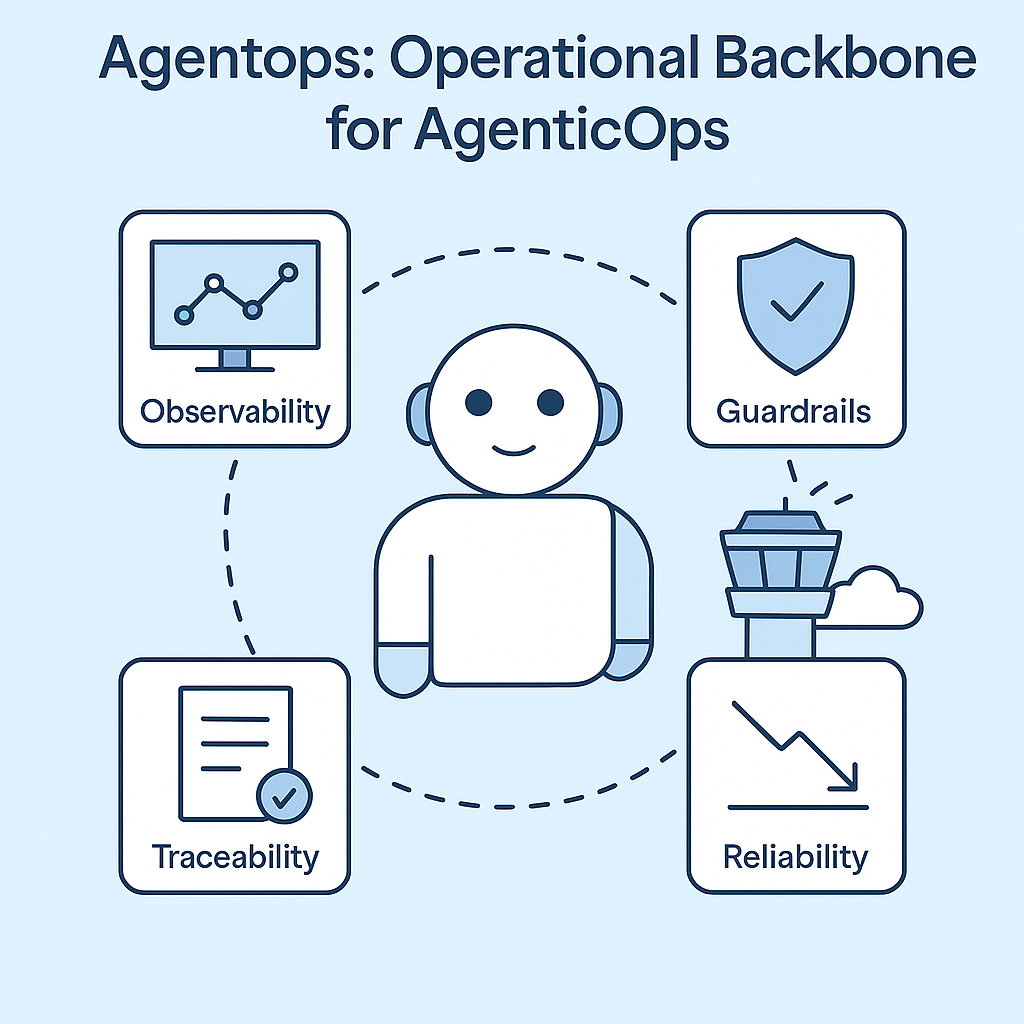
How it fits into your stack
If your life is shifting into AI Engineering, you’re probably already doing some mix of this:
- Using LangGraph, AutoGen, CrewAI, or your own glue
- Plugging in vector stores, APIs, function calls
- Deploying workflows with multiple agents and tools
An AgenticOps framework encompasses all that. It doesn’t replace it. Instead, it provides a plug-and-play layer to make it safe and visible.
It’s the runtime control layer that lets you:
- Version your agents and context
- Monitor them in action
- Understand what went wrong
- Rewind and fix without guesswork
And just like DevOps before it, AgenticOps will soon be table stakes for any serious deployment.
What you get from AgenticOps
Let’s talk outcomes:
- MTTR down: You can debug reasoning chains like logs. Find the bad prompt in seconds.
- Spend under control: Token usage is monitored and optimized. No more budget black holes.
- Safer autonomy: Guardrails catch weird behavior before it hits production.
- Compliance ready: Trace logs that tell a human story, useful for audits, explainability, and ethics reviews.
This isn’t hypothetical. This is already shipping to production.
Why I care about this
AgenticOps isn’t a buzzword. It’s the foundation that will make agents trustworthy at scale.
If we want autonomous systems to do real work, safely, reliably, transparently, we have to operationalize agency itself.
That’s what we’re building with AgenticOps. It’s our take, our lens, our direction, and how I think in this space.
Let’s talk about it.
If you want to build fast vibe coded prototypes, build alone. If you want to build stable, safe agentic systems for the long-term, build together.
If you’re building “bad ass agents” or agentic systems, I’d love to hear about it. Even if you’re just thinking about it, let me know what you’re running into. Want to play with it and explore together? Let me know. Share your repo and I’ll share mine – https://github.com/charleslbryant/agenticops-value-train.

Streamlining Dependency Management: Lessons from 2015 to Today
In this throwback Tuesday post, we revamp at a dusty draft post from 2015.
In 2015, I faced a challenging problem. I had to manage dependencies across a suite of interconnected applications. It was crucial to ensure efficient, safe builds and deployments. Our system included 8 web applications, 24 web services, and 8 Windows services. This made a total of 40 pipelines for building, deploying, and testing. At the time, this felt manageable in terms of automation, but shared dependencies introduced complexity. It was critical that all applications used the same versions of internal dependencies. This was especially important because they interacted with a shared database and dependencies can change the interaction.
Back then, we used zip files for our package format and were migrating to NuGet to streamline dependency management. NuGet was built for exactly this kind of challenge. However, we needed a system to build shared dependencies once. It was necessary to ensure version consistency across all applications. The system also needed to handle local, and server builds seamlessly.
Here’s how I approached the problem in 2015 and how I’d tackle it today, leveraging more modern tools and practices.
The 2015 Solution: NuGet as a Dependency Manager
Problem Statement
We had to ensure:
- Shared dependencies were built once and consistently used by all applications.
- Dependency versions were automatically synchronized across all projects (both local and server builds).
- External dependencies are handled individually per application.
The core challenge was enforcing consistent dependency versions across 40 applications without excessive manual updates or creating a maintenance nightmare.
2015 Approach
- Migrating to NuGet for Internal Packages
We began by treating internal dependencies as NuGet packages. Each shared dependency (e.g., ProjB, ProjC, ProjD) was packaged with a version number and stored in a NuGet repository. When a dependency changed, we built it and updated the corresponding NuGet package version. - Version Synchronization
To ensure that dependent applications used the same versions of internal packages:- We used nuspec files to define package dependencies.
- NuGet commands like
nuget updatewere incorporated into our build process. For example, if ProjD was updated,nuget update ProjDwas run in projects that depended on it.
- Automating Local and Server Builds
We integrated NuGet restore functionality into both local and server builds. On the server, we used Cruise Control as our CI server. We added a build target that handled dependency restoration before the build process began. Locally, Visual Studio handled this process, ensuring consistency across environments. - Challenges Encountered
- Updating dependencies manually with
nuget updatewas error-prone and repetitive, especially for 40 applications. - Adding new dependencies required careful tracking to ensure all projects referenced the latest versions.
- Changes to internal dependencies triggered cascading updates across multiple pipelines, which increased build times.
- We won’t talk about circular dependencies.
- Updating dependencies manually with
Despite these challenges, the system worked, providing a reliable way to manage dependency versions across applications.
The Modern Solution: Solving This in 2025
Fast forward to today, and the landscape of dependency management has evolved. Tools like NuGet remain invaluable. However, modern CI/CD pipelines have transformed how we approach these challenges. Advanced dependency management techniques and containerization have also contributed to this transformation.
1. Use Modern CI/CD Tools for Dependency Management
- Pipeline Orchestration: Platforms like GitHub Actions, Azure DevOps, or GitLab CI/CD let us build dependencies once. We can reuse artifacts across multiple pipelines. Shared dependencies can be stored in artifact repositories (e.g., Azure Artifacts, GitHub Packages) and injected dynamically into downstream pipelines.
- Dependency Locking: Tools like NuGet’s lock file (
packages.lock.json) ensure version consistency by locking dependencies to specific versions.
2. Automate Version Synchronization
- Semantic Versioning: Internal dependencies should follow semantic versioning (e.g.,
1.2.3) to track compatibility. - Automatic Dependency Updates: Use tools like Dependabot or Renovate to update internal dependencies across all projects. These tools can automate pull requests whenever a new version of an internal package is published.
3. Embrace Containerization
- By containerizing applications and services, shared dependencies can be bundled into base container images. These images act as a consistent environment for all applications, reducing the need to manage dependency versions separately.
4. Leverage Centralized Package Management
- Modern package managers like NuGet now include improved version constraints and dependency management. For example:
- Use a shared
Directory.Packages.propsfile to define and enforce consistent dependency versions across all projects in a repository. - Define
privateNuGet feeds for internal dependencies and configure all applications to pull from the same feed.
- Use a shared
5. Monitor and Enforce Consistency
- Dependency Auditing: Tools like WhiteSource or SonarQube can analyze dependency usage to ensure all projects adhere to the same versions.
- Build Once, Deploy Everywhere: By decoupling build and deployment, you can reuse prebuilt NuGet packages in local and server builds. This ensures consistency without rebuilding dependencies unnecessarily.
Case Study: Revisiting ProjA, ProjB, ProjC, and ProjD
Let’s revisit the original example that help me figure this out in 2015 but using today’s tools.
- When ProjD changes:
- A CI/CD pipeline builds the new version of ProjD and publishes it as a NuGet package to the internal feed.
- Dependency lock files in ProjB and ProjC ensure they use the updated version.
- Applications automatically update:
- Dependabot identifies the new version of ProjD and creates pull requests to update ProjB and ProjC.
- After merging, ProjA inherits the changes through ProjB.
- Consistency is enforced:
- Centralized package configuration (
Directory.Packages.props) ensures that local and server builds use the same dependency versions.
- Centralized package configuration (
The Results
By modernizing our approach:
- Efficiency: Dependencies are built once and reused, reducing redundant builds.
- Consistency: Dependency versions are enforced across all projects, minimizing integration issues.
- Scalability: The system can scale to hundreds of applications without introducing maintenance overhead.
Conclusion
In 2015, we solved the problem using NuGet and MSBuild magic to enforce dependency consistency. Today, with modern tools and practices, the process is faster, more reliable, and scalable. Dependency management is no longer a bottleneck; it’s an enabler of agility and operational excellence.
Are you ready to future-proof your dependency management? Let’s talk about optimizing your build and deployment pipelines today.
Extending the Reach of QA to Production
I have multiple lingering tasks for improving monitoring for for our applications. I believe this is a very important step we need to take to assess the quality of our applications and measure the value that we are delivering to customers. If I had my way, I would hire another me just so I can concentrate on this.
Usability
We need to monitor usage to better understand how our customer actually use the application in production. This will allow us to make better product design decisions and optimizations, prioritize testing effort in terms of regression coverage, and provide a signal for potential issues when trends are off.
Exceptions
We need a better way to monitor and analyze errors. We currently get an email when certain exceptions occur. We also log exceptions to a database. What we don’t have is a way to analyze exceptions. How often do they occur, what is the most thrown type of exception, what was system health when the exception was thrown.
Health
We need a way to monitor and be alerted of health issues (e.g. current utilization of memory, cpu, diskspace; open sessions; processing throughput…). Ops has a good handle on monitoring, but we need to be able to surface more health data and make it available outside of the private Ops monitoring systems. It’s the old “it takes a village to raise an app” thing being touted by the DevOps movement.
Visibility
Everyone on the delivery team needs some access to a dashboard where they can see the usability, exceptions, health of the app and create and subscribe to alerts for various condition thresholds that interest them. This should be even shared with certain people outside of delivery just to keep things transparent.
Conclusion
This can all be started in preproduction and once we are comfortable with it pushed to production. The point of having it is that QA is a responsibility of the entire team. Having these types of insight into production is necessary to insure that our customers are getting the quality they signed up for. When the entire team can monitoring production it allows us to extend QA because we can be proactive and not just reactive to issues in production. Monitoring production gives us the ammo we need to take preemptive action to avert issues in production while giving us the data we need to improve the application.
Thoughts on DevOps
I am not a DevOps guru. I have been learning DevOps and Continuous Improvement for about 6 years now. I wanted to blog about some of what I have learned because I see companies doing it wrong. I wanted to start internalizing some of the lessons I have learned and the grand thoughts I have had just in case someone asks me about DevOps one day.
DevOps is a Religion
I’m not going to define DevOps because there is enough of that going on (https://en.wikipedia.org/wiki/DevOps). I will say that you can’t hire your way to DevOps because it isn’t a job title. You can’t have one team named DevOps and declare you are doing DevOps. Everyone on your application delivery teams have to convert to DevOps. When you only have one team enabling some DevOps practices through tools and infrastructure you are only getting a piece of the DevOps pie. Until you have broken down the silos and increased communication you haven’t realized DevOps.
Do not focus on implementing DevOps by creating another silo in a “DevOps” team. You can create an implementation team that focuses on DevOps processes, tools, and infrastructure, but if this will be a long lived team call them a Delivery Systems team or Delivery Acceleration team and make sure they are embedded in sprint teams and not off in some room guarded by a ticket system. As with some religions, you have to congregate. Your delivery team has to communicate with each other outside of tickets and email.
When you name the team DevOps it pushes responsibility for DevOps to that team, but the byproduct of DevOps is the responsibility of the entire delivery team. This is the same problem with a QA team, your QA team is not responsible for quality, the entire delivery team is responsible for quality. When you have silos like these, it is hard to get a “One Delivery Team” mindset. Find ways to break down silos, then you won’t be one of those companies that missed the DevOps boat because you couldn’t get your new silo’d DevOps team to delivery on the promises of DevOps.
Fast Feedback is a Main By Product
One of the main benefits of doing continuous anything (DevOps includes continuous improvement processes), is you get fast feedback. The tighter, faster your feedback loops the faster you can iterate. Take a small step, get feedback, adjust based on the feedback, and iterate. It’s not rocket science, its simplification. Work in smaller batches, talk about how to make the next batch better; watch your automation pipelines and KPIs, talk about how to make your pipelines and KPIs better… TALK.
Collaboration is the Key that Unlocks the Good Stuff
Having the entire delivery team involved and talking is key. The Business, QA, Security, IT, Operations, Development… everyone must communicate to insure the team delivers the value that end users are looking for. Give end users value, they give the business value, loop. Having a delivery team that huddles in their silos with minimum communication with other teams is a good way to short circuit this loop. DevOps is a way of breaking down the silos and improving collaboration. DevOps is not the best name to convey what it can deliver. Just remember that the DevOps way should extend beyond the development and operations team.
Automation is the Glue that Binds Everything
Having an automated delivery pipeline from source check-in to production enables you to have a repeatable delivery process that is capable of automatically providing fast feedback. It gives the entire team a way to start and stop the pipeline and monitor the pipeline to adjust based on feedback from the pipeline. It also aides in collaboration by providing dashboards and communication mechanisms accessible by the entire delivery team.
If you have no automation, start with automating your build on each check-in. Then automate running of unit tests, then deployment to a test environment, running automated functional tests, deploy to the next environment. Don’t forget virtualization. Figure out how you can virtualize your environments and automate the provisioning of an environment to run your apps in. Start where you are and focus on adding the next piece until you can automatically build once and deploy and test all the way to production. Iterate your way continuous delivery.
Virtualization is Magic Pixie Dust
Many people I have asked think of the DevOps as virtualization and automated server configuration and provisioning. Even though this isn’t everything in DevOps, it’s a big part of it. Being able to spin up a virtual environment to run a test removes environments as a hindrance to more testing. Being able to spin up a virtualized mock environment for a third party service that is not ready allows us to test in spite of the missing dependency. Virtualization in production allows us to hot swap the current environment with a new one when we are ready for the next release or when production nodes are being hammered or being otherwise unruly. Codifying all of this virtualization allows us to treat our infrastructure just like we do product code. We can manage changes in a source control repository and automatically run the infrastructure code as part of our delivery process.
Quality, Security and Health Come First
Before one line of code is written on a change, an analysis of the desired change must be done before delivering it. I’m not saying a large planning document has to be done. The team has to talk through the potential effect on quality, security and health (QSH) and it makes sense to record these discussions somewhere to be used during the iteration. You can create a doc or record it in a ticket, but QSH must be discussed and addressed during the iteration.
QSH is not something that happens after development has declared code complete. It should happen in parallel with development. There should be automated unit, integration and end-to-end checks. There should be automated static analysis and security checks. A load test and analysis of health monitors should be measuring how the applications is responding to changes. This all should happen during development iterations or as close to development as possible.
On a side note, in Health I am lumping performance, scale, stress and any type of test where a simulated load is tested against the application. This could be spinning up a new virtualized environment, running automated tests then turning off the database or a service to see what happens. Health is attempting to introduce scenarios that will give insight into how the application will respond to changes. It may take a lot to get to the level of Netflix and its chaos monkey in production, but having infrastructure and tests in preproduction to measure health will give you something instead of being totally blind to health issues.
Conclusion
I know there is no real meat here or guidance on how to do these things, but that’s what Google is for or read Gene Kim’s the Phoenix Project. Anyway, I may be a little naive on a few points, but the gist is DevOps is more than a job or team title, its more than development and operations signing a peace treaty, more than automated server configuration. Think of it as another step in improving your continuous improvement process with a focus on cross team collaboration where you break down the silos separating all of the teams that deliver your application.
The Phoenix Project – A Novel about IT
We had to do a restore of a production database and it made me remember a book I read that you may enjoy. It’s called The Phoenix Project. It’s not the best written book, a little unbelievable and hokey at times, but I honestly couldn’t put it down (I’m a tech geek). I have never read a book like it.
It’s about DevOps yet, it’s a novel not a tech book. It leans more on the Ops perspective, is a retelling of The Goal, and is rooted in Kanban and Manufacturing Operations. Yet, it’s something I believe anyone working in Enterprise IT can relate to.
The Kindle version is only $10. If you read it let me know what you think as DevOps is something I am passionate about and I’d like to hear your perspective.
http://www.amazon.com/The-Phoenix-Project-Helping-Business/dp/0988262592
http://itrevolution.com/ – Author’s website
Production Updates with a Big Red Button
Imagine if you would, a modified game of Jeopardy hosted by Alex Trebec of course. This game is all about getting changes to production and a smart Dev is in the hot seat.
Dev: Can I have Daily Production Pushes for $200?
Alex: You just deployed a new code change to production, it is causing major issues with performance and you need to roll it back. How do you roll back the troublesome change without having to roll back the entire release? (Jeopardy theme music playing)…
Dev: What is a Feature Toggle.
Alex: Correct.
Dev: Can I have Daily Production Pushes for $500?
Alex: You just started work on a new feature that is no where near ready and you check in your changes to source control. The powers that be want to push to production the branch you’ve checked in the new feature… and they want to do it NOW! How do you push the branch and not expose the unfinished feature changes without having to revert the feature and other work mixed in between your feature changes?
Dev: What is a Feature Flag.
Alex: Correct.
Dev: Can I have Daily Production Pushes for $1,000?
Alex: Daily Double
Alex: Marketing wants to be able to turn a feature on and off for customers depending on their transaction volume. How do you accomplish it?
Dev: What is a Ticket Flag.
Alex: Correct.
Alex: You are our Production Jeopardy Champion?
 DecoupledLogic