Category: Pipeline
OMG! .Net is Open Source
The world is a change’n.
From the horses mouth, http://blogs.msdn.com/b/dotnet/archive/2014/11/12/net-core-is-open-source.aspx. They also have a GitHub repo, but it currently doesn’t include everything – https://github.com/dotnet/corefx.
This is very exciting news for .Net developers as this opens up our .Net skills to be eventually applied on other platforms (Linux, MacOS, iOS, Android…). Also, getting the opportunity to browse the code base and learn from it is appealing. Hopefully, I get a chance to contribute.
GoCD: Error updating Git material on Windows Server [SOLVED]
Problem
I have a Git material setup that uses a public git repository (private repos are another animal).
<materials>
  <git url="http://mydomain/MyRepo.git" materialName="myrepo.git" />
</materials>
When I trigger the pipeline that uses this material it results in an error.
[go] Start to prepare build/5/Build/1/Build on mygoserver [D:\Go Agents\Internal\1] at Fri Oct 24 08:44:49 EDT 2014
[go] Start updating files at revision b0b18a838a108a208003178fb17e8769edf9587c from
http://mydomain/MyRepo.git
Error while executing [git config remote.origin.url]
 Make sure this command can execute manually.
[go] Job completed build/5/Build/1/Build on mygoserver [D:\Go Agents\Internal\1] at Fri Oct 24 08:44:49 EDT 2014
Error
Looking at go-agent.log I see that there was a problem executing the git command.
…blah blah
2014-10-24 08:27:48,616 [loopThread] ERROR thoughtworks.go.work.DefaultGoPublisher:142 - Error while executing [git config remote.origin.url]
Make sure this command can execute manually.
java.lang.RuntimeException: Error while executing [git config remote.origin.url]
 Make sure this command can execute manually.
  …blah blah
Caused by: com.thoughtworks.go.util.command.CommandLineException: Error while executing [git config remote.origin.url]
 Make sure this command can execute manually.
  …blah blah
Caused by: java.io.IOException: Cannot run program "git" (in directory "pipelines\build"): CreateProcess error=2, The system cannot find the file specified
…blah blah
When I set the material up I got a successful test connection. So an error saying that it can’t find the git command is somewhat perplexing. Does the Git connection test use a different git than the pipeline material processor. When I installed msysgit I manually added the git bin folder to the PATH. I could run git in the command window and on git bash.
Solution
After some hair pulling I decided to re-install msysgit and this time to use the evil option that has the red danger sign.
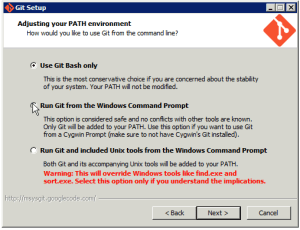
Notice that it says it will override Windows tools, like find.exe and sort.exe. Now, I have to remember that these tools are busted when the server ever has to run a script that needs these. I am not sure of any other changes, but it looks like it is a PATH change. Instead of just having {gitinstall}\bin it also adds {gitinstall}\cmd.
When I restart the Go Server and Agent and try again… IT WORKED!!!
Conclusion
If you are using a Windows Server with Go and you want to use Git Materials, you may need to allow git to override some of your Windows tools and remember that you allowed Git to break said tools when problems arise…and this will arise.
Sell Products and Services on NationBuilder
I just received my certification as a NationBuilder Expert and I wanted to give something to the NationBuilder community to celebrate :). As I thought about something I could do, I remembered that I have a customer that wants to sell products in their nation. So, I will share that solution. I warn you, it is not for the technically challenged or the faint of heart.
At the moment there isn’t an easy way to sell products and services on NationBuilder websites. So, here is how I approached this problem, but the instructions may not be applicable in the future once NationBuilder makes changes to the system. Please note that charging tax and shipping is an issue with this approach, so you may want to rethink your usage of it. If you need help setting this up, leave a comment or find me in the NationBuilder Expert directory.
Overview
We will use the following page types to mimic a shopping cart experience:
- Basic
- Product Catalog with links to various product pages
- Thank You page after the purchase is made that explains shipping, returns, customer service…etc.
- Event
- There will be an Event page for each product or service to be sold that includes detailed information about the product and a “Add to Cart” button.
- Donation
- Shopping Cart and the payment workflow to allow users to purchase the products they placed in the shopping cart.
Initial Configuration
We want to be able to track purchases and alert certain people about purchases so we have to configure certain items to allow this.
Tracking Code
Create a tracking code for purchases made through your shop (e.g. products).
Contact Type
Create a new Contact Type (e.g.“Purchase”). This will be used to create a custom way to alert someone to trigger product shipping or service provisioning.
Thank You Page
Create a Thank You page as a Basic Page. You can make this an empty page for now. We just need it ready when we want to point the Shopping Cart to it.
Shopping Cart
Create a new Donation page. Set the page for “one time payment” unless you want to allow people to make installment payments.
Note: Installment payments may be hard to track, but I haven’t tried. If you offer installment payments and you only ship once the final payment is made, you are effectively offering layaway. If you ship immediately and allow your customer to make installments, you are basically offering them credit. In both instances there is a lot to think about and track and I am not sure if NationBuilder in its current form would help you do either effectively.
Options
- You should allow multiple donations and any amount would be fine as this will be overridden when someone selects a product for sale.
- Select the tracking code you created earlier.
- You could set a goal if you are selling items to reach some goal that you want publicly viewable. I tag donors as “shopper”, but you can call it what you want. This allows me to target people that have made purchases before.
- I also tag donors as needing follow up so I can insure their product or service is processed and shipped or provisioned by someone.
- Set the follow up type to the Contact Type you setup earlier. Set “Follow up by” to today to speed processing.
- If you are actually selling a membership then you should select the membership and set the expiration date.
- I also turn off all options on the page to limit distractions from purchase. No comments, streams…etc.
- You should also edit your autoresponse template to change the wording to reflect the word “purchase” instead of “donation” or “contribution” (note: don’t change “donation” that appears between {{ }} brackets as those need to stay the same for the page to work).
- You may want to update the page template to also reflect purchase instead of donation. While you are in the template you may want to add a continue shopping button that points back to your Product Catalog page.
The rest of the options are up to you. This is NationBuilder so there are many more options you can set, but this should get you started with an OK shopping cart page.
Product Page
Next, create an Event page for each production you want to sell.
Event Settings
Basic
- If you have a set amount of inventory, you can set “Maximum Occupancy” to limit the number of purchases that can be made. You will have to adjust the template to change the message “Sorry, this event is sold out.” to something like Sorry, this item is sold out.”
- Check “Sell Tickets”.
- Set “Redirect to this page to purchase tickets” to the Shopping Cart (Donation) page created earlier.
- Set “Donation tracking code” to the tracking code create earlier.
- Nothing else should be checked besides “Don’t list this event on the website” so your product doesn’t show up in your event calendar.
Intro
- Add a detailed description of the product and maybe a picture.
Tickets
- Add the name and pricing for your product. Example, if you were selling a T-Shirt you could offer multiple pricing (or multiple ticket levels) based on size of the T-Shirt. I would leave “Description” blank.
View Cart
In the product catalog and product page templates, you can add a link to your shopping cart page. Alternatively, this can be added to the website template or you can add the page to the navigation. There should be a way for your visitors to get back to the shopping cart page.
<div><a href="/shopping_cart">View Cart</a>
Of course you should add a class so you can add some flair. If you add the link to the individual product page templates, as you create new product pages you may want to clone them so you don’t have to manually add the link.
Website Template
There is a message that displays when a product is added to the cart. It references tickets so I also replace that message. This is the message, “Thanks for coming! Now please complete your order, your tickets have been automatically added to the page below.”
I use a technique discussed on this post, . Basically, in your _flash.html template you override the default message that mentions tickets to one that talks about items (more generic).
Replace
{{ flash.message }}
with
{{ flash.message | replace: 'Thanks for coming! ', '' | replace: 'Now please complete your order, your tickets have been automatically added to the page below.','Thank you. Your items have been added.' }}
I had to do the nasty double replace for some reason or it wouldn’t work.
Demo
I can’t give a public demo, because I’m lazy, but below are some screen shots of an example I worked through as I wrote this post. You will have to pretend that I took the time to properly layout and style the pages :).
Product Catalog

Imagine product pictures and descriptions with a view details or buy now buttons instead of just text links.
Product Page

Imagination is needed here too.
Shopping Cart

Imagine the items laid out in a table and other niceties. Again, charging tax and shipping is an issue so you may want to rethink your usage of this. This could also use a subtotal (a little JavaScript magic may be in order). Once user is ready for purchase, they would follow the normal workflow for donation payments.
Conclusion
This is not a robust system for product and service sales, but it works. There is a lot to optimize and make better if sales is your primary on your site, you need another solution. You can’t use it to manage a large catalog of products as maintaining the products and the associated pages would be a nightmare. Every time you need to add, edit or remove a group of products you have to do it on each individual Product (Event) page. Yet, it gives you a way to offer a few products for sale on your Nation until the new feature for product sales is ready on NationBuilder.
Keyword Driven Testing with Gherkin in SpecFlow
Well this may be a little confusing because Gherkin is essentially a keyword driven test that uses the Given, When, Then keywords. What I am talking about is using Gherkin, specifically the SpecFlow implementation of Gherkin to create another layer of keywords on top of Gherkin to allow users to not only define the tests in plain English with Gherkin, but to also write new test scenarios without having to ask developers to implement the tests.
Even though we can look at the Gherkin scenario steps as keywords many times developers are needed for new tests because the steps can’t be reused to compose tests for new pages without developers implementing new steps. Now this may be an issue with my approach to Gherkin, but many of the examples I have seen suffer from the same problem so I’m in good company.
Keyword Driven Tests
What I was looking for is a way for developers to just create page objects and users can reuse steps to build up new scenarios they want to run without having developers implement new step definitions. This brought me full circle to one of the first test frameworks I wrote several years ago. I built a keyword driven test framework that allowed testers to open an Excel spread sheet, select action keywords, enter data, and select controls to target, to compose new test scenarios without having to involve developers in writing new tests. The spreadsheet looked something like:
| Step | Keyword | Data | Control |
| 1 | Login | charlesb,topsecret | |
| 2 | Open | Contact | |
| 3 | EnterText | Charles Bryant | FullName |
| 4 | Click | Submit |
This would be read by the test framework that would use it to drive Selenium to execute the tests. With my limited experience in test automation at the time, this became a maintenance nightmare.
Business users were able to create and run the tests, but there was a lot of duplication because the business had to write the same scenarios over and over again to test different data and expectations for related scenario. If you maintain large automated test suites, you know duplication is your enemy. For the scenario above, if they wanted to test what would happen when FullName was empty, they would have to write these four steps again in a new scenario. If there are more fields, the number of scenarios to properly cover the form could become huge. Then when the business wants to add or remove a field, change the workflow, or any other change that affects all of the duplicated tests, the change has to be done on all of them.
It would have been more maintainable if I would have created more high level keywords like Login and separated data from the scenario step definition, but I wasn’t thinking and just gave up after we had issue after issue that required fixing many scenarios because of problems with duplication. Soon I learned how to overcome this particular issue with Data Driven tests and the trick with encapsulating steps in course grained keywords (methods), but I was way past keyword driven tests and had an extreme hate for them.
Why?
You may be asking why am I trying to create a keyword driven framework on top of SpecFlow if I hate keyword driven tests. Well, I have been totally against any keyword driven approach because of my experience and I realized that it may not have been the keyword driven approach in general, but my understanding and implementation of it. I just wanted to see what it would look like and what I could do to make it maintainable. I can appreciate allowing business users to create tests on demand without having to involve developers every step of the way. I am not sold on them wanting to do it and I draw the line on giving them test recorders to write the keyword tests for them (test recorders are another fight I will have with myself later).
So, now I know what it could look like, but I haven’t figured out how I would make it maintainable yet. The source code is on GitHub and it isn’t something anyone should use as it is very naive. If you are looking for a keyword driven approach for SpecFlow, it may provide a base for one way of doing it, but there is a lot to do to make it production ready. There are probably much better ways to implement it, but for a couple hours of development it works and I can see multiple ways of making it better. I probably won’t complete it, but it was fun doing it and taking a stroll down memory lane. I still advocate creating steps that aren’t so fine grained and defined at a higher level of abstraction.
The Implementation
So the approach started with the SpecFlow Feature file. I took a scenario and tried to word it in fine grained steps like the table above.
Scenario: Enter Welcome Text
 Given I am on the "Welcome" page
 And I enter "Hello" in "Welcome"
 When I click "Submit"
 Then I should be on the "Success" page
 And "Header" text should be "Success"
Then I implemented page objects for the Welcome and Success page. Next, I implemented the first Given which allows a user to use this step in any feature scenario and open any page that we have defined as a page object that can be loaded by a page factory. When the business adds a new page a developer just has to add the new page object and the business can compose their tests against the page with the predefined generic steps.
Next, I coded the steps that allow a user to enter text in a control, click a control, verify that a specific page is open, and verify that a control has the specified text. Comparing this to my previous approach, the Keywords are the predefined scenario steps. The Data and Controls are expressed as regex properties in the steps (the quoted items). I would have to define many more keywords for this to be as robust as my previous approach with Excel, but I didn’t have to write an Excel data layer and a complex parsing engine. Yet, this still smells like a maintenance nightmare.
One problem outside of test maintenance is code maintenance. I used hard coded strings in my factories to create or select page and control objects. I could have done some reflection and used well known conventions to create generic object factories. I could have used a Data Driven approach to supply the data for scenarios and users would have to just define the actions in the tests. For example, Given I enter text in “Welcome”. Then they would define the test data in a spreadsheet or JSON file and the data can easily be changed for different environments or situations (like scalability tests). With this more generic example step the implementation would be smart enough to get the text data that needs to be entered for the current scenario from the JSON file. This was another problem with my previous keyword driven approach because I didn’t separate data from the tests so to move to another environment or provide data for different situations meant copying the Excel files and updating the data for each scenario that needed to change.
Conclusion
Well, that’s if for now. Maybe I can grow to love or at least like this type of keyword driven testing.
Sample Project: https://github.com/charleslbryant/specflowkeyworddriventest
Selenium WebDriver Custom Table Element
One thing I like to do is to create wrappers that simplify usage of complex APIs. I also like wrappers that allow me to add functionality to an API. And when I can use a wrapper to get rid of duplicate code, I’m down right ecstatic.
Well today I’d like to highlight a little wrapper magic that helps simplify testing HTML tables. The approach isn’t new, but it was introduced in TestPipe by a junior developer with no prior test automation experience (very smart guy).
First some explanation before code as it may be a little hard to understand. TestPipe actually provides a wrapper around Selenium Web Driver. This includes wrappers around the Driver, SearchContext, and Elements. TestPipe has a BaseControl that is basically a wrapper around WebDriver’s IWebElement. This not only allows us to bend WebDriver to our will, the biggest benefit, but it also gives us the ability to swap browser drivers without changing our test code. So, we could opt to use WatiN or some custom System.Net and helpers and not have to do much, if anything, in terms of adjusting our test code. (Side Note: this isn’t a common use case, almost as useless as wrapping the database just so you can change the database later…doesn’t happen often, if ever, but its nice that its there just in case)
GridControl
Like I said, we have a BaseControl. To provide some nice custom functionality for working with tables we will extend BaseControl.
public class GridControl : BaseControl
{
 public GridControl(IBrowser browser)
   : base(browser, null, null)
 {
 }
 //...Grid methods
}
Breaking this down, we create a new class, GridControl, that inherits BaseControl. In the constructor we inject an IBrowser, which is the interface implemented by our WebDriver wrapper. So, outside of TestPipe, this would be like injecting IWebDriver. The BaseControl handles state for Driver and exposes it to our GridControl class through a public property. This same concept can be used to wrap text boxes, drop down lists, radio button…you get the idea.
GetCell
I won’t show all of the code, but it’s on GitHub for your viewing pleasure. Instead, I will break down a method that provide some functionality to help finding cells in tables. GetCell, this method provides a simple way to get any cell in a table by the row and column.
public IControl GetCell(int row, int column)
{
 StringBuilder xpathCell = new StringBuilder();
 xpathCell.Append("//*[@id='");
 xpathCell.Append(this.SelectId.ToString());
 xpathCell.Append("']/tbody/tr[");
 xpathCell.Append(row);
 xpathCell.Append("]/td[");
 xpathCell.Append(column);
 xpathCell.Append("]");
 Select selector = new Select(FindByEnum.XPath, xpathCell.ToString());
 IControl control = this.Find(selector);
 return control;
}
This isn’t the actual TestPipe code, but enough to get the gist of how this is handled in TestPipe. We are building up an XPath query to find the tr at the specified row index and the td at the specified column index. Then we pass the XPath to a Selector class that is used in the Find method to return an IControl. IControl is the interface for the wrapper around WebDriver’s IWebElement. The Find method uses our wrapper around WebDrivers ISearchContext to find the element…who’s on first?
One problem with this approach is the string “/tbody/tr”. What if your table doesn’t have a tbody? Exactly, it won’t find the cell. This bug was found by another junior developer that recently joined the project, another very smart guy. Anyway, this is a problem we are solving as we speak and it looks like we will default to “/tr” and allow for injection of a different structure like “/tbody/tr” as a method argument. Alternatively, we could search for “/tr” then if not found search for “/tbody/tr”. We may do both search for the 2 structures and allow injection. These solutions are pretty messy, but it’s better than having to write this code every time you want to find a table cell. The point is we are encapsulating this messy code so we don’t have to look at it and getting a cell is as simple as passing the row and column we want to get from the table.
Usage in Tests
In our page object class we could use this by assigning GridControl to a property that represents a table on our page. (If you aren’t using page objects in your automated browser tests, get with the times)
//In our Page Object class we have this property
public GridControl MyGrid
{
    get
    {
        return new GridControl(this.Browser);
    }
}
Then it is pretty easy to use it in tests.
//Here we use myPage, an instance of our Page Object,
//to access MyGrid to get the cell we want to test
string cell = myPage.MyGrid.GetCell(2,5).Text;
Assert.AreEqual("hello", cell);
Boom! A ton of evil duplicate code eradicated and some sweet functionality added on top of WebDriver.
Conclusion
The point here is that you should try to find ways to wrap complex APIs to find simpler uses of the API, cut down on duplication, and extend the functionality provided by the API. This is especially true in test automation where duplication causes maintenance nightmares.
Microsoft Infrastructure as Code with PowerShell DSC
Desired State Configuration (DSC) is a PowerShell platform that provides resources that enable the ability to deploy, configure and manage Windows servers. When you run a DSC configured resource on a target system it will first check if the target matches the configured resource. If it doesn’t match it, it will make it so.
To use DSC you have to author DSC configurations and stage the configuration to make it available for use on target systems and decide whether you will pull or push to your target systems. DSC is installed out of the box with PowerShell (starting with 4.0). PowerShell is already installed in the default configuration of Windows Server 2012 so you don’t have to jump through any major hoops to get going.
DSC Resources
DSC Resources are modules that DSC uses to actually do work on the server. DSC comes with basic resources out the box, but the PowerShell team provides a DSC Resource Kit that provides a collection of useful, yet experimental, DSC Resources. The Resource Kit will simplify usage of DSC as you won’t have to create a ton of custom resources to configure your target systems.
http://gallery.technet.microsoft.com/DSC-Resource-Kit-All-c449312d
You can also create your own custom resources and it seems not too difficult to do. I even saw a post that suggests that you can code your resources with C#, I haven’t tried this, but it would be a plus if your not very comfortable with PowerShell.
http://blogs.msdn.com/b/powershell/archive/2014/05/29/wish-i-can-author-dsc-resource-in-c.aspx
There is a preview of a resource gallery here, https://msconfiggallery.cloudapp.net/packages?q=Tags%3A%22DSC%22. You can probably find additional resources produced by the community with a little searching.
Push or Pull
Do you push changes to the target system or allow the target to pull changes from a central server? This is a debate with merits on both sides where opponents advocate for one or the other. I have seen arguments on both sides that state the scalability and maintainability benefits of one over the other. My opinion is I don’t really care right now (premature optimization).
One of the first DSC posts I read on TechNet said that Pull will most likely be the preferred method so I went with it, although there is more setup you have to go through to get going with pull. Push is basically a one line command. In the end, the decision is yours as you can do both, just don’t lose any sleep trying to pick one over the other. Pick one, learn how DSC works, and make the Push or Pull decision after you get your feet wet.
PowerShellGet
This is a diversion, but a good one IMHO. One problem with the Pull model is you need to have all of the resources (modules) downloaded on your target. Normally, you would have to devise a strategy to insure all of your DSC Resource dependencies are available on the target, but PowerShellGet solves this. PowerShellGet brings the concept of dependency management (similar to NuGet) to the PowerShell ecosystem.
Basically, you are able to discover, install, and update modules from a central module gallery server. This is not for DSC only, you can install any PowerShell modules available on the gallery (powerful stuff). PowerShellGet is part of the Windows Management Framework (WMF), http://blogs.msdn.com/b/powershell/archive/2014/05/14/windows-management-framework-5-0-preview-may-2014-is-now-available.aspx.
Infrastructure as Code
I was pleased at how simple it is to create DSC Configurations. Although, the jury is still out on how maintainable it is for large infrastructures. After reading about it, I saw no reason to wait any more to get my Windows infrastructure translated to code and stored along with my source code in a repository, as it should be. If you have multiple servers and environments and you don’t have your infrastructure configuration automated and you know its possible to do, your just plain dumb.
Infrastructure as code is a core principle of Continuous Delivery and DSC gives me an easy way to score some points in this regard and stop being so dumb. Also, with the Chef team developing Cookbooks that use DSC Configurations as Resources, I can plainly see a pathway to achieving all the cool stuff I have been reading about happening in the OpenSource environment stacks in regards to infrastructure as code.
DSC Configuration
The DSC Configuration is straight forward and I won’t bore you with a rehashing of the info found in the many resources you can find on the interwebs (some links below).
Configuration MyApp
    {
      Node $AllNodes.NodeName
      {
        #Install the IIS Role
        WindowsFeature IIS
        {
          Ensure = “Present”
          Name = “Web-Server”
        }
        #Install ASP.NET 4.5
        WindowsFeature ASP
        {
          Ensure = “Present”
          Name = “Web-Asp-Net45”
        }
      }
      $ConfigurationData = @{
        AllNodes = @(
            @{
                NodeName="myappweb1"
             },
            @{
                NodeName="myappweb2"
             }
         )
       }
       }
This simple configuration installs IIS and ASP.Net 4.5 on 2 target nodes.
Configuration Staging
To be consumed by DSC the configuration needs to be transformed into an MOF file (Management Object File). You can create this file by hand in a text editor, but why when it can be automated and I am obsessed with automation.
MyApp -ConfigurationData $ConfigurationData
This calls our MyApp configuration function and creates the MOF file. I can customize this a bit further by defining the ConfiguationData array in a separate file and defining exactly where I want the MOF file created. This gives me good separation of logic and data, like a good coder should.
MyApp -ConfigurationData c:\projects\myapp\deploy\MyAppConfigData.psd1 -OutputPath c:\projects\myapp\deploy\config
Above, the ConfigurationData is in a separate file named MyAppConfigData.psd1.
If I want, I can lean towards the push model and push this config to the target nodes.
MyApp -Path c:\projects\myapp\deploy\config -wait –Verbose
To use the pull model you have to configure a pull server and deploy your configurations. The pull server is basically a site hosted in IIS. Setting it up is a little involved so I won’t cover it here, but you can get details here and of course you can Bing more on it.
Conclusion
Well that’s enough for now. Hope it inspires someone to take the leap to infrastructure as code in Windows environments. I know I’m inspired and can finally stop being so scared or lazy, not sure which one, and code my infrastructure. Happy coding!
More Info
- http://blogs.technet.com/b/privatecloud/archive/2013/08/30/introducing-powershell-desired-state-configuration-dsc.aspx
- http://technet.microsoft.com/en-us/library/dn249925.aspx
- http://technet.microsoft.com/en-us/library/dn249912.aspx
- http://channel9.msdn.com/Events/TechEd/Europe/2013/MDC-B302#fbid=
- http://www.getchef.com/blog/2014/07/24/getting-ready-for-chef-powershell-dsc/
- http://www.vexasoft.com/blogs/powershell/9561687-powershell-4-desired-state-configuration-enforce-ntfs-permissions
- http://blogs.msdn.com/b/powershell/archive/2013/11/21/powershell-dsc-resource-for-configuring-pull-server-environment.aspx
Archer Application Template
The Archer Application Template is my opinionated implementation of a DDD‘ish, CQRS‘ish, Onion Architecture‘ish project template. I use all the ish’es because it isn’t a pure representation of any of them, but borrows concepts from my experience with all of them. I had a few questions asked about it on Twitter and at a recent conference I attended so I thought I would do a blog about it to give more information on what it is and how it can be used.
What is Archer and Why the Name?
I guess I should explain the name. My wife’s nick name is Dutchess. She likes to watch this crazy cartoon named Archer and the main character, Archer, his code name is Dutchess. So, my wife says that her code name is Archer. Well Archer kind of reminds me of architecture so it was only natural to name it Archer…right? And it only made sense to code name the first release Dutchess.
The main reason I created it was so I could have a central location (GitHub) to save the template. I use the folder structure and some of the interfaces and base classes over and over again on projects I work on. I would normally copy and paste it and use it in a new project. Having it in a central location accessible by all the computers I work on was the driver for posting it on GitHub. Actually, I didn’t really think anyone would actually look at it or attempt to use it. You can find it here, but be warned that it is an early work in progress – https://github.com/charleslbryant/ArcherAppTemplate.
In the grand scheme, my vision is provide Core and Infrastructure as a framework of sorts as they provide a pattern that can be reused across projects. I want to compile Core and Infrastructure and reuse the binaries across multiple applications. Maybe even host them on NuGet. This hasn’t been my usage pattern yet as I am still trying to clean them up and stabilize them so I can use them without worrying too much about breaking changes. When will I reach this nirvana? I don’t know because there is no development plan for this.
Right now, one of the primary benefits for me is a reusable folder structure and the interfaces and base classes that I can use to wire up an application’s general and cross cutting concerns with the application infrastructure. I split the architecture into 3 layers: Core, Infrastructure, and Application. The Core project provides interfaces, base classes, and core implementation of various generic application concerns. Infrastructure is a project that provides implementations of various infrastructure related concerns such as configuration, cache, logging and generic data access repositories. Application is an empty project where the specific application concerns are implemented using the Core and Infrastructure.
OK enough fluff, let’s dig a little deeper into the dry documentation.
Core
Cache
Cache provides centralized access to the application cache store.
ICache
This interface provides the abstraction for application cache and provides for setting, getting, and removing keys from the cache.
CacheManager
This manager allows clients to access cache through the ICache interface by injecting the implementation of cache needed by the client.
Command
Command is the C in CQRS. Commands are basically actions that clients can take in a domain.
ICommand
This interface is basically a marker to identify a class as a command.
ICommandHandler
Commands handlers are used to process commands and this interface provides the contract for all command handlers. It exposes an Execute method that is used to kick of command processing. There was a specific question in regards to validation of commands. I validate requests that are passed as commands in the UI. I don’t trust this validation so I also do validation in the command handler, which may include additional validation not included in the UI. Since commands return void, there is no way to return the result of validation through the command. So, when validation fails I will throw a custom ValidationException that includes the reason validation failed. This can be caught higher in the application stack so that messaging can be returned to the user. This may change as I am not yet 100% sure if this is how I want to implement validation. The main take away is there should be multiple points of validation and there needs to be a way to alert users to validation errors, their cause, and possibly how to correct validation issues.
ICommandDispatcher
Command dispatchers are used to route commands to the proper command handler. This interface exposes a Dispatch method that is used to trigger the command routing and execution of the command handler’s Execute method.
CommandDispatcher
This provides a default implementation of the ICommandDispatcher interface. It uses Ninject to wire up commands to command handlers.
Configuration
IConfiguration
This interface provides the abstraction for application configuration and provides for setting, getting, and removing keys from the configuration. This is extremely similar to the Cache, but configuration provides a long lived persistence of key/values pairs where cache is just a temporary short lived storage of key/value pairs.
ConfigurationManager
Similar to the CacheManager, this manager allows clients to access configuration through the IConfiguration interface by injecting the implementation of configuration needed by the client.
Entity
This is an interesting namespace. Entity is the same as the DDD entity and is basically a way to define the properties of some domain concept. I don’t have the concept of an Aggregate, although I am thinking about adding it as I appreciate the concept in DDD.
IEntity
This interface just exposes an Id property that all entities should have. Currently it is a string, but I am thinking that it should probably be a custom type because all Id’s won’t be strings, int’s, or Guid’s, but I would like to have to type safety without forcing my opinion on what an Id should be.
EntityBase
This is a basic implementation of IEntity.
NamedEntity
This is a basic implementation of IEntity that is based on EntityBase and adds a string Name property. This was added because many of my entities included a name property and I got tired of duplicating Name.
Logger
This is one of those areas that need work. I am sure that will have some breaking changes. I am not yet convinced on which implementation of logging I want to base my contracts on.
ILogger
The current interface for logging exposes one method, Log.
LogEntry
Right now this is a marker class, placeholder. I envision it holding properties that are common to all log entries.
LogManager
This manager allows clients to access logging through the ILogger interface by injecting the implementation of logging needed by the client.
Message
Messaging in the Archer domain context concerns messaging users through applications like email, IM, Twitter…and more. This is another area that needs to stablize. I have used so many different implementations of messaging and I haven’t settled on a design. Currently, Message is implemented with email in mind, but we may need to abstract it so that messages can be sent to various types of messaging application servers.
IEmail
This interface exposes one method, Send. The method accepts a Message to send and a MailServer to send it with.
Message
Message is not yet implemented, but it should contain the properties that are used in sending a message.
MailServer
MailServer is not yet implement, but it should contain the properties that are used to route Message to a MailServer.
MailManager
This manager allows clients to send mail with the IEmail interface by injecting the implementation of email needed by the client.
Query
Query is the Q in CQRS. Queries are basically requests for data that clients can ask of a domain. Queries look a lot like Commands in the structure of the files that make up the namespace, but the major difference is Commands return void and Queries return a result set.
IQuery
This interface is basically a marker to identify a class as a query.
IQueryHandler
Query handlers are used to process queries and this interface provides the contract for all query handlers. It exposes a Retrieve method that is used to kick of query processing.
IQueryDispatcher
Query dispatchers are used to route queries to the proper query handler. This interface exposes a Dispatch method that is used to trigger the query routing and execution of the query handler’s Retrieve method.
QueryDispatcher
This provides a default implementation of the IQueryDispatcher interface. It uses Ninject to wire up queries to query handlers.
Repository
IReadRepository
This is a data access repository that addresses read only concerns, it returns a result set for queries.
IWriteRepository
This is a data access repository that addresses write only concerns, like commands it does not return a result set, but it does return a bool that signifies if the write action succeeded or not. It violates CQRS in that I am exposing an update and delete method in the interface, but I wanted this to work for non-CQRS implementations, so I assume this is more CQS than CQRS.
Conclusion
I will cover infrastructure, application, and other topics in future posts.
GoCd Agent Config After Installation
Quick post. Today, I heard a question about changing the IP address of the Go Server that a Go Agent is registered with. The setting is here, D:\Go Agents\Internal\1\default.cruise-agent. Of course you have to look in your specific agent install directory (I install multiple agents on one server so my path is a little deep). Open the file in a text editor and the IP should be the first property (GO_SERVER=127.0.0.1). Of course there is more that you can change in the file, but unless you are getting real fancy with your setup you shouldn’t need to change much:
GO_SERVER=127.0.0.1
export GO_SERVER
GO_SERVER_PORT=8153
export GO_SERVER_PORT
AGENT_WORK_DIR=/var/lib/go-agent
export AGENT_WORK_DIR
DAEMON=Y
VNC=N
Improvement Kata
I like katas. Wikipedia defines kata as, (型 or 形 literally: “form”) a Japanese word describing detailed choreographed patterns of movements practiced either solo or in pairs. I have used katas to help me establish my understanding or rhythm while learning a new concept. For example, when I wanted to learn Test Driven Development I did Uncle Bob’s Bowling Game Kata.
Below is the improvement kata from the HP Laser Jet firmware team. This was a massive team of 400 developers that implemented continuous delivery in 3 years before continuous delivery was invented. One interesting and impressive fact about what this team accomplished was that they automated testing of circuit boards (and we complain about unit testing simple methods). This is the gist of the kata.
- What is the target condition? (The challenge)
- What is the actual condition now?
- What obstacles are preventing you from reaching it?
- Which obstacles are you addressing now?
- What is your next step? (Start of PDCA cycle, plan-do-check-act)
- When can we go see what we learned from taking the step?
I’m not going to get into the details of the kata because you can Bing all the info you want on it. I was just impressed hearing about what the HP team accomplished and felt ashamed for feeling my past improvement tasks were hard. I use to use a similar process in evaluating business strategies and tactics. This is the same thing that I have done on Agile development teams and a practice I use today.
W. Edward Deming and Toyota started the craze and HP made it work for a massive software development organization. I have read and seen multiple resources on process improvement and the improvement kata, but this talk, by Jez Humble, one of my DevOps hero’s, made me do this post (https://www.youtube.com/watch?v=6m9nCtyn6kE). The talk is on why companies should grow innovation from with in, specifically grow DevOps experts instead of hiring them. He also touches on the HP team and the improvement kata.
Conclusion
If you haven’t heard of the improvement kata, I would recommend you add it to your research list if you are a part of a team that wants to get better.
The Amazing DevOps Transformation Of The HP LaserJet Firmware Team (Gary Gruver)
Using Powershell to Export an SVN XML List to CSV
I needed to get a list of files in a specific folder of an SVN repository and export it as an csv file. The main reason was to get the size of the contents of the folder, but I also wanted to work with the results (sort, group, filter) and Excel was the tool I wanted to do it in. I will use the svn command line to get the list of files and directories and Powershell to parse, transform and output the CSV file.
PS C:\program files\tortoisesvn\bin> ([xml](svn list --xml --recursive https://myrepohost/svn/repo/branches/branch/folder)).lists.list.entry | select -property @(@{N='revision';E={$_.commit.GetAttribute('revision')}},@{N='author';E={$_.commit.author}},'size',@{N='date';E={$_.commit.date}},'name') | sort -property date | Export-Csv c:\svnlist.csv
OK, that is a mouthful, so here is a break down of what’s going on here.
[xml] – this is the Powershell XML type accelerator. It converts plain text XML into an XML document object that Powershell can work with. This can be used on any source that returns plain text XML, not just SVN list. More info, http://blogs.technet.com/b/heyscriptingguy/archive/2014/06/10/exploring-xml-document-by-using-the-xml-type-accelerator.aspx.
svn list –xml –recursive https://myrepohost/svn/repo/branches/branch/folder – this returns an xml list of files and folders from the svn path and recurse into subdirectories (http://svnbook.red-bean.com/en/1.7/svn.ref.svn.html#svn.ref.svn.sw.verbose).
.lists.list.entry – this is some XML parsing magic where we get a reference to the root “lists” node, then each “list” and each “entry” in the list. More info, http://blogs.technet.com/b/heyscriptingguy/archive/2012/03/26/use-powershell-to-parse-an-xml-file-and-sort-the-data.aspx.
The next part of the script we are sending each entry node object to our processing pipeline to produce the output. First we set the properties we want. If you want to see the XML, you could output to a file like this:
PS C:\program files\tortoisesvn\bin> ([xml](svn list --xml --recursivehttps://myrepohost/svn/repo/branches/branch/folder).Save("c:\svnlist.xml")
This simply takes the XML document created by [xml] and saves it to a file. If you view this file you would see that there is a root lists node that has a child node list, that has child node entry, which in turn has child nodes: name, size, and commit (with revision attribute and child node for author and date).
<?xml version="1.0" encoding="UTF-8"?>
<lists>
<list path="https://myrepohost/svn/repo/branches/branch/folder"><entry kind="file">
<name>somefile.cs</name>
<size>409</size>
<commit revision="18534">
<author>Charles.Bryant</author>
<date>2010-02-09T18:08:05.647589Z</date>
</commit>
</entry>
...
| select -property…. – this takes each of our entry nodes and parses it to select the output we want. Example: I want the author included in my output so I will tell Powershell to include author, N=’author’ and set the value to the value of the author node from the commit node object, E={$_.commit.author}. You will notice that to get the revision I am asking Powershell to GetAttribute on the commit node. As you can see, its pretty powerful and I could reformat my output as I see fit. More info, http://technet.microsoft.com/en-us/library/dd347697.aspx.
| sort -property date – this does what it says and sorts by date, http://technet.microsoft.com/en-us/library/dd347718.aspx.
| Export-Csv c:\svnlist.csv – formats the results as csv and saves it to a file, http://technet.microsoft.com/en-us/library/ee176825.aspx.
Conclusion
Powershell strikes again and provides a simple and easy way to work with XML output. I actually did another script that prints the size of the repository folder by getting a sum of the “size” nodes, but I will leave that as an exercise for the reader (hint: Measure-Object Cmdlet and the -Sum Parameter would be useful).
 DecoupledLogic