Category: AI
Most Software Is Just CRUD. That’s Not the Problem.
I spent my career in startups, enterprises, and small boutique consultancies. And if I’m being honest about most of the systems I’ve worked on, they were over-complicated CRUD machines.
Different domains. Different UIs. Different industries. But underneath? Create, read, update, delete. From the UI to the API to the database, we molded CRUD into something usable, something valuable.
We wrapped business rules around it. We added workflows, enforced permissions, tracked state transitions, sprinkled in some complex algorithms where needed. But the core of what most systems do? They move data around.
That doesn’t make these systems trivial. It makes them structured. State machines, permission layers, data mutation rules, integration plumbing. And structured domains are exactly the kind of thing that’s automation-friendly.
That’s why AI is both dangerous and powerful at the same time.
The Word “Code” Is 80 Years Old. So Is the Problem.
In my last post I mentioned Uncle Bob Martin’s observation about Grace Hopper and the origin of the word “code.” It’s worth sitting with for a minute.
When Hopper and her team programmed the Harvard Mark I, “code” meant the numbers they wrote on paper. Numbers representing hole positions on 24-bit paper tape. That was the program.
Hopper spent the years after that trying to get away from code entirely, trying to move programming toward natural language. She built some of the earliest compilers to do it.
Eighty years later, we still call our programs “code.” Every step up the abstraction ladder, from hole positions to assembler to Fortran to C to managed runtimes to cloud abstractions, we kept calling it code.
The people closer to the metal always complained that the higher level didn’t understand what was really happening. And they were right, at a certain level. But that was always the point.
We don’t punch cards anymore. We don’t read assembly to ship a CRUD app. We don’t manage memory for every request lifecycle.
Each time we moved up, we traded low-level visibility for leverage. The people who adapted operated at a different level entirely. The people who clung to the lower layer complained about the inadequacies of the higher one.
Now the abstraction layer is rising again. But this time, the nature of the shift is different.
This Abstraction Step Isn’t Like the Others
Every previous step up the abstraction ladder was deterministic. C compiled to assembly the same way every time. Managed runtimes handled memory according to defined algorithms.
Cloud abstractions mapped to infrastructure through predictable configurations. You could trace the path from the higher level to the lower level. The mapping was knowable.
AI-generated code doesn’t work like that. It’s stochastic. Ask it to scaffold a service and you’ll get something reasonable, something that works, but it’s sampled, not compiled. Run it again and you might get a different implementation. The output sits in a probability space, not a deterministic one.
For most CRUD scaffolding, this doesn’t matter much. The solution space is narrow enough that the probabilistic output is reliably close to what a deterministic process would produce.
Wiring up a DTO, implementing a repository pattern, generating a migration. These tasks are constrained enough that AI’s stochastic nature is practically invisible.
But when AI starts reasoning through edge cases, inferring business intent, or making architectural choices, the stochastic nature matters a lot. The danger is the mismatch: probabilistic reasoning producing artifacts that systems treat as deterministic truth.
A contract, a migration, a security boundary. Once it exists, the system executes it as fact. It doesn’t know or care that it was generated by a process that could have gone differently.
That’s the new risk that didn’t exist at any previous level of the abstraction ladder.
The Danger Isn’t That CRUD Is Simple. The Danger Is That CRUD Becomes Cheap.
This is the part I don’t see enough people talking about.
When CRUD becomes nearly free to produce, more systems get built. More features get added. More integrations get stitched together. More surface area exists than anyone can reason about.
The cost per unit of implementation drops toward zero, but the governance cost per unit doesn’t. Anything that becomes cheap gets overproduced. That’s not a software principle, it’s an economic one.
Without constraint discipline, we won’t get better systems. We’ll get more of them. Layered, duplicated, loosely governed, and fragile. The implementation volume explodes but the system intent stays murky. And now the implementation is stochastic on top of it.
That’s invisible complexity debt. And it compounds.
Humans Love Proving AI Is Wrong
I see it constantly. Humans reveling in AI getting things wrong.
“See? It misunderstood the intent.” “See? It missed an edge case.” “See? It hallucinated.”
There’s almost a celebration every time someone can prove that humans are still necessary in the SDLC. I get it. But it’s a weak position. It’s defensive. It’s arguing that our value is in catching mistakes in 300 lines of generated code.
The mistakes they’re catching are stochastic outputs that slipped through without verification. The solution isn’t to celebrate catching them. The solution is to build systems where they get caught before they matter.
Humans are becoming the bottleneck in raw code production. Not because we’re irrelevant, but because we’re slower.
An AI can produce hundreds of lines in seconds. It can scaffold services, wire up DTOs, implement repository patterns, generate migrations, create test suites. A human doing that line by line is objectively slower.
Just like punching cards was slower. Just like writing assembly was slower. Just like manually allocating memory everywhere was slower.
We abstracted those layers away. Now we’re abstracting away bulk implementation.
The Hard Parts Were Never Typing
This doesn’t make software development easier. If anything it gets harder. Because the hard parts were never typing.
Consider two examples.
A payments service needs to decide what happens when a refund is requested after a partial chargeback has already been applied. AI can generate the refund endpoint in seconds. It cannot decide whether the business eats the overlap, rejects the refund, or caps it at the remaining amount. That’s a constraint decision.
A multi-tenant system needs to determine its isolation boundary. AI can scaffold either a shared-database or database-per-tenant architecture in minutes. It cannot decide which one is right. That depends on compliance requirements, cost structure, and what the business can tolerate if a tenant’s data leaks into another tenant’s view.
AI can generate CRUD scaffolding all day long. It cannot make these kinds of decisions. And that responsibility doesn’t shrink as abstraction rises. It intensifies, especially when the abstraction layer below you is probabilistic instead of deterministic.
The Human Moves Up the Stack to the Verification Boundary
Every time we moved up the abstraction ladder, the human role shifted. We stopped writing the lower-level thing and started governing how it got produced. This time, the shift has a specific shape.
I don’t need to read every line of generated CRUD anymore. What I need to do is govern the boundary between stochastic generation and deterministic system surfaces. I need to make sure that nothing AI produces probabilistically hardens into load-bearing system behavior without verification.
That governance takes a specific form. The constraint-first loop:
- Define the contract. Specify inputs, outputs, invariants, and boundaries before any code is generated.
- Define the tests. Write verification criteria that encode what correct behavior looks like.
- Generate. Let AI implement against the contract and tests.
- Evaluate. Run the tests. Check the output against the contract.
- Reject or accept. If the output violates the contract, reject it. Do not patch stochastic output manually.
- Refine. Tighten the contract or the tests based on what failed.
- Loop. Repeat until the output passes verification.
PassFailDefine ContractDefine TestsGenerate with AIEvaluate OutputAcceptRejectRefine Constraints
This loop isn’t just a workflow preference. It’s the verification layer that makes AI-assisted development safe. Without it, you’re letting dice rolls become the walls of your building.
The human moves from “writer” to “architect and governor.” And that’s uncomfortable for people who built their identity around keystrokes.
We Might Need More People, Not Fewer
Here’s the part people don’t expect: we may need more humans in this world, not fewer.
The reasoning is simple. If generation cost drops to near zero, the volume of systems being built explodes. Every new system still needs someone to define its constraints, verify its behavior, govern its boundaries, and decide what it should and shouldn’t do.
Those tasks don’t compress the way implementation does. A single architect can’t govern fifty AI-generated services any more than a single building inspector can sign off on fifty skyscrapers going up simultaneously.
So the roles shift. Fewer people writing boilerplate. More people designing systems, defining evaluation criteria, modeling business intent, and governing safety. The bottleneck won’t be “who can type the fastest.” It’ll be “who can think clearly about systems at the rate those systems are being produced.”
The Abstraction Layer Is Rising. Again.
Software was never about typing. It was about shaping constraints around state.
That truth has been there since Hopper’s team wrote hole positions on paper. It’s been there through every abstraction layer since. The implementation details changed. The nature of the work didn’t.
CRUD isn’t the problem. Cheap CRUD without containment is. We’re about to produce more software in five years than the previous fifty combined. The question isn’t whether we can generate it. The question is whether we can scale constraint discipline as fast as we’re scaling code production.
That’s where AgenticOps begins.
Let’s talk about it.
Previous: [I’ve Never Fully Understood the Systems I Work In. AI Is Making That Worse.]
I’ve Never Fully Understood the Systems I Work In. AI Is Making That Worse.
I don’t know how many systems I’ve worked in without fully understanding how they work.
I’ve debugged production issues in codebases I’d never seen before. I’ve added features to systems that were built years before I showed up. I’ve built systems understanding how they are built but not why they are being built.
No documentation. No architecture diagrams. No one left on the team who could explain why that weird abstraction exists or what constraints shaped the original design. No context on the intent behind the technical debt I was inheriting. No explanation for why the system was overly complex.
I have built and maintained small systems, massive systems at scale, and in between. I rarely, if ever, had a complete understanding of any of them. I couldn’t hold them in my head. I couldn’t walk through them class by class, function by function, or explain them end to end with any real confidence.
Not because of some personal failing. Because complex systems are not memorizable. They never were.
AI Expands the Surface Area
AI can produce thousands of lines of code in a day. It can scaffold entire services, generate integrations, write tests, refactor modules. The surface area of what “exists” in a codebase is exploding. I’m going to know even less than I did before about what’s in these code repositories.
So the question I keep coming back to isn’t “how do I understand everything?” That was never realistic for me. The question is, how do I operate safely and effectively in systems I don’t fully understand, especially when AI is multiplying how much code exists?
Code is accumulating faster than any human can read it, and the abstraction layer I operate in is rising with it. The problem isn’t just bigger. It’s structurally different.
Total Understanding Was Always a Myth
I could never understand a complex system end to end. Not really. Especially once it crosses a certain threshold of complexity. What I understand are abstractions, the models, flows, boundaries, invariants.
Mechanical familiarity, reading and understanding every line, is not the same as structural comprehension. As a C# programmer you don’t read the IL the compiler emits. Not because the IL doesn’t matter, but because the compiler operates within constraints that make line-by-line review redundant. The language specification is the review.
Do we need to do a mechanical review of code generated by an agent?
A fair objection is a compiler is deterministic. Same input, same output, every time. An agent is stochastic. Same constraints can produce structurally different code on each run. But that variance isn’t new. Put three developers in separate rooms with the same requirements and you’ll get three different implementations. Different variable names, different control flow, different abstractions. The output was never deterministic. We dealt with that variance long before AI through code review, architecture, contracts, and automated checks and tests.
The best reviewers never reviewed code by expecting a specific implementation. They reviewed structurally: does it satisfy the contract, pass the tests, respect the boundaries? But plenty of code review was mechanical. Line by line, checking syntax, naming, style, catching things a linter should catch. That worked when the volume of code roughly matched the capacity to read it.
Agents break that balance. They produce more code than any human can efficiently read line by line. Mechanical code review doesn’t scale to agent-speed output. What replaces it isn’t less review. It’s a different kind of review. Instead of code review maybe we call it peer review or agent-assisted review with a focus on constraints, invariants, contracts, and structural correctness. The discipline that the best reviewers always practiced becomes the only viable approach.
What actually matters is: what value does a system produce? Who consumes it? What are the critical flows? Where are the boundaries? What must never break? How to increase maintainability, quality, security… value?
If I can explain how value moves through a system, I’m in control of how I move and operate in that system. If I can’t, I’m guessing. And I’ve done enough guessing with enough experience to make intuition look intentional. I hallucinated long before AI.
I Had to Stop Thinking Bottom-Up
For a long time my instinct when entering a new codebase was to start reading code. File by file, class by class. It felt productive. It wasn’t. I ended up with a pile of implementation details and no mental model to hang them on. I understood How without the Why.
The Why, the business purpose a system exists to serve, is the reason I was hired. The systems I worked in existed for a reason. Understanding the services that serve the users of the system maps to that purpose. Designing, building, and maintaining services is what I do, and the Why is the reason I do it.
Understanding moved top-down. Define the Northstar of the system and the purpose of its services. Map the user problem to the user experience through service interfaces and the contract for inputs and outputs.
Identify state transitions and data flows. Understand the dependencies. Clarify the invariants, the things that must always be true for the system and services to function.
Only then do I care about how specific classes or functions are implemented.
If I can’t sketch a system or service on a whiteboard in five minutes, I don’t understand it yet. Doesn’t matter how many files I’ve written or read. I am hired to support the Why above the code.
With AI Agents, My Role Changes
Today, I’m not the typist, the writer of code, that focuses on the How. I’m the operator of AI agents. I deliver the Why by designing and evaluating the How driven by agents.
Uncle Bob Martin made a sharp observation in his book We, Programmers. He traces how the word “code” comes from Grace Hopper’s team programming the Harvard Mark I. “Code” referred to the numbers they wrote on paper representing hole positions on 24-bit paper tape.
Hopper spent the rest of her career trying to get away from code, trying to move toward more natural languages. Eighty years later, we still call our programs “code.” Uncle Bob calls that a reflection of our failure to meet her goal.
He frames the AI question as a binary. Is AI just the next compiler, translating higher-level code to lower-level code? Or is it what Hopper envisioned, something where prompts aren’t code at all, but natural language negotiations and the realization of Hopper’s goal?
It’s a good question. But I wonder if compiler-vs-negotiation is the real axis.
I view it more as deterministic vs stochastic.
When AI scaffolds a CRUD service from a schema, the output is predictable and verifiable. The task has a narrow solution space with deterministic input, clear schema, clear constraints, predictable output. You can inspect it and trust it roughly the way you’d trust a compiler.
When AI reasons through edge cases, infers business intent, or makes architectural judgment calls, that’s probabilistic. Ambiguous intent, competing constraints, tradeoffs that require iterative refinement. The output isn’t necessarily wrong, but it’s sampled a next token guess. Run it again and you might get a different answer.
And the confidence surface is invisible. There’s no compiler warning when AI makes a plausible-but-wrong architectural choice. Hallucinations don’t have an error code.
The mistake is using stochastic reasoning to produce deterministic system surfaces without verification.
A contract. An interface. A migration. A security boundary. These become load-bearing the moment they exist. The system doesn’t know or care that the thing defining its behavior was probabilistically generated. It executes it as truth.
This is the gap. AI can generate implementation, the How. What it can’t generate are constraints, architectural boundaries, risk surfaces, and operational discipline. Yes it can write words that appear to be constraints, but I can’t delegate my responsibility for them, even if I let AI do most of the writing.
What I allow to go into production is on me, no one else. It’s on me to make sure that anything AI generates probabilistically gets verified before it hardens into something a production system treats as fact.
If AI writes 10,000 lines of code and I haven’t defined the contracts, the interfaces, the performance expectations, the security constraints, the observability requirements, and the test surfaces, then I’ve let dice rolls become load-bearing walls in the system.
AI doesn’t remove architectural responsibility. It amplifies it.
I Don’t Scale Understanding. I Scale Containment.
I’m not trying to know everything. I gave up on that a long time ago. What I’m trying to do is design systems where I don’t have to know everything.
That means clear interfaces. Explicit schemas. Strict typing. Unit tests, contract tests, integration tests, security and performance tests. Tracing and metrics. Logs that actually tell me something useful when things go sideways.
If something breaks, I don’t rely on memory. I rely on instrumentation. Understanding becomes observational, not memorized.
I can’t hold 200,000 lines of code in my head. But I’ll hold onto a one-page system summary, a lifecycle map, a state machine diagram, a list of invariants, a list of “what must never happen,” and a dependency diagram.
Those are the compression artifacts I’ll actually carry around. Not the implementation. The constraints that govern it.
And with AI generating code faster than I can read it, constraint-first is the only sane approach. Define the contract. Define the tests. Define the boundaries. Then let AI implement. Evaluate the result. Accept, reject, or refine. Loop until convergence.
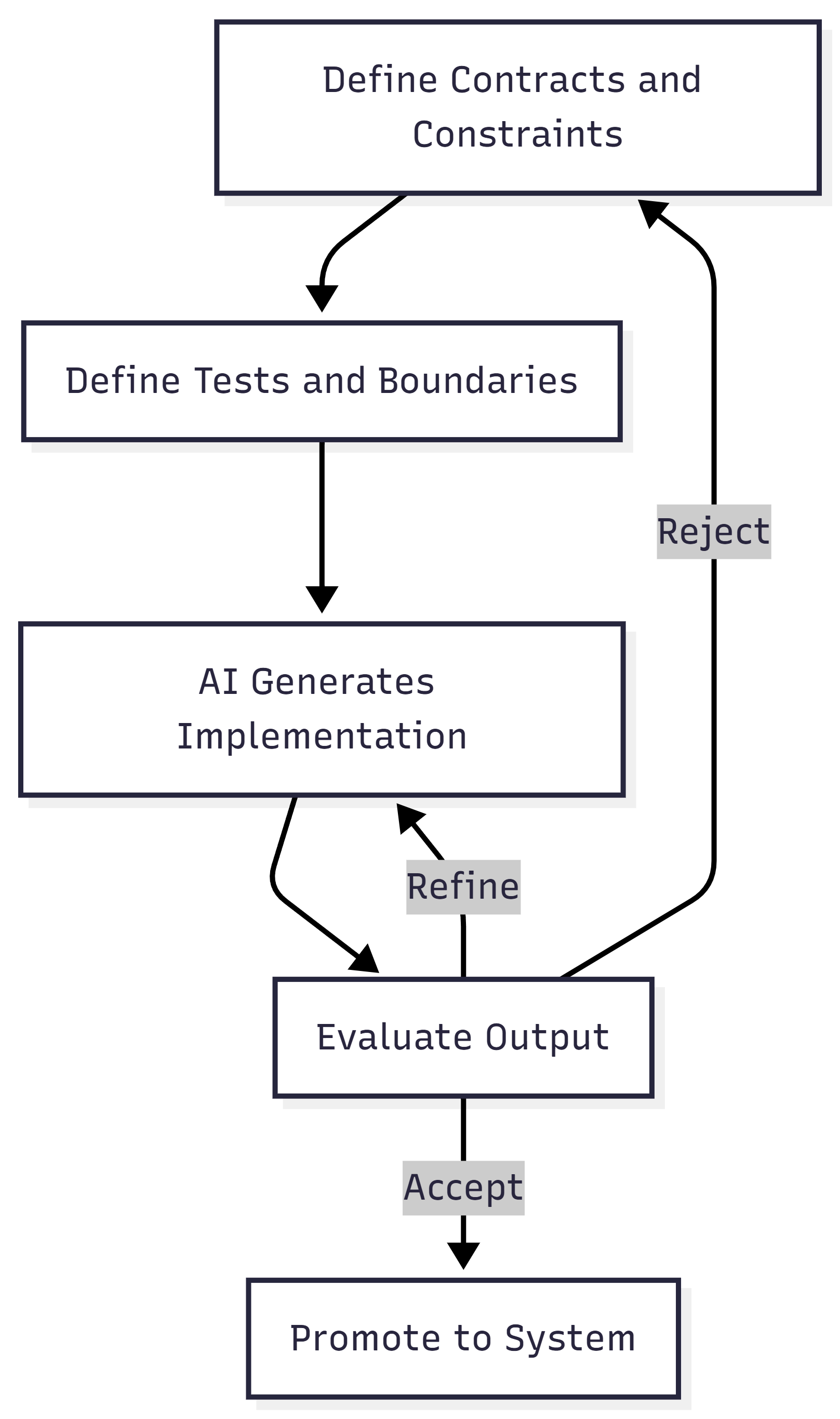
That loop is the verification layer. It catches stochastic output before it becomes deterministic system behavior. Without it, AI-generated systems turn into unbounded complexity farms.
When I design and build, I optimize for maintainability and low mean time to value. Containment is how I get there.
The Real Shift
I believe the industry is moving from “I understand every line of code” to “I understand the boundaries, constraints, and risk surfaces.” Some might call that a loss of craftsmanship. I think it’s evolution.
The skill isn’t omniscience. It’s navigational confidence. Can I enter a foreign system, form a hypothesis, test it safely, reduce the blast radius, and improve it incrementally? If yes, I’m fine. AI doesn’t change that. It just increases the speed at which I can do it.
I don’t think software development has ever been about typing in a coding language. To me it’s about shaping constraints around state.
The job is transcending up a layer of abstraction, operating teams of AI agents and governing the boundary between what AI generates probabilistically and what systems execute deterministically. The code, whether I wrote it or AI did, is an artifact of my decisions. And my decisions are what matter.
That’s the shift I’m building around. And I call it AgenticOps.
Let’s talk about it.
Codify How You Work
You don’t build an agent by thinking about agents. You build an agent by thinking about how you do work.
Your ability to multiply your output begins with a simple discipline: take the skills locked in your head and turn them into structured, repeatable workflows. This is the starting point for all operational leverage. This is the kernel the entire system will be improved on.
The Way
When you codify how you work, you give yourself a system that can multiply your output and scale across projects, teams, and tools. You create clarity about how decisions get made, how work begins, how it moves, and how it completes. This is the foundation for any AgenticOps system you may build later.
But at this stage, the focus is only on you and the real place you get work done.
Establishing structure creates surface area for improvement. Improvement reduces waste. Waste reduction compounds over time.
This is the quiet logic behind AgenticOps: you externalize your way of working, let the system run your way as is. Then observe the friction and reduce waste where it naturally accumulates. You are not inventing efficiency. You are uncovering it and optimizing it away.
The Problem
Most people never write down how they work. They assume it is too complex, too obvious, or too personal to articulate. Some worry that codification leads to replacement. Some worry that it is tedious or unnecessary.
These fears result in the same outcome. The process remains invisible, so it cannot be measured, analyzed, improved, shared, or extended. Its hard to multiply if you can’t see what to multiply.
Then there are people that write down how they want to work instead of how they work today. Premature optimization is a trap. Clarity first. Compression later.
Solution Overview
The DecoupledLogic way is to treat your workflow and the workflow data as the most valuable operational asset you have. Before any optimization or automation is possible, we capture the real way you move through work. Not the theoretical model. Not the cleaned-up version. Not the one you wish you followed. The one you actually practice when no one is watching.
How you orient yourself. How you define what matters. How you locate the boundaries. How you identify the first irreversible decision. How you choose what not to do. How you set priority and direction before you set pace.
This is the material the system will learn from. This is the kernel it will grow from.
How It Works
All work follows a simple cycle: Start > Work > End. Input > Process > Output. This canonical sequence never changes. It is one of the few timeless rules in operational thinking.
Within the loop there are deeper patterns that matter.
Getting ready
This is how you select the next thing to work on. How you prioritize. How you set a target or goal. How you define the expected outcome and your stopping point. How you establish your north star. This is also where you gather context, align resources, and prepare your operational environment. Getting ready is not passive. It is an active decision about where your attention is going and why. This could be a simple 10 second though, don’t make it overly deep.
Starting the work
This is how you signal the start of the task. How you initiate the first meaningful action. How you reduce uncertainty enough to move forward. How you commit to the direction you set in the previous step. Starting is not the same as preparing. It is the moment you choose momentum over deliberation and take the first step out of the starting blocks.
This is the first move. And that first move is the kernel the entire system will be built on.
Working in flow
This is how you break down the problem. How you evaluate options and make decisions. How you measure progress while you are inside the work. How you prevent stalls and maintain forward motion. This is where your thinking style creates the most value and where codification has the greatest impact.
Ending the work
This is how you decide something is complete. How you package, deliver, publish, or hand off. How you create closure and free cognitive space for the next cycle. Ending well is as important as starting well because it defines what counts as done.
Reviewing the work
This is how you assess quality. How you reflect on what happened. How you identify improvement targets. How you reset for the next iteration of a cycle.
Cross-cutting functions
These patterns show up at every stage. How you communicate the work. How you measure the work. How you improve the work. These are not separate steps. They shape the entire cycle from beginning to end.
You already do all of this consciously or subconsciously. Codification is simply making it visible.
Impact
Once your workflow is explicit:
- You gain clarity about your own method
- You reduce waste because you can see where energy leaks
- You create a pattern others can follow without confusion
- You unlock automation and agents that actually reflect how you work
- You build a system that can multiply your output and evolve with you, not around you
A system is only as strong as its kernel. An agent is only as good as the pattern it learns from. And a workflow can only be optimized once the work itself has been made visible.
Start
Do not start building agents by thinking about agents. Start by thinking about how the work is done.
Write down your beginning, your flow, your completion, and your review. Capture your real process in the real place that work gets done. Let the existing system reflect back how it works. Then reduce the waste you can now see in the reflection.
Once the process exists outside the head of the people doing the work, the path to optimization becomes straightforward. Start with how you work.
If you want, we can codify your workflow together and create your first operational blueprint to begin improving how you work in the agentic age.
Let’s talk about it.

Meet /llms.txt: The AI-First Treasure Map Every Site Needs
This started as a small post that ballooned as I dug in and had more questions. You can give this post to your AI buddy or NotebookLM to have a discussion about how to win in Web X.0.
I am on a journey to transform from an enterprise software developer into an AI Engineer. Additionally, I am becoming an AgenticOps Operator. I’m learning so much. I’ve said it before on this blog that the way we consume the internet is changing. AI agents are increasingly taking over how we consume the internet. They provide us with relevant and curated content without us having to leave the chat UI. That means that businesses need to rethink SEO to attract these agents if they want to reach us.
Imagine giving ChatGPT, Claude, or Perplexity an LLM focused sitemap highlighting exactly where your site’s most valuable content lives. That’s the growing power of /llms.txt, the latest practice borrowed from SEO, but made specifically for large-language models (LLMs).
Why /llms.txt Matters
AI tools like ChatGPT don’t pre-crawl your entire site; they pull pages in real-time, often burning valuable context window space on ads, nav bars, and irrelevant HTML elements. This inefficiency leads to missed content and inaccurate AI-generated answers. Enter /llms.txt: a concise, Markdown-formatted “treasure map” guiding LLMs directly to your high-value content.
I’m not saying this is the answer or that it will solve LLM search results for your website, but this is a start and a move in the right direction that doesn’t take a huge budget to experiment with.
A Quick History
The /llms.txt concept kicked off when Jeremy Howard (Answer.ai) proposed it in September 2024. Mintlify boosted its popularity, auto-generating /llms.txt files for thousands of SaaS documentation sites. Soon, Anthropic adopted the format, sparking broader acceptance across AI and SEO communities.
What Does /llms.txt Look Like?
Here’s a minimal example:
# Project Name

> A clear, concise summary of your site’s purpose.

## Core Docs

- [Quick Start](https://example.com/docs/quick-start): Installation and basic usage.

- [API Reference](https://example.com/api): Comprehensive REST and webhook documentation.

## Optional

- [Changelog](https://example.com/changelog): Latest updates and release notes.
Each heading creates a clear hierarchy, with short descriptions guiding AI directly to the content you want featured.
Here is a more complete version – https://www.fastht.ml/docs/llms.txt.
DIY or Automate?
Creating /llms.txt is straightforward:
- Choose 10-20 golden pages covering your most critical content.
- Write concise descriptions (no keyword stuffing needed).
- Host it at https://your-domain.com/llms.txt.
If you’d rather automate:
- Plugins like the WordPress LLMs-Full.txt Generator or tools like Firecrawl and Mintlify CLI simplify the process, ensuring your map stays fresh.
Here’s an easy way to start building your /llms.txt today. Give your favorite LLM chatbot (ChatGPT, Claude, Gemini…) links to the pages you want to list on your website. Provide it with a link to https://decoupledlogic.com/2025/07/28/meet-llms-txt-the-ai-first-treasure-map-every-site-needs/ and and https://llmstxt.org/ to provide it with context on /llms.txt. Then ask it to “create an llm.txt file for our website”, and see what you get.
Then submit your /llms.txt to https://directory.llmstxt.cloud/, https://llmstxt.site/, and llmstxthub.com.
Good Practices Checklist
- Limit your list to fewer than 25 high-value links.
- Avoid redirects or query parameters.
- Provide helpful, readable summaries, not keywords.
- Include only reliable, versioned content.
- /llms.txt isn’t private, use robots.txt alongside it for protection.
Early Results & Adoption
As of mid-2025:
- Prominent sites are actively maintaining /llms.txt and the list is growing
- Popular SEO plugins like Yoast and Rank Math now support it.
- Tools like LangChain and Cursor demonstrate significant improvements in AI citation accuracy.
- We are very early and all of this may change if Google decides to jump into this space.
How Do LLMs Discover /llms.txt?
This was my biggest question when I heard about /llms.txt. Here’s what I understand.
Currently, there’s no standardized automatic discovery for /llms.txt like there is for robots.txt or sitemap.xml. Instead, LLMs primarily discover /llms.txt through manual or indirect methods:
Current Discovery Methods
- Manual Submission:
- You explicitly feed your
/llms.txtURL to AI agents like ChatGPT (Browse), Claude, Perplexity, or custom-built tools (Semantic Kernel, LangChain, LangGraph). - Typically, you’d provide the direct URL (e.g.,
https://your-site.com/llms.txt) for ingestion.
- You explicitly feed your
- Community Directories:
- Sites like directory.llmstxt.cloud, https://llmstxt.site/ and llmstxthub.com maintain lists of public
/llms.txtURLs. - LLM developers periodically index these directories.
- Sites like directory.llmstxt.cloud, https://llmstxt.site/ and llmstxthub.com maintain lists of public
- Integration with AI Platforms:
- Platforms like Mintlify, Firecrawl, or LangChain may ingest URLs proactively from known sources or integrations with SEO/LLM plugins.
Future Potential for Automatic Discovery
A standardized discovery process (like the established robots.txt approach) is likely to emerge as /llms.txt gains adoption:
- Root-level probing (
https://your-site.com/llms.txt) could become a default behavior for AI crawlers. - Inclusion in a sitemap (e.g., referencing
/llms.txtfrom yoursitemap.xml) could assist automated discovery.
Currently, these methods are under active discussion within AI and SEO communities.
Recommended Good Practices (Today)
- Explicitly share your
/llms.txtURL directly with the platforms you’re targeting. - Submit your URL to community directories (like directory.llmstxt.cloud) to improve visibility.
- Monitor emerging standards to adapt quickly once automatic discovery becomes standard.
How to Submit Your URL Directly to AI Tools?
1. ChatGPT (Browse with Bing)
- Open ChatGPT with Browsing enabled.
- Paste your URL with a clear prompt:
"Please read and summarize the key points from https://your-site.com/llms.txt"
2. Anthropic Claude or Perplexity
- Simply paste your URL directly into the chat and prompt clearly:
"Review our documentation here: https://your-site.com/llms.txt and answer any product-related questions based on it."
3. LangChain/LangGraph (Python Example)
- For API-based ingestion, use the following snippet:
from langchain.document_loaders import WebBaseLoader loader = WebBaseLoader("https://your-site.com/llms.txt") docs = loader.load() - Once loaded, your content is available for inference in your custom AI apps.
Quick-check: Is Your URL Ready?
- Paste your URL into any browser:
- It should directly show your markdown content (no login or redirects).
- Example success case:
# Company Documentation > Core Product Resources ## Essential Pages - [Getting Started](https://your-site.com/start): Quick onboarding steps.
How to Experiment with /llms.txt?
Here’s how your company can effectively experiment with /llms.txt to measure its real-world impact:
1. Define Clear Objectives
Start by specifying exactly what you want to achieve. Typical objectives include:
- Better AI-generated citations
- Increased discoverability of key content
- Improved user engagement via AI-driven channels
2. Choose Targeted Metrics to Track
Focus on measurable outcomes, including:
- Citations and backlinks from AI tools
- Organic traffic from AI-powered search results
- Changes in session duration or page depth from AI referrals
- Reduction in support queries due to better AI answers
3. Create and Implement a Test Version
Develop a concise /llms.txt:
- Select 10–20 high-value pages.
- Clearly label your content and hierarchy.
- Deploy it at the root:
your-domain.com/llms.txt.
Example structure:
# Company Name
> Your one-line value proposition.

## Core Content
- [Getting Started](https://your-domain.com/start): Setup & onboarding guide.
- [Product Overview](https://your-domain.com/product): Key features & use cases.

## Secondary Content
- [Knowledge Base](https://your-domain.com/kb): Common issues & solutions.
4. Baseline Measurement
Before releasing the /llms.txt publicly:
- Capture existing traffic metrics from AI-generated citations.
- Document current quality of AI-generated summaries and answers referencing your content.
5. Launch Your Experiment
Share your /llms.txt URL manually with key inference-time agents to jumpstart discovery:
- ChatGPT (Browsing), Claude, Perplexity, Google AI Overviews, LangChain tools, etc.
(Automatic discovery isn’t standardized yet, so manual submission is essential.)
6. Monitor and Analyze Results
Regularly check (weekly or monthly) and add to reporting:
- Increases in AI-driven referral traffic
- Quality improvements in content citations by AI
- Enhanced accuracy in AI-generated summaries or Q&A referencing your site
- User behavior analytics from referrals (page views, bounce rates, conversions)
7. Iterate and Optimize
Based on your findings, adjust your /llms.txt strategy:
- Add or remove pages based on AI citation performance.
- Improve content descriptions to guide AI context better.
- Consider automation tools (like Mintlify CLI or Firecrawl) for frequent updates.
Common Pitfalls to Avoid
- Keep
/llms.txttight and precise. - Provide clear, succinct context—AI reads the prose carefully.
- Regularly update the file based on actual usage data.
The Bottom Line
Think of /llms.txt as your AI landing page, optimized to direct AI models straight to your best resources. Regularly updating this file with your release cycle boosts AI-driven engagement, accuracy, and visibility in an increasingly AI-first world. ASO (Agent Search Optimization) and similar concepts are becoming a thing and it’s a good time to start learning more about the coming changes to SEO and internet marketing.
Let’s talk about it.
Ready to implement your own AI-first treasure map? Starting your /llms.txt experiment today positions your brand ahead of the curve in optimizing AI-driven discovery and citation quality. Would you like support setting up measurement tools, or perhaps a sample /llms.txt tailored specifically for your site?
Want to dig in on it, let’s talk about. I’m always down to talking about all things AI, agents, and AgenticOps.

AgentOps: The Operational Backbone for AgenticOps
Why agents need their own control plane, and what we’re doing about it.
We’ve spent decades refining how to ship software safely. DevOps gave us version control, CI/CD, monitoring, rollback. Then came MLOps, layering on model registries, drift detection, pipeline orchestration. It’s all good.
But now we’re shipping something different: autonomous agents. Virtual coders that operate alone in their own little sandbox. They are a bunch of mini-me’s that code much better than me. However, they sometimes get lost and don’t know what to do. As a result, they will make things up.
We’re not just shipping code or models, but goal-seeking, tool-using, decision-making alien lifeforms. Beings that reason, reflect, and act. And many are shipping with zero visibility into what they’re doing after launch. I say give them agency but give them guardrails. Trust but verify.
I’ve been enjoying what I’ve been reading on the topic of AgentOps. I’m interested in how to bring valuable practices into our agent development. That’s where AgenticOps comes in. It’s not just DevOps with prompt logging. It’s been a year long thought exercise on how we operationalize agency in production.
What’s so different about autonomous agents?
A few things, actually:
- They improvise. Every agent run can take a new path. Prompts mutate. Goals shift.
- They chain tools and memory. It’s not one model, it’s a process graph across APIs, vectors, scratchpads.
- They’re hard to debug. When something goes wrong, you don’t just check logs. You need to replay reasoning.
- They cost money in real time. An agent stuck in a loop doesn’t just crash, it runs up a token bill that costs real money.
The DevOps playbook wasn’t built for this. Neither was MLOps. This is something new. AgentOps is cool, I love, it but I’ve been calling it AgenticOps and its my playbook.
So what is AgenticOps, really?
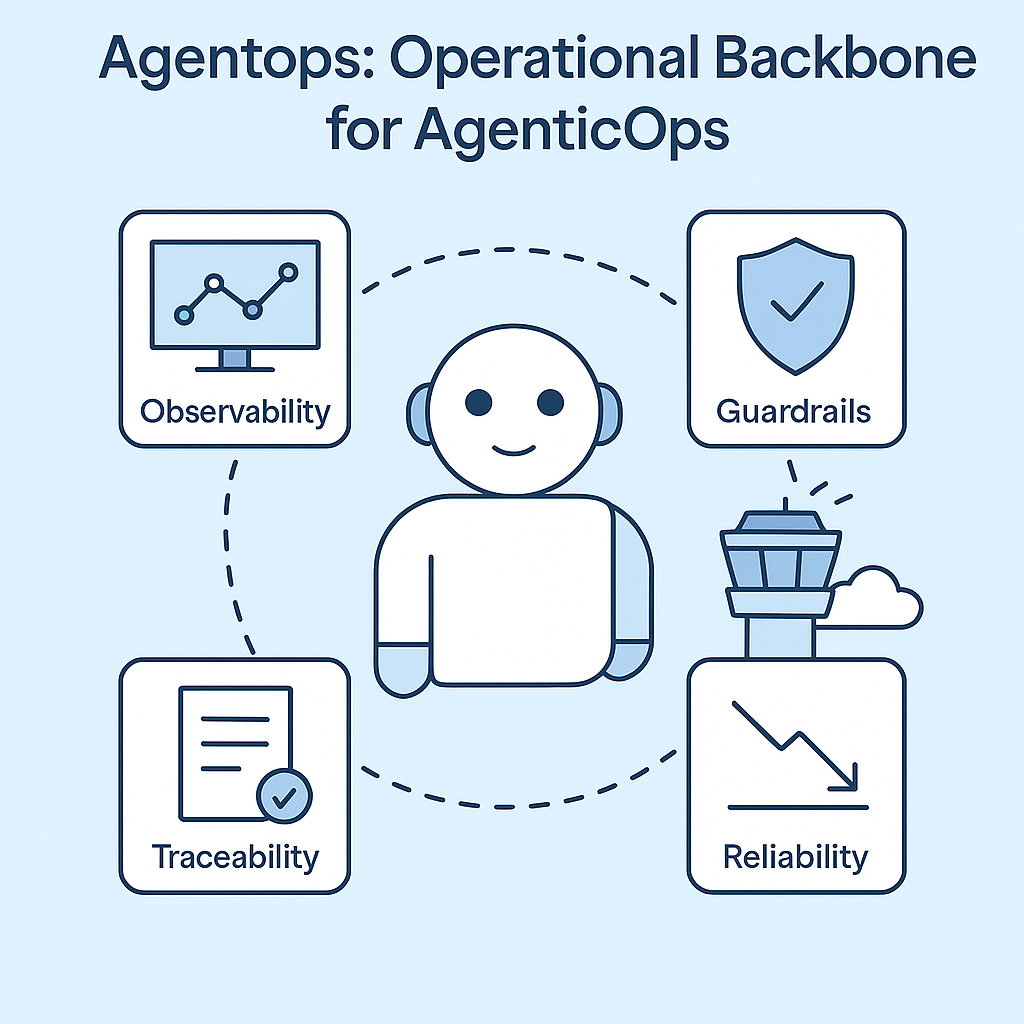
Think of AgenticOps as your mission control tower for autonomous systems. It’s how you keep agency productive, safe, and accountable at scale. These agents are like bad ass kids in a classroom sometimes. My wife is a teacher and she says my agents need routines and rituals and behavior strategies. They need AgenticOps
Here’s what AgenticOps adds to the stack that echoes what I’m seeing in AgentOps:
- Observability for agents
Live dashboards. Step-level traces. Session replays. You see what the agent thought, decided, and did, just like tracing a debugger. - Guardrails that matter
Limit which tools agents can access. Enforce memory policies. Break runaway loops before they eat your GPU budget. - Full traceability
Every prompt, tool call, response, and memory snapshot logged and queryable. Audit trails you can actually follow. - Reliability at runtime
Detect anomalies, hallucinations, cost spikes. Trigger alerts or pause execution if things go sideways.
This isn’t observability-as-a-service tacked onto ChatGPT. This is real operational scaffolding for agentic systems in production.
How it fits into your stack
If your life is shifting into AI Engineering, you’re probably already doing some mix of this:
- Using LangGraph, AutoGen, CrewAI, or your own glue
- Plugging in vector stores, APIs, function calls
- Deploying workflows with multiple agents and tools
An AgenticOps framework encompasses all that. It doesn’t replace it. Instead, it provides a plug-and-play layer to make it safe and visible.
It’s the runtime control layer that lets you:
- Version your agents and context
- Monitor them in action
- Understand what went wrong
- Rewind and fix without guesswork
And just like DevOps before it, AgenticOps will soon be table stakes for any serious deployment.
What you get from AgenticOps
Let’s talk outcomes:
- MTTR down: You can debug reasoning chains like logs. Find the bad prompt in seconds.
- Spend under control: Token usage is monitored and optimized. No more budget black holes.
- Safer autonomy: Guardrails catch weird behavior before it hits production.
- Compliance ready: Trace logs that tell a human story, useful for audits, explainability, and ethics reviews.
This isn’t hypothetical. This is already shipping to production.
Why I care about this
AgenticOps isn’t a buzzword. It’s the foundation that will make agents trustworthy at scale.
If we want autonomous systems to do real work, safely, reliably, transparently, we have to operationalize agency itself.
That’s what we’re building with AgenticOps. It’s our take, our lens, our direction, and how I think in this space.
Let’s talk about it.
If you want to build fast vibe coded prototypes, build alone. If you want to build stable, safe agentic systems for the long-term, build together.
If you’re building “bad ass agents” or agentic systems, I’d love to hear about it. Even if you’re just thinking about it, let me know what you’re running into. Want to play with it and explore together? Let me know. Share your repo and I’ll share mine – https://github.com/charleslbryant/agenticops-value-train.


Browser War III: The Rise of the AI Web
A New Battle Begins
The browser wars are back. First it was Netscape vs Internet Explorer. Then Chrome took on Firefox and swallowed Internet Explorer’s market share. Now we’re entering Browser War III, and this time, the battleground is intelligence.
AI is no longer just bolted onto browsers. It’s becoming the core experience. The new wave of contenders isn’t just adding chatbots. They’re building entire browsers around autonomous AI agents. The result: browsers that browse for you.
From Interface to Intelligent Assistant
Traditional browsers were built to load web pages. These new AI-first browsers are built to do things.
They summarize documents. They manage tabs. They finish tasks like booking flights, shopping, and writing content. These tasks are done not through extensions, but through embedded agents with full-page context.
Opera’s Neon browser calls itself agentic, capable of navigating the web and performing actions on your behalf. Perplexity’s Comet positions itself as an AI operating system, not just a search layer. The Browser Company’s Dia is rebuilding Arc from the ground up with AI multitasking. Brave’s Leo helps users instantly without sending data for training.
The key shift: these aren’t tools. They’re collaborators.
The Contenders are Lining Up
Multiple companies are now entering the AI-first browser race:
- OpenAI’s browser is built on Chromium and powered by ChatGPT. It keeps users inside a chat interface and directly competes with Chrome. Open AI hiring people who helped build Chrome makes sense now.
- Perplexity’s Comet integrates its AI search engine with tools that read pages, summarize content, manage workflows, and book things for users.
- Opera’s Neon promises both “Do” (task automation) and “Make” (content creation), reimagining the browser as an active assistant.
- Brave with Leo builds privacy-first AI features into its interface, allowing real-time assistance without data retention.
- Dia by The Browser Company focuses on multitasking and AI-native design, continuing Arc’s legacy while pushing toward full agentic capabilities.
Meanwhile, incumbents are adapting. Google has added generative AI to Chrome and launched an AI-powered search mode. Microsoft continues to embed Copilot deeper into Edge. It’s getting hot in here.
Why It Matters
If AI browsers succeed, they won’t just replace your browser. They’ll replace how you interact with the internet.
Imagine this future:
- No more ten-tab rabbit holes
- No more hunting for links
- No more manually filling out forms or searching product reviews
Instead, you prompt your browser. It understands. It acts.
This could flip the digital economy. Publishers already report falling traffic as AI bots, not humans, consume content. Search becomes less important if users just ask their browser agent. Ads become less visible if browsing happens behind the scenes. Even how people read news or shop online may shift. I
A report from the Reuters Institute found that younger users are increasingly getting news from AI chatbots, not websites. Platforms like Opera Neon now claim they can generate images, translate voice, and write entire reports, all from a single prompt. This is about more than speed or simplicity. It’s a new paradigm for web interaction.
I’ve been on my soapbox shouting how we need to learn how to market and optimize for agents, they’re coming.
Why It Might Stall
There’s also good reason to stay grounded. And get off my soapbox.
Most people don’t switch browsers easily. Chrome has over 60 percent market share. Habits are sticky. And the early experience with some AI browsers shows that they still stumble.
Perplexity’s Comet, for instance, was impressive on simple tasks but failed on more complex actions, according to early TechCrunch reviews. Privacy remains a concern. These tools often ask for deep access to calendars, email, or documents, which can be a tough sell.
There’s also the risk of hallucinations and automation mistakes. And if every company builds their own AI agent, users might be overwhelmed, not empowered.
Big Tech won’t sit still. Google will copy features that work. Microsoft already has the distribution power to push Copilot across Windows and Edge.
And then there are the regulators. The DOJ is already targeting Google’s browser dominance. GDPR and CCPA are tightening the rules around data access and retention. Any AI browser hoping to scale must navigate this legal minefield.
A Slow Shift or a Seismic One
The future of browsers may not flip overnight. But the trajectory is clear. AI is no longer a side feature. It’s becoming the foundation.
For now, early adopters and power users will lead the charge. But the potential is significant. If these tools get good enough to reliably perform tasks, not just surface content, the way we use the web will change.
We’re not just watching a browser war. We’re watching a transformation in how humans and machines work together online.
Whether this becomes the dominant model or fades into niche use depends on what happens next. But the ambition is clear. In Browser War III, the question isn’t which browser loads faster. It’s which one thinks and acts better.
Ubuntu Dev Environment Setup on Windows (WSL)
It’s been hard for me to sit back and watch everyone dig into Claude Code without me. This weekend I took a little time to get it installed and it was a journey. Claude Code doesn’t run native on Windows so I had to do some WSL magic. I want to write about Claude Code, but not write now. Let’s just say I’m not going back to Cursor, VS Code, Windsurf or Aider… I’m team Claude Code, until the next shiny thing distracts my attention.
Any way Ubuntu isn’t my thing so this was harder than it should be. Good thing we have these super intelligent machines at our disposal. I asked my AI assistant George to write an install guide. Below is what I got. This wasn’t as straight forward as the guide lays it out, but it wasn’t too hard to go back and forth with George to get everything up and running.
I am basically running Claude Code in Cursor running in Ubuntu. Fun times.
This guide walks you through installing and configuring a full-featured development environment using WSL, Ubuntu, and essential development tools. You’ll be ready to develop locally with Docker, Claude Code, Azure, GitHub, and more.
1. Prerequisites
- Windows 10/11 with WSL enabled
- WSL2 installed (wsl –install in PowerShell)
- A Linux distribution (we used Ubuntu 24.04)
- Terminal: Windows Terminal
2. Setup Folder Structure
mkdir -p ~/projectscd ~/projectsKeep all your development projects in this folder. Easy to back up, mount, and manage.
4. Git + GitHub CLI
sudo apt updatesudo apt install git gh -ygh auth loginUse gh to clone, create, and manage GitHub repos easily.
5. Node.js (via nvm)
# Install NVM (Node Version Manager)curl -o- https://raw.githubusercontent.com/nvm-sh/nvm/v0.39.7/install.sh | bash# Load nvm into current shell sessionexport NVM_DIR="$HOME/.nvm"source "$NVM_DIR/nvm.sh"# Verify nvm is availablenvm –versionnvm install --ltsnvm use –ltsnvm alias default 'lts/*'node -vnpm -v3. Claude Code + Cursor Setup
Install Cursor (AI coding editor)
In WSL Ubuntu:
cd ~/projectsmkdir my-project && cd my-projectcursor .Inside Cursor terminal, run:
npm install -g @anthropic-ai/claude-codeclaude doctorInside Claude run:
/terminal-setup/initIf Claude is stuck “Synthesizing” or “Offline”:
- Make sure Claude is signed in and internet is stable and you are working on a folder in Ubuntu not Windows
- Press Esc to cancel
- Restart Cursor and check Claude Code panel
6. .NET SDK
wget https://packages.microsoft.com/config/ubuntu/24.04/packages-microsoft-prod.deb -O packages-microsoft-prod.debsudo dpkg -i packages-microsoft-prod.debsudo apt updatesudo apt install dotnet-sdk-8.0 -y7. Azure CLI
curl -sL https://aka.ms/InstallAzureCLIDeb | sudo bashaz login --use-device-codeIf login doesn’t open a browser, copy the code and paste it at: https://microsoft.com/devicelogin
8. Docker CLI
Install Docker Desktop for Windows with WSL integration enabled.
In Ubuntu:
docker versiondocker context lsEnsure your context is set to desktop-linux if needed:
bash
docker context use desktop-linux
If permission denied on /var/run/docker.sock:
sudo usermod -aG docker $USERnewgrp docker9. Optional Dev Tools (Highly Recommended)
| Tool | Use Case | Install Command |
| make | Build automation | sudo apt install make |
| jq | JSON manipulation | sudo apt install jq |
| htop | Process monitor | sudo apt install htop |
| fzf | Fuzzy file finder | sudo apt install fzf |
| ripgrep | Fast file search (used by Claude) | sudo apt install ripgrep |
| tree | Directory visualizer | sudo apt install tree |
| redis-cli | Redis command-line | sudo apt install redis-tools |
| psql | PostgreSQL command-line | sudo apt install postgresql-client |
10. Azure Functions Core Tools
npm install -g azure-functions-core-tools@4 --unsafe-perm true11. Terminal Enhancements
Oh My Zsh (already installed if you ran /terminal-setup)
To fix re-opening setup prompt:
rm ~/.zshrc.pre-oh-my-zshAdd completions:
gh completion -s zsh >> ~/.zshrcaz completion >> ~/.zshrcsource ~/.zshrc12. Sync Windows Projects to Ubuntu (Optional)
rsync -avh /mnt/c/Users/YourName/path/to/project/ ~/projects/Final Checklist
| Area | Tools |
| AI Pairing | Claude Code + Cursor |
| Git Workflows | Git + GitHub CLI (gh) |
| Web Dev | Node.js, npm, nvm |
| C#/.NET | .NET SDK 8 |
| Cloud | Azure CLI + Functions Core |
| Containers | Docker + Desktop Integration |
| Data Access | PostgreSQL + Redis CLI |
| Dev Tooling | jq, htop, tree, ripgrep, fzf |
You’re done. You’ve got a complete AI-first, cloud-ready, full-stack dev environment right in your Ubuntu WSL.

Background Agents in Cursor: Cloud-Powered Coding at Scale
Build Faster with Cloud-First Automation
Imagine coding without ever leaving your IDE, delegating repetitive tasks to AI agents running silently in the background. That’s the vision behind Cursor’s new Background Agents, a new feature that brings scalable, cloud-native AI automation directly into your development workflow.
From Local Prompts to Parallel Cloud Execution
In traditional AI pair-programming tools, you’re limited to one interaction at a time. Cursor’s Background Agents break this mold by enabling multiple agents to run concurrently in the cloud, each working on isolated tasks while you stay focused on your core logic.
Whether it’s UI bug fixes, content updates, or inserting reusable components, you can queue tasks, track status, and review results, all from inside Cursor.
Why This Matters
Problem: Manual Context Switching Slows Us Down
Every time we need to fix layout issues, update ads, or create pull requests, we context-switch between the browser, editor, GitHub, and back.
Solution: One-Click Cloud Agents
With Background Agents, we:
- Offload UI tweaks or content changes in seconds
- Automatically create and switch to feature branches
- Review and merge pull requests without leaving the IDE
It’s GitHub Copilot meets DevOps, fully integrated.
How It Works
- Enable Background Agents under Settings → Beta in Cursor.
- Authenticate GitHub for seamless PR handling.
- Snapshot your environment, so the agent can mirror it in the cloud.
- Assign tasks visually using screenshots and plain language prompts.
- Review results in the control panel with direct PR links.
Each agent operates independently, meaning you can:
- Fix mobile UI bugs in parallel with adding a new ad card.
- Update dummy content while another agent links it to a live repo.
Keep tabs on multiple tasks without blocking your main flow.
Note: This is expensive at the moment because it will use the Max Mode.
The Impact: Focus Where It Matters
- 🚀 Speed: Complete multi-step changes in minutes.
- 🧠 Context: Stay immersed in Cursor with no GitHub tab juggling.
- 🤝 Collaboration: Review, update, and deploy changes faster as a team.
What’s Next?
The Cursor team is working on:
- Auto-merging from Cursor (no GitHub hop)
- Smarter task context awareness
- Conflict resolution across overlapping branches
Is this is the future of development workflows, agent-powered, cloud-native, and editor-first?
Try It Out
Enable Background Agents in Cursor and assign your first task. Start with a UI fix or content block update and see how you like it. Just remember that this service uses Max Mode and is expensive so be careful.
If you are looking to improve your development workflow with AI, let’s talk about it.

Enterprise SaaS is Broken. AI Agents Can Fix It.
Let’s talk about enterprise software.
Everyone knows the dirty secret: it’s complex, bloated, slow to change, and ridiculously expensive to customize. It’s a million dollar commitment for a five-year implementation plan that still leaves users with clunky UIs, missing features, and endless integration headaches.
And yet, companies line up for enterprise software as a service (SaaS) products. Why? Because the alternative, building custom systems from scratch, can be even worse.
But what if there was a third way?
I believe there is. And I believe AgenticOps and AI agents are the key to unlocking it.
The Current Limitation: AI Agents Can’t Build Enterprise Systems (Yet)
There’s a widely held belief that AI agents aren’t capable of building and maintaining enterprise software. And let’s be clear: today, that’s mostly true.
Enterprise software isn’t just code. It’s architecture, security, compliance, SLAs, user permissions, complex business rules, and messy integrations. It’s decades of decisions and interdependencies. It requires long-range memory, system-wide awareness, judgment, and stakeholder alignment.
AI agents today can generate CRUD services and unit tests. They can refactor a function or scaffold an API. But they can’t steward a system over time, not without help.
The Disruptive Model: Enterprise System with a Core + Customizable Modules
If I were to build a new enterprise system today, I wouldn’t sell build a monoliths or one-off custom builds.
I’d build a base platform, a composable, API-driven foundation of core services like auth, eventing, rules, workflows, and domain modules (like claims, rating engines, billing, etc. for insurance).
Then, I’d enable intelligent customization through AI agents.
For example, a customer could start with a standard rating engine, then they could ask the system for customizations:
> “Can you add a modifier based on the customer’s loyalty history?”
An agent would take the customization request:
- Fork the base module.
- Inject the logic.
- Update validation rules and documentation.
- Write test coverage.
- Submit a merge request into a sandbox or preview environment.
This isn’t theoretical. This is doable today with the right architecture, agent orchestration, and human-in-the-loop oversight.
The Role of AI Agents in This Model
AI agents aren’t building without engineers. They’re replacing repetition. They’re doing the boilerplate, the templating, the tedious tasks that slow innovation to a crawl.
In this AgenticOps model, AI agents act as:
- Spec interpreters (reading a change request and converting it into code)
- Module customizers (modifying logic inside a safe boundary)
- Test authors and validators
- Deployment orchestrators
Meanwhile, human developers become:
- Architects of the core platform
- Stewards of system integrity
- Reviewers and domain modelers
- Trainers of the agent workforce
The AI agent doesn’t own the system. But it extends it rapidly, safely, and repeatedly.
This Isn’t Just Faster. It’s a Better Business Model.
What we’re describing is enterprise software as a service as a living organism, not a static product. It adapts, evolves, and molds to each client’s needs without breaking the core.
It means:
- Shorter sales cycles (“Here’s the base. Let’s customize.”)
- Lower delivery cost (AI handles the repetitive implementation work)
- Faster time to value (custom features in days, not quarters)
- Higher satisfaction (because the system actually does what clients need)
- Recurring revenue from modules and updates
What It Takes to Pull This Off
To make this AgenticOps model work, we need:
- A composable platform architecture with contracts at every boundary (OpenAPI, MCP, etc.)
- Agents trained on domain-specific architecture patterns and rules
- A human-in-the-loop review system with automated guardrails
- A way to deploy, test, and validate changes per client
- Observability, governance, and audit logs for every action an agent takes
Core build with self serve client customizations.
AI Agents Won’t Build Enterprise Software Alone. But They’ll Change the Game for Those Who Do.
In this vision, AI Agents aren’t here to replace engineers. In reality, they may very well replace some engineers, but they could also increase the need for more engineers to manage this agent workforce. Today, AI Agents can equip engineers and make them faster, freer, and more focused on the work that actually moves the needle.
This is the future: enterprise SaaS that starts composable, stays governable, and evolves continuously to meet client needs with AI-augmented teams.
If you’re building this kind of Agentic system, or want to, let’s talk about it.

Execution is Everything: Building an AgenticOps Playbook That Works
Ideas are easy; execution is the hard part.
We’ve all seen great strategies gather dust simply because the path from planning to action wasn’t clear. The problem isn’t always the ideas or the people, often, it’s the absence of a structured playbook for execution.
When execution falters, it’s usually due to unclear roles, inconsistent processes, or poor communication. Over the years, I’ve seen firsthand how these issues erode momentum and hinder even the most talented teams.
A practical playbook addresses these pitfalls directly. It documents not just what needs to be done, but also how to do it consistently, who is responsible at each step, and why it matters. Clear processes remove guesswork, improve collaboration, and make execution repeatable and scalable.
But a good playbook isn’t rigid. It’s a living document, evolving as teams learn and conditions change. Regularly scheduled feedback loops ensure continuous improvement, allowing the team to adapt swiftly and effectively.
Recently, I’ve been exploring the idea of “Playbooks as Code,” inspired by the concept of infrastructure as code. Infrastructure as code allows teams to provision and manage cloud resources through scripts, ensuring consistency, measurability, and testability. Similarly, implementing playbooks as automated workflows, using tools like Microsoft Power Automate or Zapier, lets us codify execution steps. This approach transforms a documented playbook into a deployable, executable workflow, initiated at the push of a button. It ensures consistent, measurable, and testable workflows, significantly enhancing reliability and efficiency.
If you’re finding your team struggles to turn strategic intent into results, consider whether your execution clarity matches your strategic clarity. Building a detailed, flexible execution playbook, and perhaps exploring playbooks as code, might just be the most impactful thing you do this year.
What’s been your experience with execution playbooks or automated workflows? I’d love to learn from your insights. If you want to build one with me, let’s talk about it.
 DecoupledLogic